> ## Documentation Index
> Fetch the complete documentation index at: https://www.truefoundry.com/llms.txt
> Use this file to discover all available pages before exploring further.
# Custom Endpoints
> Connect any HTTP service to the AI Gateway for centralized authentication, access control, and tracing
**Custom Endpoints** let you register arbitrary HTTP services in the AI Gateway and route traffic through them. Unlike integrations that target a specific provider API (OpenAI, Anthropic, and so on), Custom Endpoints accept **any HTTP upstream**—internal REST APIs, Azure Speech Services, bespoke ML services, or third-party endpoints—while keeping a single entry point for your applications.
Use Custom Endpoints when you want **one TrueFoundry API key** for callers, **per-endpoint access control**, and **full tracing** without distributing upstream credentials to every client. The gateway acts as a **transparent proxy**: it forwards the HTTP method, path, query string, headers, and body to your upstream base URL without translating payloads.
Upstream credentials and extra headers are configured once on the provider account or integration; the gateway **injects** them on every upstream request automatically.
Multiple endpoints under the same account can also be pooled behind a **single aggregated endpoint** with weight or priority routing — useful for increasing aggregate concurrency past one backend's limits, or for primary/backup failover. See [Load balancing across endpoints](#load-balancing-across-endpoints).
### Example integrations
Several providers that aren't first-class integrations in the AI Gateway are connected through Custom Endpoints. Use these ready-made guides as references when wiring up your own upstream:
Proxy CoreWeave models served via W\&B Inference's OpenAI-compatible API.
Route to PipeShift's OpenAI-compatible chat completions API.
Call io.net Intelligence open-source models through the gateway.
Proxy Resemble AI text-to-speech synthesis requests.
Proxy Ringg.AI Parrot speech-to-text transcription requests.
### Setup
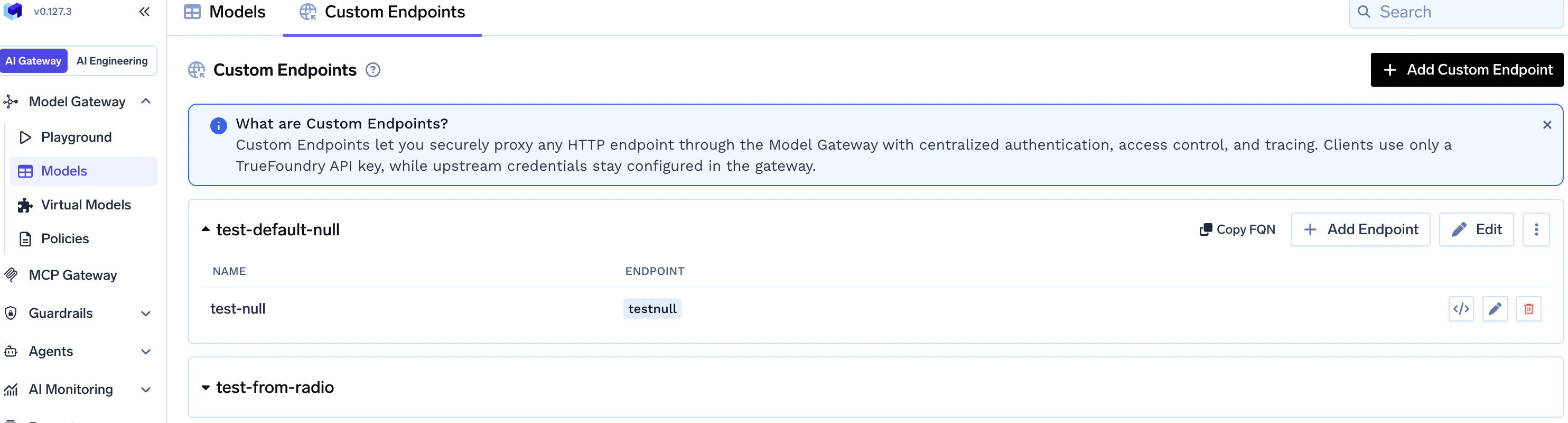 From the TrueFoundry dashboard, go to **AI Gateway** → **Models**, open the **Custom Endpoints** tab, and click **Add Custom Endpoint**.
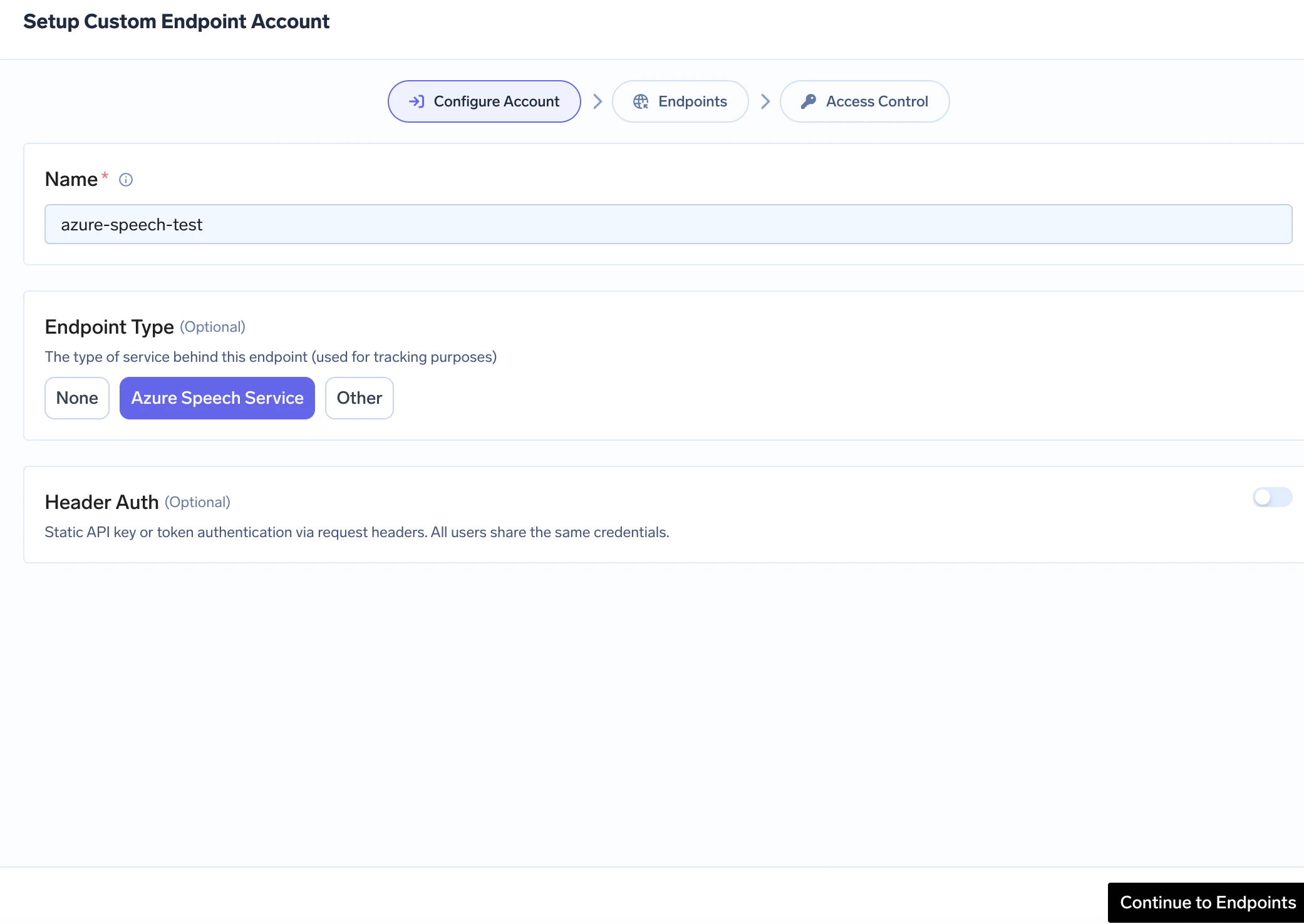
In the wizard, complete **Configure Account**: **Name** (required), optional **Endpoint Type** (**None**, **Azure Speech Service**, or **Other**), and optional **Header Auth** at the account level so integrations can inherit the same default upstream authentication. Use **Continue to Endpoints** when ready.
To turn the account into a load-balanced pool, expand **Advanced** and set **Routing Type** to `Weight` or `Priority`, then enter a **Slug**. The slug becomes the second URL segment for the aggregated endpoint (`/proxy-api///`). Leave Routing Type as `None` for the standard per-endpoint flow. See [Load balancing across endpoints](#load-balancing-across-endpoints).
From the TrueFoundry dashboard, go to **AI Gateway** → **Models**, open the **Custom Endpoints** tab, and click **Add Custom Endpoint**.
In the wizard, complete **Configure Account**: **Name** (required), optional **Endpoint Type** (**None**, **Azure Speech Service**, or **Other**), and optional **Header Auth** at the account level so integrations can inherit the same default upstream authentication. Use **Continue to Endpoints** when ready.
To turn the account into a load-balanced pool, expand **Advanced** and set **Routing Type** to `Weight` or `Priority`, then enter a **Slug**. The slug becomes the second URL segment for the aggregated endpoint (`/proxy-api///`). Leave Routing Type as `None` for the standard per-endpoint flow. See [Load balancing across endpoints](#load-balancing-across-endpoints).
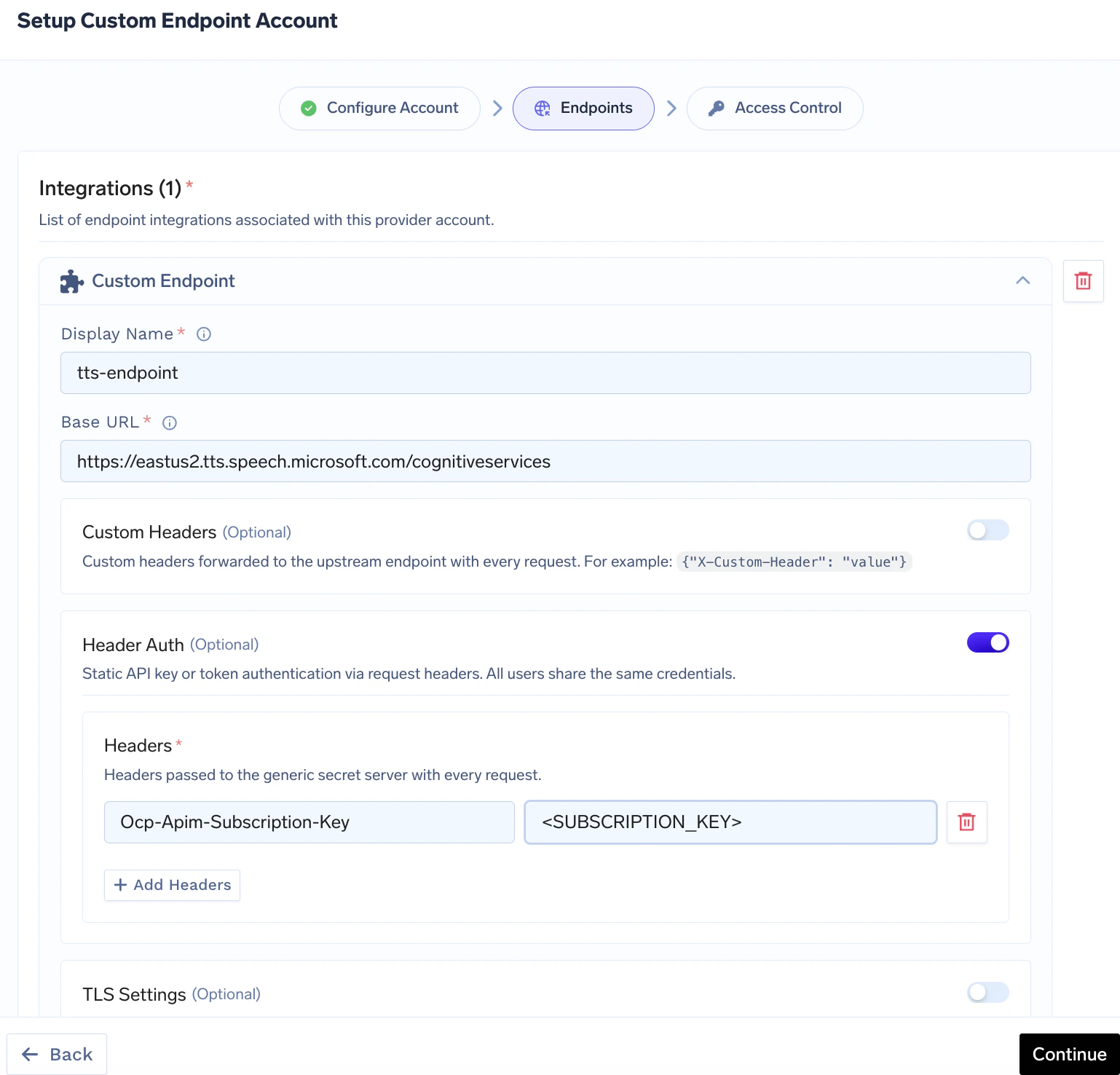
 On the **Endpoints** wizard step, add or edit an endpoint integration (**Add Endpoint** from the list view works the same flow).
Set **Display Name** and **Base URL** (the upstream origin — **must not** end with a trailing slash; see configuration reference). Optionally enable **Custom Headers**, **Header Auth** (per-endpoint upstream credentials), or **TLS Settings**.
If the account has **Routing Type** set, a **Load Balancing Config** group appears on each endpoint with **Weight** (weight mode) or **Priority** (priority mode), plus **Fallback Status Codes** and **Fallback Candidate**. See [Per-endpoint load balancing fields](#per-endpoint-load-balancing-fields).
On the **Endpoints** wizard step, add or edit an endpoint integration (**Add Endpoint** from the list view works the same flow).
Set **Display Name** and **Base URL** (the upstream origin — **must not** end with a trailing slash; see configuration reference). Optionally enable **Custom Headers**, **Header Auth** (per-endpoint upstream credentials), or **TLS Settings**.
If the account has **Routing Type** set, a **Load Balancing Config** group appears on each endpoint with **Weight** (weight mode) or **Priority** (priority mode), plus **Fallback Status Codes** and **Fallback Candidate**. See [Per-endpoint load balancing fields](#per-endpoint-load-balancing-fields).
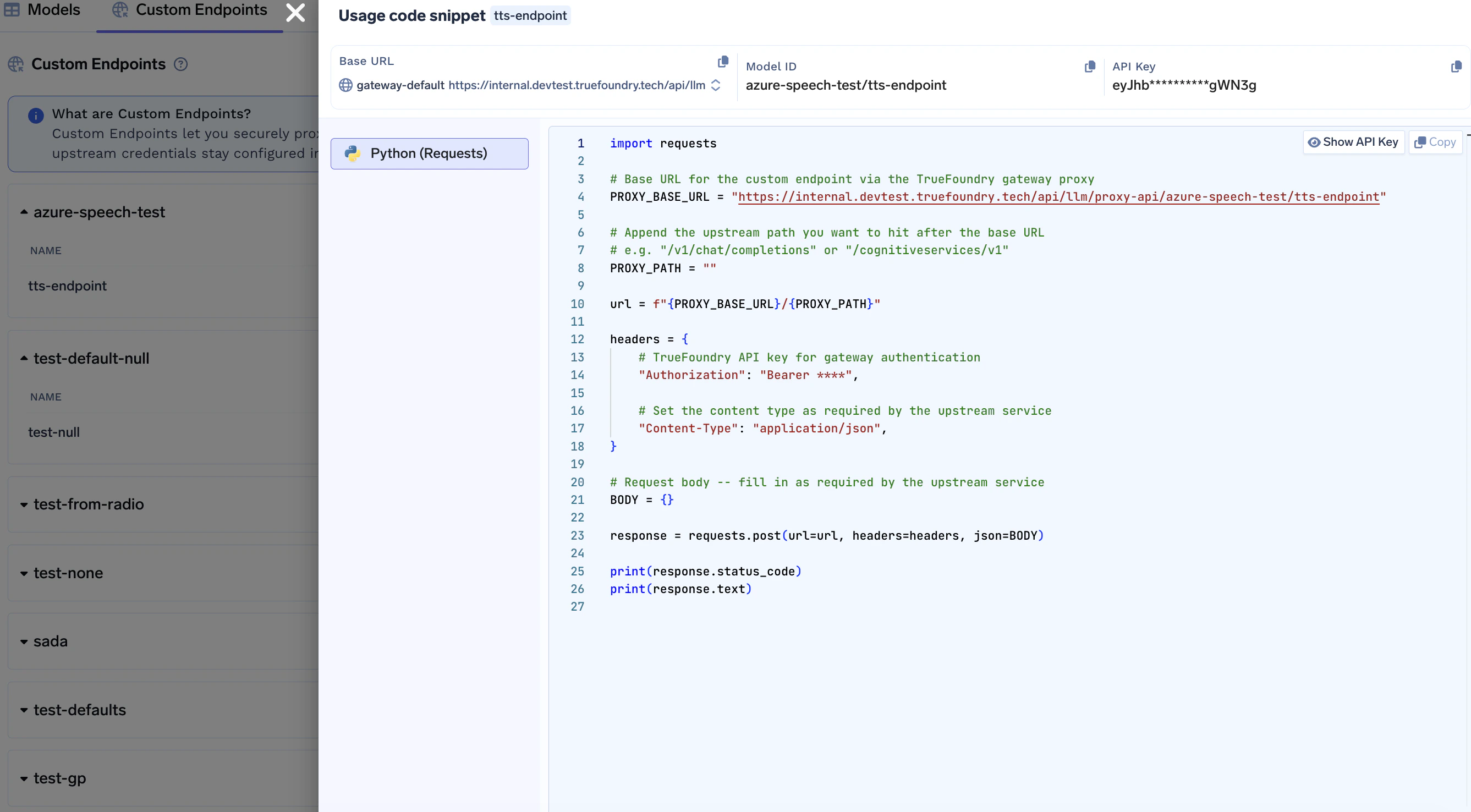
 Call the gateway using the pattern below. Replace `GATEWAY_BASE_URL`, `providerAccountName`, and `endpointName` with your values, and append any path that should be joined to the integration **Base URL**.
```python lines theme={"dark"}
import requests
url = "{GATEWAY_BASE_URL}/proxy-api/{providerAccountName}/{endpointName}/your/upstream/path"
headers = {
"Authorization": "Bearer your-truefoundry-api-key",
"Content-Type": "application/json",
}
body = {"key": "value"}
response = requests.post(url, headers=headers, json=body)
print(response.status_code)
print(response.text)
```
Callers only need a **TrueFoundry API key** for the gateway. Upstream authentication is applied by the gateway from your provider account and integration settings—you do not pass upstream secrets from client code.
Call the gateway using the pattern below. Replace `GATEWAY_BASE_URL`, `providerAccountName`, and `endpointName` with your values, and append any path that should be joined to the integration **Base URL**.
```python lines theme={"dark"}
import requests
url = "{GATEWAY_BASE_URL}/proxy-api/{providerAccountName}/{endpointName}/your/upstream/path"
headers = {
"Authorization": "Bearer your-truefoundry-api-key",
"Content-Type": "application/json",
}
body = {"key": "value"}
response = requests.post(url, headers=headers, json=body)
print(response.status_code)
print(response.text)
```
Callers only need a **TrueFoundry API key** for the gateway. Upstream authentication is applied by the gateway from your provider account and integration settings—you do not pass upstream secrets from client code.
 The wizard also includes an **Access Control** step after **Endpoints** (who can use this provider account), consistent with other AI Gateway providers — see [Gateway access control](/docs/ai-gateway/gateway-access-control).
The same manifest fields are available through the **TrueFoundry CLI** (`tfy apply`) if you configure provider accounts without the dashboard.
### Endpoint structure
Requests use this URL shape (query parameters are forwarded unchanged):
```
{GATEWAY_BASE_URL}/proxy-api/{providerAccountName}/{endpointName}/{upstream-path}?{query-params}
```
| Segment | Meaning |
| --------------------- | ------------------------------------------------------------------------------------------------------------------------------------ |
| `providerAccountName` | **Name** of your Custom Endpoint provider account (lowercase letters, digits, hyphens; 3–32 characters) |
| `endpointName` | Integration **Display Name** used in the URL (letters, digits, `-`, `_`, `.`; no spaces; 2–62 characters; cannot start with a digit) |
| `upstream-path` | Path appended to the integration’s **Base URL** |
| `query-params` | Optional; passed through to the upstream as-is |
Provider account and integration names must satisfy the patterns above when created. If your HTTP client requires encoding for certain characters in the path segment, URL-encode `endpointName` accordingly.
### Authentication
**Gateway authentication** — Same as other AI Gateway routes: send `Authorization: Bearer ` (or your deployment’s documented gateway auth).
**Upstream authentication** — Configure **Header Auth** (header name/value pairs used as upstream credentials) and optional **Custom Headers** on the provider account and/or each integration. The gateway adds these to the proxied request; callers never see upstream keys.
If an integration has **no** Header Auth, the gateway uses the provider account’s Header Auth when present. Setting Header Auth on an integration **replaces** the account default for that endpoint only.
Upstream services that expect **Bearer** or **HTTP Basic** credentials still use Header Auth: you store the **exact header name and value** the upstream expects (often `Authorization`). Examples:
**Bearer token**
| Header | Value |
| --------------- | ------------------------------------- |
| `Authorization` | `Bearer ` |
Enter the same **Header** name and **value** in the integration’s Header Auth (or account-level Header Auth).
**Username and password (HTTP Basic)**
Basic authentication sends a single `Authorization` header whose value is `Basic ` followed by the **Base64 encoding** of `username:password` (UTF-8), with **no** newline inside that string.
1. Build the string `username:password` (colon between user and password).
2. Base64-encode it (standard Base64, padding as needed).
3. Set Header Auth to `Authorization` = `Basic `.
Example (compute once, paste the header value into the gateway):
```python lines theme={"dark"}
import base64
user = "myuser"
password = "mypass"
token = base64.b64encode(f"{user}:{password}".encode("utf-8")).decode("ascii")
# token is e.g. "bXl1c2VyOm15cGFzcw=="
print(f'Authorization: Basic {token}')
```
Equivalent one-liners:
```bash theme={"dark"}
# macOS / Linux — prints the Base64 segment (prefix with `Basic ` for the full header value)
printf '%s' 'myuser:mypass' | base64
```
Paste **Authorization** = `Basic ` into Header Auth in the UI.
**API key in a custom header** (e.g. Azure Speech)
| Header | Value |
| --------------------------- | -------------------- |
| `Ocp-Apim-Subscription-Key` | `` |
### Load balancing across endpoints
Pool multiple endpoints under the same provider account behind a **single aggregated URL** to raise aggregate concurrency or to run a primary/backup topology. Typical uses include scaling out replicas of an internal API, fanning out across multiple regional deployments of the same HTTP service, or combining several Azure Speech subscriptions to lift the per-subscription request limit.
```mermaid theme={"dark"}
flowchart LR
App[Your application] --> Slug["/proxy-api/account/slug/..."]
Slug --> GW[AI Gateway]
GW --> E1["account/endpoint-a"]
GW --> E2["account/endpoint-b"]
GW --> E3["account/endpoint-c"]
```
#### How it works
* Set `routing_type` (`weight` or `priority`) and a `slug` on the **provider account**, and add a `loadbalancing_config` to each endpoint integration.
* Call the pool at `{GATEWAY_BASE_URL}/proxy-api/{providerAccountName}/{slug}/{upstream-path}`. The slug replaces the single `endpointName` segment.
* Per-endpoint URLs continue to work alongside the slug URL — useful for testing one upstream in isolation.
* For each request, the gateway picks an endpoint, proxies the call, and on a response whose status is listed in `fallback_status_codes` (or on a network error) retries the next eligible endpoint. Repeated failures cool an endpoint down across requests automatically.
* Access is checked at the **provider account** level in aggregated mode — per-endpoint `authorized_subjects` lists are not consulted.
The dashboard's "usage code snippet" helper is only generated for **individual endpoints**, not for the load-balanced slug endpoint. Build the request URL yourself using the template below — gateway authentication and upstream auth injection work exactly like the per-endpoint flow.
Template: `{GATEWAY_BASE_URL}/proxy-api/{providerAccountName}/{slug}/{upstream-path}`
* `{slug}` is the account's **Slug** (not an endpoint's Display Name).
* `{upstream-path}` is appended to the chosen endpoint's `base_url`, identical to the per-endpoint flow.
* You can copy the snippet from any individual endpoint as a starting point and replace the endpoint name segment with the slug.
#### Configuration structure
The following YAML shows the complete shape of a load-balanced custom endpoint provider account. The same fields are available in the dashboard form editor.
```yaml theme={"dark"}
type: provider-account/custom-endpoint
name: my-endpoint-pool # URL segment 1; lowercase, 3-32 chars
endpoint_type: other # optional: azure-speech-service | other (tracking only)
routing_type: weight # weight | priority (omit for per-endpoint only)
slug: pool # required when routing_type is set; URL segment 2
auth_data: # optional account-level default upstream auth
type: header
headers:
Authorization: "Bearer "
integrations:
- type: integration/model/custom-endpoint
name: endpoint-a # target id at runtime: my-endpoint-pool/endpoint-a
base_url: https://a.internal.example.com/v1 # no trailing slash
loadbalancing_config:
weight: 60 # weight mode: 0-100; all weights must sum to 100
fallback_status_codes: ["429", "500", "502", "503"]
fallback_candidate: true
headers:
X-Env: prod
# auth_data and tls_settings can also be set per endpoint and override the account defaults
- type: integration/model/custom-endpoint
name: endpoint-b
base_url: https://b.internal.example.com/v1
loadbalancing_config:
weight: 40
fallback_candidate: true
```
##### Per-endpoint load balancing fields
| Field | Type | Description |
| ----------------------- | ------------------ | ------------------------------------------------------------------------------------------------------------------------------------------------------------------------------------------------- |
| `weight` | int (0-100) | Traffic share, **weight mode only**. Weights across all endpoints must sum to 100. |
| `priority` | int (≥ 0) | Priority, **priority mode only**. Lower number = higher priority; `0` is highest. |
| `fallback_status_codes` | string\[] | Upstream HTTP statuses that trigger a fallback to the next endpoint. Default: `["401", "403", "404", "408", "429", "500", "502", "503"]`. |
| `fallback_candidate` | bool | If `false`, the endpoint never receives fallback traffic from another endpoint — it is only used when picked as the primary. Default: `true`. |
| `metadata_match` | map\[string]string | Optional. Restrict the endpoint to requests whose [resolved metadata](#metadata-based-target-filtering) matches **all** key-value pairs. Endpoints without `metadata_match` always stay eligible. |
Validation rules: setting `routing_type` requires `slug` and **at least 2 endpoints**. In weight mode, every endpoint needs a `weight` and the sum across endpoints must equal **100**. In priority mode, every endpoint needs a `priority`. Without `routing_type`, `slug` and `loadbalancing_config` are ignored.
#### Weight-based routing
Distributes requests across endpoints in proportion to their `weight`. Best for spreading load across multiple equivalent backends to raise aggregate concurrency.
```yaml theme={"dark"}
type: provider-account/custom-endpoint
name: orders-api-pool
routing_type: weight
slug: orders
integrations:
- type: integration/model/custom-endpoint
name: replica-1
base_url: https://orders-1.internal.example.com
loadbalancing_config:
weight: 50
- type: integration/model/custom-endpoint
name: replica-2
base_url: https://orders-2.internal.example.com
loadbalancing_config:
weight: 50
```
Call the pool:
```python Python lines theme={"dark"}
import requests
url = "{GATEWAY_BASE_URL}/proxy-api/orders-api-pool/orders/api/v1/orders"
headers = {
"Authorization": "Bearer your-truefoundry-api-key",
"Content-Type": "application/json",
}
response = requests.post(url, headers=headers, json={"customer_id": "cust_123", "limit": 10})
print(response.status_code, response.json())
```
```bash curl lines theme={"dark"}
curl -X POST "{GATEWAY_BASE_URL}/proxy-api/orders-api-pool/orders/api/v1/orders" \
-H "Authorization: Bearer your-truefoundry-api-key" \
-H "Content-Type: application/json" \
-d '{"customer_id": "cust_123", "limit": 10}'
```
A single Azure Speech subscription has a fixed per-resource concurrency. Combining several subscriptions or regions behind one slug endpoint multiplies the headroom and lets the gateway fail over on `429`.
```yaml theme={"dark"}
type: provider-account/custom-endpoint
name: azure-speech-pool
endpoint_type: azure-speech-service
routing_type: weight
slug: tts
integrations:
- type: integration/model/custom-endpoint
name: eastus2
base_url: https://eastus2.tts.speech.microsoft.com/cognitiveservices
auth_data:
type: header
headers:
Ocp-Apim-Subscription-Key: ""
loadbalancing_config:
weight: 70
- type: integration/model/custom-endpoint
name: westus2
base_url: https://westus2.tts.speech.microsoft.com/cognitiveservices
auth_data:
type: header
headers:
Ocp-Apim-Subscription-Key: ""
loadbalancing_config:
weight: 30
```
The pool is called at `{GATEWAY_BASE_URL}/proxy-api/azure-speech-pool/tts/v1` — same SSML body and `X-Microsoft-OutputFormat` header as the single-endpoint example in [Use cases](#use-cases), only the URL changes.
#### Priority-based routing
Routes every request to the **highest-priority healthy endpoint** (`0` is highest) and falls back to the next on failure. Best for primary/backup topologies.
```yaml theme={"dark"}
type: provider-account/custom-endpoint
name: search-pool
routing_type: priority
slug: search
integrations:
- type: integration/model/custom-endpoint
name: primary
base_url: https://search-primary.internal.example.com
loadbalancing_config:
priority: 0
fallback_status_codes: ["429", "500", "502", "503"]
- type: integration/model/custom-endpoint
name: backup
base_url: https://search-backup.internal.example.com
loadbalancing_config:
priority: 1
```
Every request goes to `primary` while it is healthy; when it returns a fallback status code or is in cooldown, the gateway tries `backup`.
#### Metadata-based target filtering
You can constrain an endpoint to only receive traffic when request metadata matches specific key-value pairs using `metadata_match` under its `loadbalancing_config`. This works the same way as on [virtual model targets](/docs/ai-gateway/virtual-model#metadata-based-target-filtering).
The gateway evaluates **resolved metadata** (not just raw request headers). Metadata can come from:
* **Request metadata header** — `x-tfy-metadata` (JSON object with string keys and values)
* **Virtual account tags** — when using a virtual account, its tags are included in metadata
* **Default gateway metadata** — configured at the gateway level (commonly used in self-hosted setups)
* **SaaS gateway location metadata** — `tfy_gateway_region` and `tfy_gateway_zone` are automatically added by the SaaS gateway based on which region handled the request
For each endpoint:
* If `metadata_match` is not set (or empty), the endpoint always stays eligible.
* If `metadata_match` is set, **all** configured pairs must match exactly (`AND` semantics).
* Filtering happens before weight/priority ordering and cooldown are computed, so only matching endpoints participate in routing for that request.
```yaml theme={"dark"}
type: provider-account/custom-endpoint
name: search-pool
routing_type: weight
slug: search
integrations:
- type: integration/model/custom-endpoint
name: search-us
base_url: https://us.search.internal.example.com
loadbalancing_config:
weight: 70
metadata_match:
region: us
tier: enterprise
- type: integration/model/custom-endpoint
name: search-shared
base_url: https://shared.search.internal.example.com
loadbalancing_config:
weight: 30
```
For a request with:
```http theme={"dark"}
x-tfy-metadata: {"region":"us","tier":"enterprise"}
```
both endpoints are eligible. For:
```http theme={"dark"}
x-tfy-metadata: {"region":"eu","tier":"enterprise"}
```
only `search-shared` remains eligible because `search-us` does not match.
For routing by SaaS gateway region using `tfy_gateway_region` / `tfy_gateway_zone`, see the [virtual model example](/docs/ai-gateway/virtual-model#metadata-based-target-filtering) — the same pattern applies, just put `metadata_match` under each integration's `loadbalancing_config`.
If no endpoint matches the request metadata, the gateway returns `404` with an error indicating that none of the configured endpoints matched `metadata_match` conditions. Always include at least one endpoint without `metadata_match` as a catch-all, or ensure your metadata rules cover all possible values.
#### Fallback and health
* **`fallback_status_codes`** — Upstream statuses that cause the gateway to stop on the current endpoint and try the next eligible one in the pool. Statuses outside this list propagate to the caller immediately. Default: `["401", "403", "404", "408", "429", "500", "502", "503"]`.
* **`fallback_candidate`** — When `false`, the endpoint is excluded from receiving fallback traffic from other endpoints; it is only used when selected as its own primary by the routing strategy.
* **Network errors** (timeouts, connection failures) always roll over to the next endpoint regardless of `fallback_status_codes`.
* **Automatic cooldown** — Repeated failures (`401`, `403`, `429`, `5xx`) within a short rolling window mark an endpoint unhealthy. Healthy endpoints are tried first; if every endpoint is in cooldown the gateway still tries them as a last resort. Recovery is automatic once errors age out of the window.
Compared to [Virtual Models](/docs/ai-gateway/virtual-model), custom endpoints use the same weight/priority concepts and the same [`metadata_match`](#metadata-based-target-filtering) routing, but in a different shape: routing is configured on the **account** with `routing_type` + `slug`, targets are **implicit** (every endpoint under the account), and each endpoint carries its own `loadbalancing_config`. There is no `routing_config` / `load_balance_targets` array, no latency-based routing, and no `sticky_routing`, `sla_cutoff`, retry attempts/delay, or `override_params`.
### Use cases
```python Azure Speech (text-to-speech) lines theme={"dark"}
import requests
# Integration Base URL should be like https://.tts.speech.microsoft.com/cognitiveservices (no trailing slash).
# Append only the REST suffix — here `v1` for SSML — so the upstream becomes …/cognitiveservices/v1
url = "{GATEWAY_BASE_URL}/proxy-api/{providerAccountName}/{endpointName}/v1"
headers = {
"Authorization": "Bearer your-truefoundry-api-key",
"Content-Type": "application/ssml+xml",
"X-Microsoft-OutputFormat": "audio-16khz-128kbitrate-mono-mp3",
}
ssml = """
Hello from the gateway.
"""
response = requests.post(url, headers=headers, data=ssml.encode("utf-8"))
response.raise_for_status()
# Response body is binary audio from the upstream service.
open("output.mp3", "wb").write(response.content)
```
```python Internal REST API lines theme={"dark"}
import requests
url = "{GATEWAY_BASE_URL}/proxy-api/{providerAccountName}/{endpointName}/api/v1/orders"
headers = {
"Authorization": "Bearer your-truefoundry-api-key",
"Content-Type": "application/json",
}
payload = {"customer_id": "cust_123", "limit": 10}
response = requests.post(url, headers=headers, json=payload)
print(response.json())
```
```python Any HTTP service (GET) lines theme={"dark"}
import requests
url = "{GATEWAY_BASE_URL}/proxy-api/{providerAccountName}/{endpointName}/health"
headers = {"Authorization": "Bearer your-truefoundry-api-key"}
response = requests.get(url, headers=headers, timeout=30)
print(response.status_code, response.text)
```
### Configuration reference
#### Provider account (`provider-account/custom-endpoint`)
| Field | Description |
| ----------------- | -------------------------------------------------------------------------------------------------------------------------------------------------------------------------------------------------------------------------------------- |
| **Name** | Unique account identifier (lowercase letters, digits, hyphens; 3–32 characters); used in the gateway URL as `providerAccountName` |
| **Endpoint Type** | Optional: `azure-speech-service` or `other` (used for tracking / defaults in the product) |
| **Routing Type** | Optional: `weight` or `priority`. Turns the account into a load-balanced pool. Leave unset for the standard per-endpoint flow. See [Load balancing across endpoints](#load-balancing-across-endpoints) |
| **Slug** | Required when **Routing Type** is set. Pattern: letters, digits, `-`, `_`, `.`; 2–62 characters; cannot start with a digit. Becomes the second URL segment for the aggregated endpoint (`/proxy-api///`) |
| **Header Auth** | Optional default upstream auth: header-based credentials (`type: header` plus a **Headers** map), applied when an integration has no Header Auth of its own |
| **Collaborators** | Who can manage or use this account — see [Gateway access control](/docs/ai-gateway/gateway-access-control) |
#### Integration (endpoint)
| Field | Description |
| ------------------------- | ------------------------------------------------------------------------------------------------------------------------------------------------------------------------------------------------------------------------------------------- |
| **Display Name** | Identifies the endpoint in the UI and in the URL as `endpointName` (pattern: letters, digits, `-`, `_`, `.`; no spaces; cannot start with a digit) |
| **Base URL** | HTTPS (or HTTP) origin **without** a trailing slash; the gateway appends `upstream-path` from the request |
| **Custom Headers** | Optional key/value headers merged into every upstream request (often under Advanced) |
| **Header Auth** | Optional upstream credentials as header key/value pairs; when set, replaces provider-account Header Auth for this integration |
| **TLS Settings** | Optional **Reject Unauthorized** toggle and optional **Custom CA Certificates** text for upstream TLS verification |
| **Load Balancing Config** | Required on every endpoint when the parent account has **Routing Type** set. See [Per-endpoint load balancing fields](#per-endpoint-load-balancing-fields) for the sub-field reference |
| **Access Control** | Optional `authorized_subjects` for per-subject allow lists — commonly edited via API or manifest rather than the default UI. Not consulted when calling the account's aggregated slug URL (access is checked at the provider-account level) |
### Tracing
All traffic through Custom Endpoints is traced with span type **`CustomEndpoint`** on the gateway trace / root span. To browse requests in the dashboard, see [Request Logging](/docs/ai-gateway/request-logging). For general tracing concepts (traces, spans, attributes), see the [LLM tracing overview](/docs/tracing/overview).
Aggregated (load-balanced) requests carry extra attributes on the same span so you can see which pooled endpoint served each request and how often fallback occurred:
| Attribute | Meaning |
| ------------------------------------- | -------------------------------------------------------------------------------- |
| `custom_proxy_routing_type` | `weight` or `priority` |
| `custom_proxy_slug` | The account slug used in the request URL |
| `custom_proxy_endpoint_name` | The endpoint that actually served the request |
| `custom_proxy_target_was_cooled_down` | `true` if the request had to use an endpoint in cooldown (all targets unhealthy) |
| `loadbalance_target_attempt_count` | Number of endpoints attempted before success or final failure |
| `loadbalance_first_target` | First endpoint tried for this request |
| `loadbalance_final_target` | Endpoint that produced the final response |
The wizard also includes an **Access Control** step after **Endpoints** (who can use this provider account), consistent with other AI Gateway providers — see [Gateway access control](/docs/ai-gateway/gateway-access-control).
The same manifest fields are available through the **TrueFoundry CLI** (`tfy apply`) if you configure provider accounts without the dashboard.
### Endpoint structure
Requests use this URL shape (query parameters are forwarded unchanged):
```
{GATEWAY_BASE_URL}/proxy-api/{providerAccountName}/{endpointName}/{upstream-path}?{query-params}
```
| Segment | Meaning |
| --------------------- | ------------------------------------------------------------------------------------------------------------------------------------ |
| `providerAccountName` | **Name** of your Custom Endpoint provider account (lowercase letters, digits, hyphens; 3–32 characters) |
| `endpointName` | Integration **Display Name** used in the URL (letters, digits, `-`, `_`, `.`; no spaces; 2–62 characters; cannot start with a digit) |
| `upstream-path` | Path appended to the integration’s **Base URL** |
| `query-params` | Optional; passed through to the upstream as-is |
Provider account and integration names must satisfy the patterns above when created. If your HTTP client requires encoding for certain characters in the path segment, URL-encode `endpointName` accordingly.
### Authentication
**Gateway authentication** — Same as other AI Gateway routes: send `Authorization: Bearer ` (or your deployment’s documented gateway auth).
**Upstream authentication** — Configure **Header Auth** (header name/value pairs used as upstream credentials) and optional **Custom Headers** on the provider account and/or each integration. The gateway adds these to the proxied request; callers never see upstream keys.
If an integration has **no** Header Auth, the gateway uses the provider account’s Header Auth when present. Setting Header Auth on an integration **replaces** the account default for that endpoint only.
Upstream services that expect **Bearer** or **HTTP Basic** credentials still use Header Auth: you store the **exact header name and value** the upstream expects (often `Authorization`). Examples:
**Bearer token**
| Header | Value |
| --------------- | ------------------------------------- |
| `Authorization` | `Bearer ` |
Enter the same **Header** name and **value** in the integration’s Header Auth (or account-level Header Auth).
**Username and password (HTTP Basic)**
Basic authentication sends a single `Authorization` header whose value is `Basic ` followed by the **Base64 encoding** of `username:password` (UTF-8), with **no** newline inside that string.
1. Build the string `username:password` (colon between user and password).
2. Base64-encode it (standard Base64, padding as needed).
3. Set Header Auth to `Authorization` = `Basic `.
Example (compute once, paste the header value into the gateway):
```python lines theme={"dark"}
import base64
user = "myuser"
password = "mypass"
token = base64.b64encode(f"{user}:{password}".encode("utf-8")).decode("ascii")
# token is e.g. "bXl1c2VyOm15cGFzcw=="
print(f'Authorization: Basic {token}')
```
Equivalent one-liners:
```bash theme={"dark"}
# macOS / Linux — prints the Base64 segment (prefix with `Basic ` for the full header value)
printf '%s' 'myuser:mypass' | base64
```
Paste **Authorization** = `Basic ` into Header Auth in the UI.
**API key in a custom header** (e.g. Azure Speech)
| Header | Value |
| --------------------------- | -------------------- |
| `Ocp-Apim-Subscription-Key` | `` |
### Load balancing across endpoints
Pool multiple endpoints under the same provider account behind a **single aggregated URL** to raise aggregate concurrency or to run a primary/backup topology. Typical uses include scaling out replicas of an internal API, fanning out across multiple regional deployments of the same HTTP service, or combining several Azure Speech subscriptions to lift the per-subscription request limit.
```mermaid theme={"dark"}
flowchart LR
App[Your application] --> Slug["/proxy-api/account/slug/..."]
Slug --> GW[AI Gateway]
GW --> E1["account/endpoint-a"]
GW --> E2["account/endpoint-b"]
GW --> E3["account/endpoint-c"]
```
#### How it works
* Set `routing_type` (`weight` or `priority`) and a `slug` on the **provider account**, and add a `loadbalancing_config` to each endpoint integration.
* Call the pool at `{GATEWAY_BASE_URL}/proxy-api/{providerAccountName}/{slug}/{upstream-path}`. The slug replaces the single `endpointName` segment.
* Per-endpoint URLs continue to work alongside the slug URL — useful for testing one upstream in isolation.
* For each request, the gateway picks an endpoint, proxies the call, and on a response whose status is listed in `fallback_status_codes` (or on a network error) retries the next eligible endpoint. Repeated failures cool an endpoint down across requests automatically.
* Access is checked at the **provider account** level in aggregated mode — per-endpoint `authorized_subjects` lists are not consulted.
The dashboard's "usage code snippet" helper is only generated for **individual endpoints**, not for the load-balanced slug endpoint. Build the request URL yourself using the template below — gateway authentication and upstream auth injection work exactly like the per-endpoint flow.
Template: `{GATEWAY_BASE_URL}/proxy-api/{providerAccountName}/{slug}/{upstream-path}`
* `{slug}` is the account's **Slug** (not an endpoint's Display Name).
* `{upstream-path}` is appended to the chosen endpoint's `base_url`, identical to the per-endpoint flow.
* You can copy the snippet from any individual endpoint as a starting point and replace the endpoint name segment with the slug.
#### Configuration structure
The following YAML shows the complete shape of a load-balanced custom endpoint provider account. The same fields are available in the dashboard form editor.
```yaml theme={"dark"}
type: provider-account/custom-endpoint
name: my-endpoint-pool # URL segment 1; lowercase, 3-32 chars
endpoint_type: other # optional: azure-speech-service | other (tracking only)
routing_type: weight # weight | priority (omit for per-endpoint only)
slug: pool # required when routing_type is set; URL segment 2
auth_data: # optional account-level default upstream auth
type: header
headers:
Authorization: "Bearer "
integrations:
- type: integration/model/custom-endpoint
name: endpoint-a # target id at runtime: my-endpoint-pool/endpoint-a
base_url: https://a.internal.example.com/v1 # no trailing slash
loadbalancing_config:
weight: 60 # weight mode: 0-100; all weights must sum to 100
fallback_status_codes: ["429", "500", "502", "503"]
fallback_candidate: true
headers:
X-Env: prod
# auth_data and tls_settings can also be set per endpoint and override the account defaults
- type: integration/model/custom-endpoint
name: endpoint-b
base_url: https://b.internal.example.com/v1
loadbalancing_config:
weight: 40
fallback_candidate: true
```
##### Per-endpoint load balancing fields
| Field | Type | Description |
| ----------------------- | ------------------ | ------------------------------------------------------------------------------------------------------------------------------------------------------------------------------------------------- |
| `weight` | int (0-100) | Traffic share, **weight mode only**. Weights across all endpoints must sum to 100. |
| `priority` | int (≥ 0) | Priority, **priority mode only**. Lower number = higher priority; `0` is highest. |
| `fallback_status_codes` | string\[] | Upstream HTTP statuses that trigger a fallback to the next endpoint. Default: `["401", "403", "404", "408", "429", "500", "502", "503"]`. |
| `fallback_candidate` | bool | If `false`, the endpoint never receives fallback traffic from another endpoint — it is only used when picked as the primary. Default: `true`. |
| `metadata_match` | map\[string]string | Optional. Restrict the endpoint to requests whose [resolved metadata](#metadata-based-target-filtering) matches **all** key-value pairs. Endpoints without `metadata_match` always stay eligible. |
Validation rules: setting `routing_type` requires `slug` and **at least 2 endpoints**. In weight mode, every endpoint needs a `weight` and the sum across endpoints must equal **100**. In priority mode, every endpoint needs a `priority`. Without `routing_type`, `slug` and `loadbalancing_config` are ignored.
#### Weight-based routing
Distributes requests across endpoints in proportion to their `weight`. Best for spreading load across multiple equivalent backends to raise aggregate concurrency.
```yaml theme={"dark"}
type: provider-account/custom-endpoint
name: orders-api-pool
routing_type: weight
slug: orders
integrations:
- type: integration/model/custom-endpoint
name: replica-1
base_url: https://orders-1.internal.example.com
loadbalancing_config:
weight: 50
- type: integration/model/custom-endpoint
name: replica-2
base_url: https://orders-2.internal.example.com
loadbalancing_config:
weight: 50
```
Call the pool:
```python Python lines theme={"dark"}
import requests
url = "{GATEWAY_BASE_URL}/proxy-api/orders-api-pool/orders/api/v1/orders"
headers = {
"Authorization": "Bearer your-truefoundry-api-key",
"Content-Type": "application/json",
}
response = requests.post(url, headers=headers, json={"customer_id": "cust_123", "limit": 10})
print(response.status_code, response.json())
```
```bash curl lines theme={"dark"}
curl -X POST "{GATEWAY_BASE_URL}/proxy-api/orders-api-pool/orders/api/v1/orders" \
-H "Authorization: Bearer your-truefoundry-api-key" \
-H "Content-Type: application/json" \
-d '{"customer_id": "cust_123", "limit": 10}'
```
A single Azure Speech subscription has a fixed per-resource concurrency. Combining several subscriptions or regions behind one slug endpoint multiplies the headroom and lets the gateway fail over on `429`.
```yaml theme={"dark"}
type: provider-account/custom-endpoint
name: azure-speech-pool
endpoint_type: azure-speech-service
routing_type: weight
slug: tts
integrations:
- type: integration/model/custom-endpoint
name: eastus2
base_url: https://eastus2.tts.speech.microsoft.com/cognitiveservices
auth_data:
type: header
headers:
Ocp-Apim-Subscription-Key: ""
loadbalancing_config:
weight: 70
- type: integration/model/custom-endpoint
name: westus2
base_url: https://westus2.tts.speech.microsoft.com/cognitiveservices
auth_data:
type: header
headers:
Ocp-Apim-Subscription-Key: ""
loadbalancing_config:
weight: 30
```
The pool is called at `{GATEWAY_BASE_URL}/proxy-api/azure-speech-pool/tts/v1` — same SSML body and `X-Microsoft-OutputFormat` header as the single-endpoint example in [Use cases](#use-cases), only the URL changes.
#### Priority-based routing
Routes every request to the **highest-priority healthy endpoint** (`0` is highest) and falls back to the next on failure. Best for primary/backup topologies.
```yaml theme={"dark"}
type: provider-account/custom-endpoint
name: search-pool
routing_type: priority
slug: search
integrations:
- type: integration/model/custom-endpoint
name: primary
base_url: https://search-primary.internal.example.com
loadbalancing_config:
priority: 0
fallback_status_codes: ["429", "500", "502", "503"]
- type: integration/model/custom-endpoint
name: backup
base_url: https://search-backup.internal.example.com
loadbalancing_config:
priority: 1
```
Every request goes to `primary` while it is healthy; when it returns a fallback status code or is in cooldown, the gateway tries `backup`.
#### Metadata-based target filtering
You can constrain an endpoint to only receive traffic when request metadata matches specific key-value pairs using `metadata_match` under its `loadbalancing_config`. This works the same way as on [virtual model targets](/docs/ai-gateway/virtual-model#metadata-based-target-filtering).
The gateway evaluates **resolved metadata** (not just raw request headers). Metadata can come from:
* **Request metadata header** — `x-tfy-metadata` (JSON object with string keys and values)
* **Virtual account tags** — when using a virtual account, its tags are included in metadata
* **Default gateway metadata** — configured at the gateway level (commonly used in self-hosted setups)
* **SaaS gateway location metadata** — `tfy_gateway_region` and `tfy_gateway_zone` are automatically added by the SaaS gateway based on which region handled the request
For each endpoint:
* If `metadata_match` is not set (or empty), the endpoint always stays eligible.
* If `metadata_match` is set, **all** configured pairs must match exactly (`AND` semantics).
* Filtering happens before weight/priority ordering and cooldown are computed, so only matching endpoints participate in routing for that request.
```yaml theme={"dark"}
type: provider-account/custom-endpoint
name: search-pool
routing_type: weight
slug: search
integrations:
- type: integration/model/custom-endpoint
name: search-us
base_url: https://us.search.internal.example.com
loadbalancing_config:
weight: 70
metadata_match:
region: us
tier: enterprise
- type: integration/model/custom-endpoint
name: search-shared
base_url: https://shared.search.internal.example.com
loadbalancing_config:
weight: 30
```
For a request with:
```http theme={"dark"}
x-tfy-metadata: {"region":"us","tier":"enterprise"}
```
both endpoints are eligible. For:
```http theme={"dark"}
x-tfy-metadata: {"region":"eu","tier":"enterprise"}
```
only `search-shared` remains eligible because `search-us` does not match.
For routing by SaaS gateway region using `tfy_gateway_region` / `tfy_gateway_zone`, see the [virtual model example](/docs/ai-gateway/virtual-model#metadata-based-target-filtering) — the same pattern applies, just put `metadata_match` under each integration's `loadbalancing_config`.
If no endpoint matches the request metadata, the gateway returns `404` with an error indicating that none of the configured endpoints matched `metadata_match` conditions. Always include at least one endpoint without `metadata_match` as a catch-all, or ensure your metadata rules cover all possible values.
#### Fallback and health
* **`fallback_status_codes`** — Upstream statuses that cause the gateway to stop on the current endpoint and try the next eligible one in the pool. Statuses outside this list propagate to the caller immediately. Default: `["401", "403", "404", "408", "429", "500", "502", "503"]`.
* **`fallback_candidate`** — When `false`, the endpoint is excluded from receiving fallback traffic from other endpoints; it is only used when selected as its own primary by the routing strategy.
* **Network errors** (timeouts, connection failures) always roll over to the next endpoint regardless of `fallback_status_codes`.
* **Automatic cooldown** — Repeated failures (`401`, `403`, `429`, `5xx`) within a short rolling window mark an endpoint unhealthy. Healthy endpoints are tried first; if every endpoint is in cooldown the gateway still tries them as a last resort. Recovery is automatic once errors age out of the window.
Compared to [Virtual Models](/docs/ai-gateway/virtual-model), custom endpoints use the same weight/priority concepts and the same [`metadata_match`](#metadata-based-target-filtering) routing, but in a different shape: routing is configured on the **account** with `routing_type` + `slug`, targets are **implicit** (every endpoint under the account), and each endpoint carries its own `loadbalancing_config`. There is no `routing_config` / `load_balance_targets` array, no latency-based routing, and no `sticky_routing`, `sla_cutoff`, retry attempts/delay, or `override_params`.
### Use cases
```python Azure Speech (text-to-speech) lines theme={"dark"}
import requests
# Integration Base URL should be like https://.tts.speech.microsoft.com/cognitiveservices (no trailing slash).
# Append only the REST suffix — here `v1` for SSML — so the upstream becomes …/cognitiveservices/v1
url = "{GATEWAY_BASE_URL}/proxy-api/{providerAccountName}/{endpointName}/v1"
headers = {
"Authorization": "Bearer your-truefoundry-api-key",
"Content-Type": "application/ssml+xml",
"X-Microsoft-OutputFormat": "audio-16khz-128kbitrate-mono-mp3",
}
ssml = """
Hello from the gateway.
"""
response = requests.post(url, headers=headers, data=ssml.encode("utf-8"))
response.raise_for_status()
# Response body is binary audio from the upstream service.
open("output.mp3", "wb").write(response.content)
```
```python Internal REST API lines theme={"dark"}
import requests
url = "{GATEWAY_BASE_URL}/proxy-api/{providerAccountName}/{endpointName}/api/v1/orders"
headers = {
"Authorization": "Bearer your-truefoundry-api-key",
"Content-Type": "application/json",
}
payload = {"customer_id": "cust_123", "limit": 10}
response = requests.post(url, headers=headers, json=payload)
print(response.json())
```
```python Any HTTP service (GET) lines theme={"dark"}
import requests
url = "{GATEWAY_BASE_URL}/proxy-api/{providerAccountName}/{endpointName}/health"
headers = {"Authorization": "Bearer your-truefoundry-api-key"}
response = requests.get(url, headers=headers, timeout=30)
print(response.status_code, response.text)
```
### Configuration reference
#### Provider account (`provider-account/custom-endpoint`)
| Field | Description |
| ----------------- | -------------------------------------------------------------------------------------------------------------------------------------------------------------------------------------------------------------------------------------- |
| **Name** | Unique account identifier (lowercase letters, digits, hyphens; 3–32 characters); used in the gateway URL as `providerAccountName` |
| **Endpoint Type** | Optional: `azure-speech-service` or `other` (used for tracking / defaults in the product) |
| **Routing Type** | Optional: `weight` or `priority`. Turns the account into a load-balanced pool. Leave unset for the standard per-endpoint flow. See [Load balancing across endpoints](#load-balancing-across-endpoints) |
| **Slug** | Required when **Routing Type** is set. Pattern: letters, digits, `-`, `_`, `.`; 2–62 characters; cannot start with a digit. Becomes the second URL segment for the aggregated endpoint (`/proxy-api///`) |
| **Header Auth** | Optional default upstream auth: header-based credentials (`type: header` plus a **Headers** map), applied when an integration has no Header Auth of its own |
| **Collaborators** | Who can manage or use this account — see [Gateway access control](/docs/ai-gateway/gateway-access-control) |
#### Integration (endpoint)
| Field | Description |
| ------------------------- | ------------------------------------------------------------------------------------------------------------------------------------------------------------------------------------------------------------------------------------------- |
| **Display Name** | Identifies the endpoint in the UI and in the URL as `endpointName` (pattern: letters, digits, `-`, `_`, `.`; no spaces; cannot start with a digit) |
| **Base URL** | HTTPS (or HTTP) origin **without** a trailing slash; the gateway appends `upstream-path` from the request |
| **Custom Headers** | Optional key/value headers merged into every upstream request (often under Advanced) |
| **Header Auth** | Optional upstream credentials as header key/value pairs; when set, replaces provider-account Header Auth for this integration |
| **TLS Settings** | Optional **Reject Unauthorized** toggle and optional **Custom CA Certificates** text for upstream TLS verification |
| **Load Balancing Config** | Required on every endpoint when the parent account has **Routing Type** set. See [Per-endpoint load balancing fields](#per-endpoint-load-balancing-fields) for the sub-field reference |
| **Access Control** | Optional `authorized_subjects` for per-subject allow lists — commonly edited via API or manifest rather than the default UI. Not consulted when calling the account's aggregated slug URL (access is checked at the provider-account level) |
### Tracing
All traffic through Custom Endpoints is traced with span type **`CustomEndpoint`** on the gateway trace / root span. To browse requests in the dashboard, see [Request Logging](/docs/ai-gateway/request-logging). For general tracing concepts (traces, spans, attributes), see the [LLM tracing overview](/docs/tracing/overview).
Aggregated (load-balanced) requests carry extra attributes on the same span so you can see which pooled endpoint served each request and how often fallback occurred:
| Attribute | Meaning |
| ------------------------------------- | -------------------------------------------------------------------------------- |
| `custom_proxy_routing_type` | `weight` or `priority` |
| `custom_proxy_slug` | The account slug used in the request URL |
| `custom_proxy_endpoint_name` | The endpoint that actually served the request |
| `custom_proxy_target_was_cooled_down` | `true` if the request had to use an endpoint in cooldown (all targets unhealthy) |
| `loadbalance_target_attempt_count` | Number of endpoints attempted before success or final failure |
| `loadbalance_first_target` | First endpoint tried for this request |
| `loadbalance_final_target` | Endpoint that produced the final response |