> ## Documentation Index
> Fetch the complete documentation index at: https://www.truefoundry.com/llms.txt
> Use this file to discover all available pages before exploring further.
# Coralogix
> Learn how to export LLM Gateway traces to Coralogix using OpenTelemetry integration.
This guide provides instructions for integrating [Coralogix](https://coralogix.com/) with the TrueFoundry AI Gateway to export OpenTelemetry traces.
## What is Coralogix?
Coralogix is a full-stack observability platform that provides real-time insights into logs, metrics, and traces. It offers advanced analytics, alerting, and visualization capabilities for monitoring your applications and infrastructure.
### Key Features of Coralogix
* **[Real-time Analytics](https://coralogix.com/platform/)**: Stream and analyze logs, metrics, and traces in real-time without indexing delays
* **[ML-Powered Insights](https://coralogix.com/solutions/)**: Automatically detect anomalies and patterns using machine learning algorithms
* **[Cost-Effective Storage](https://coralogix.com/pricing/)**: Flexible data management with hot, warm, and cold storage tiers for cost optimization
## Prerequisites
Before integrating Coralogix with TrueFoundry, ensure you have:
1. **TrueFoundry Account**: Create a [Truefoundry account](https://www.truefoundry.com/register) and follow the instructions in our [Gateway Quick Start Guide](https://docs.truefoundry.com/gateway/quick-start)
2. **Coralogix Account**: Sign up for a [Coralogix account](https://coralogix.com/)
3. **Coralogix API Key**: Generate an API key from your Coralogix dashboard
## Integration Steps
TrueFoundry AI Gateway supports exporting OpenTelemetry traces to Coralogix, allowing you to monitor and analyze your LLM requests in Coralogix's observability platform.
### Step 1: Get Your Coralogix Configuration
From your Coralogix dashboard, gather the following information:
1. **Traces Endpoint**: Your Coralogix OTEL traces endpoint (e.g., `ingress.eu2.coralogix.com:443`)
2. **API Key**: Your Coralogix API key for authorization
3. **Subsystem and Application Names**: Configure these to organize your traces in Coralogix
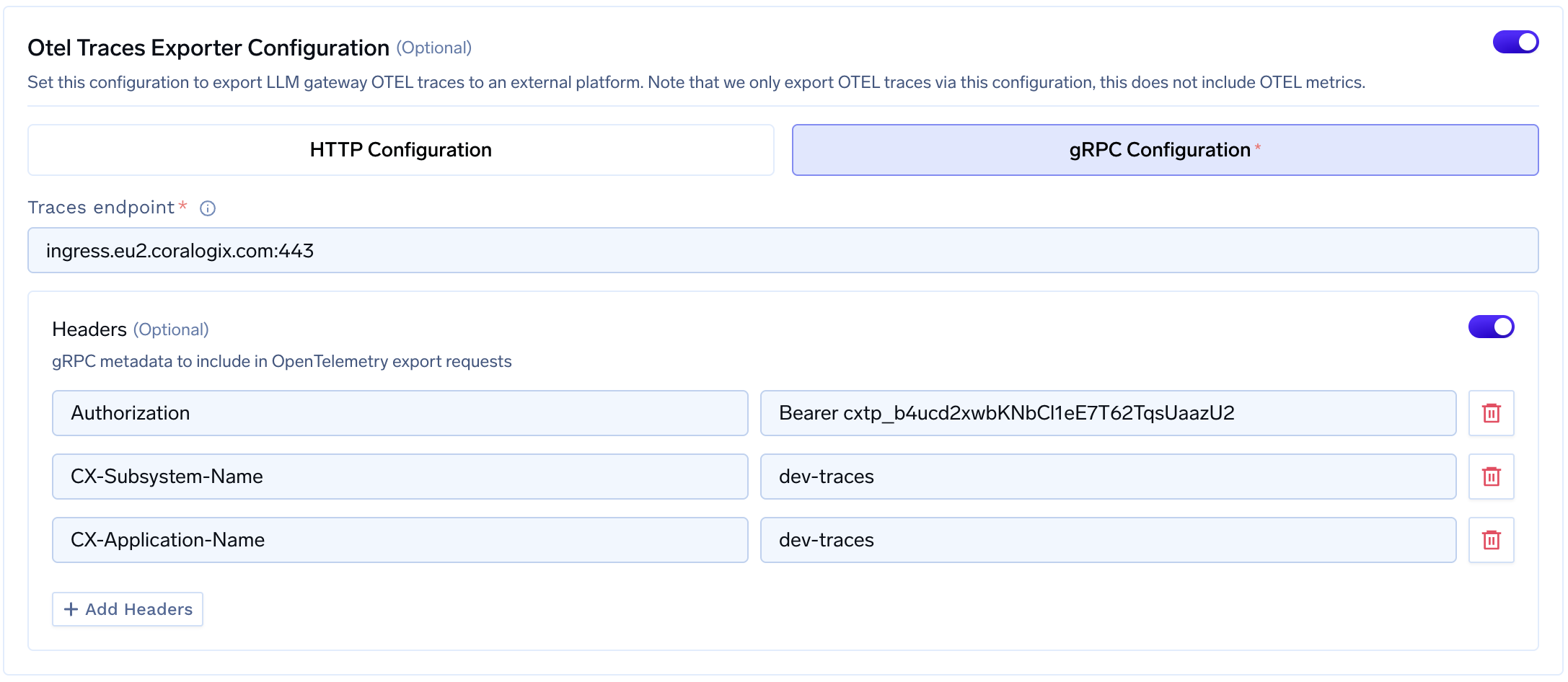
### Step 2: Configure OTEL Export in TrueFoundry
1. Go to **AI Gateway** → **Controls** → **Settings** in the TrueFoundry dashboard
2. Scroll down to the **OTEL Config** section and click the edit button
3. Enable the **OTEL Traces Exporter Configuration** toggle
4. Select **gRPC Configuration** (recommended for Coralogix)
5. Enter your Coralogix traces endpoint
 ### Step 3: Configure Headers
Add the required headers for Coralogix authentication:
| Header | Value |
| --------------------- | ------------------------------------------ |
| `Authorization` | `Bearer ` |
| `CX-Subsystem-Name` | Your subsystem name (e.g., `dev-traces`) |
| `CX-Application-Name` | Your application name (e.g., `dev-traces`) |
Click **Save** to apply your configuration.
### Step 4: Verify the Integration
1. Make some requests through the TrueFoundry AI Gateway
2. Navigate to the **Monitor** section in TrueFoundry to verify traces are being generated
### Step 3: Configure Headers
Add the required headers for Coralogix authentication:
| Header | Value |
| --------------------- | ------------------------------------------ |
| `Authorization` | `Bearer ` |
| `CX-Subsystem-Name` | Your subsystem name (e.g., `dev-traces`) |
| `CX-Application-Name` | Your application name (e.g., `dev-traces`) |
Click **Save** to apply your configuration.
### Step 4: Verify the Integration
1. Make some requests through the TrueFoundry AI Gateway
2. Navigate to the **Monitor** section in TrueFoundry to verify traces are being generated
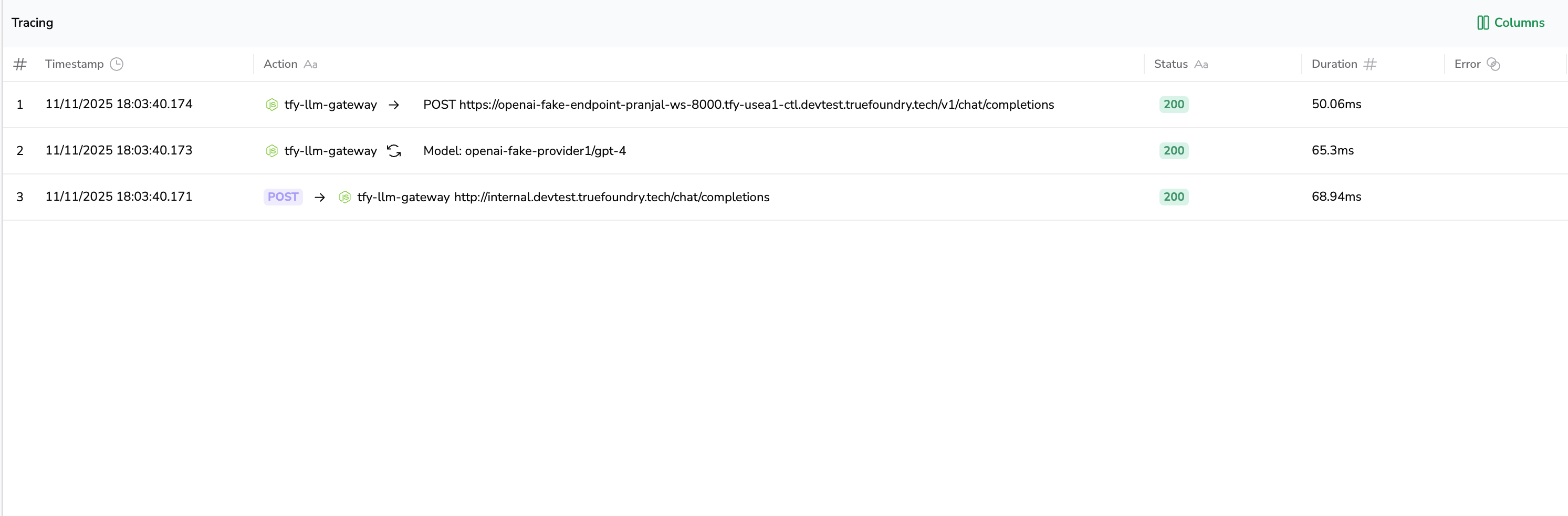 3. Log into your Coralogix dashboard and navigate to the **Traces** section
4. Verify that traces from TrueFoundry are appearing with your configured application and subsystem names
## Configuration Options
### Coralogix Regional Endpoints
Coralogix has different endpoints based on your region. For the most up-to-date endpoints, refer to the [official Coralogix documentation](https://coralogix.com/docs/integrations/coralogix-endpoints/).
| Region | gRPC Endpoint |
| ------------------ | ------------------------------- |
| Europe 1 | `ingress.coralogix.com:443` |
| Europe 2 | `ingress.eu2.coralogix.com:443` |
| USA 1 | `ingress.coralogix.us:443` |
| APAC 1 (India) | `ingress.app.coralogix.in:443` |
| APAC 2 (Singapore) | `ingress.coralogixsg.com:443` |
Choose the endpoint that matches your Coralogix account region.
## Benefits of Using Coralogix with TrueFoundry
1. **Unified Observability**: View all your LLM traces alongside other application telemetry in one platform
2. **Advanced Analytics**: Leverage Coralogix's ML-powered analytics to detect anomalies in your LLM usage
3. **Cost Optimization**: Use Coralogix's tiered storage to manage trace data costs effectively
4. **Custom Dashboards**: Create custom dashboards to visualize LLM performance metrics
5. **Alerting**: Set up alerts for latency spikes, error rates, or unusual patterns in your LLM usage
3. Log into your Coralogix dashboard and navigate to the **Traces** section
4. Verify that traces from TrueFoundry are appearing with your configured application and subsystem names
## Configuration Options
### Coralogix Regional Endpoints
Coralogix has different endpoints based on your region. For the most up-to-date endpoints, refer to the [official Coralogix documentation](https://coralogix.com/docs/integrations/coralogix-endpoints/).
| Region | gRPC Endpoint |
| ------------------ | ------------------------------- |
| Europe 1 | `ingress.coralogix.com:443` |
| Europe 2 | `ingress.eu2.coralogix.com:443` |
| USA 1 | `ingress.coralogix.us:443` |
| APAC 1 (India) | `ingress.app.coralogix.in:443` |
| APAC 2 (Singapore) | `ingress.coralogixsg.com:443` |
Choose the endpoint that matches your Coralogix account region.
## Benefits of Using Coralogix with TrueFoundry
1. **Unified Observability**: View all your LLM traces alongside other application telemetry in one platform
2. **Advanced Analytics**: Leverage Coralogix's ML-powered analytics to detect anomalies in your LLM usage
3. **Cost Optimization**: Use Coralogix's tiered storage to manage trace data costs effectively
4. **Custom Dashboards**: Create custom dashboards to visualize LLM performance metrics
5. **Alerting**: Set up alerts for latency spikes, error rates, or unusual patterns in your LLM usage