> ## Documentation Index
> Fetch the complete documentation index at: https://www.truefoundry.com/llms.txt
> Use this file to discover all available pages before exploring further.
# AWS Bedrock
> Configure and use AWS Bedrock models through TrueFoundry's AI Gateway with cross-region support
### Adding Models
This section explains the steps to add AWS Bedrock models and configure the required access controls.
From the TrueFoundry dashboard, navigate to `AI Gateway` > `Models` and select `AWS Bedrock`.
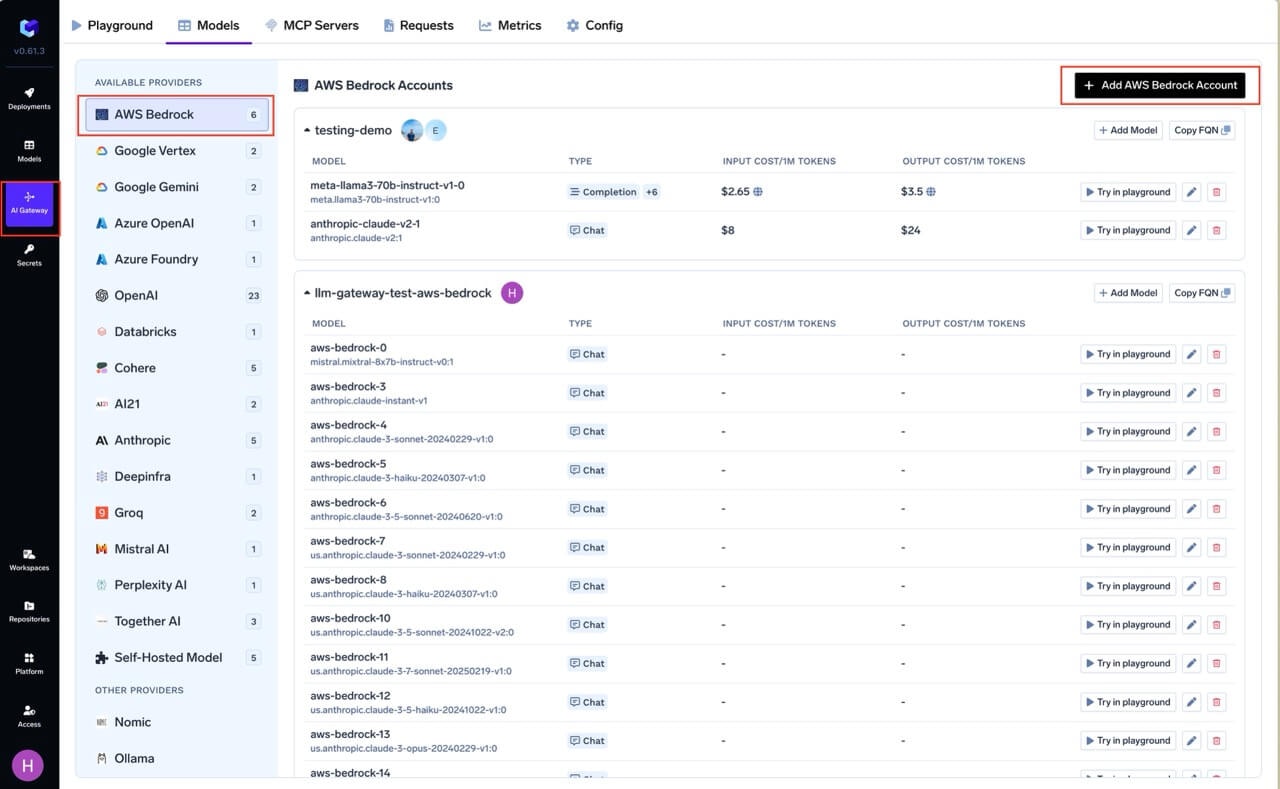 Give a unique name for the bedrock account which will be used to refer later in the models. The models in the account will be referred to as `@providername/@modelname`. Add collaborators to your account. You can decide which users/teams have access to the models in the account (**User Role**) and who can add/edit/remove models in this account (**Manager Role**). You can read more about access control [here](/docs/ai-gateway/gateway-access-control).
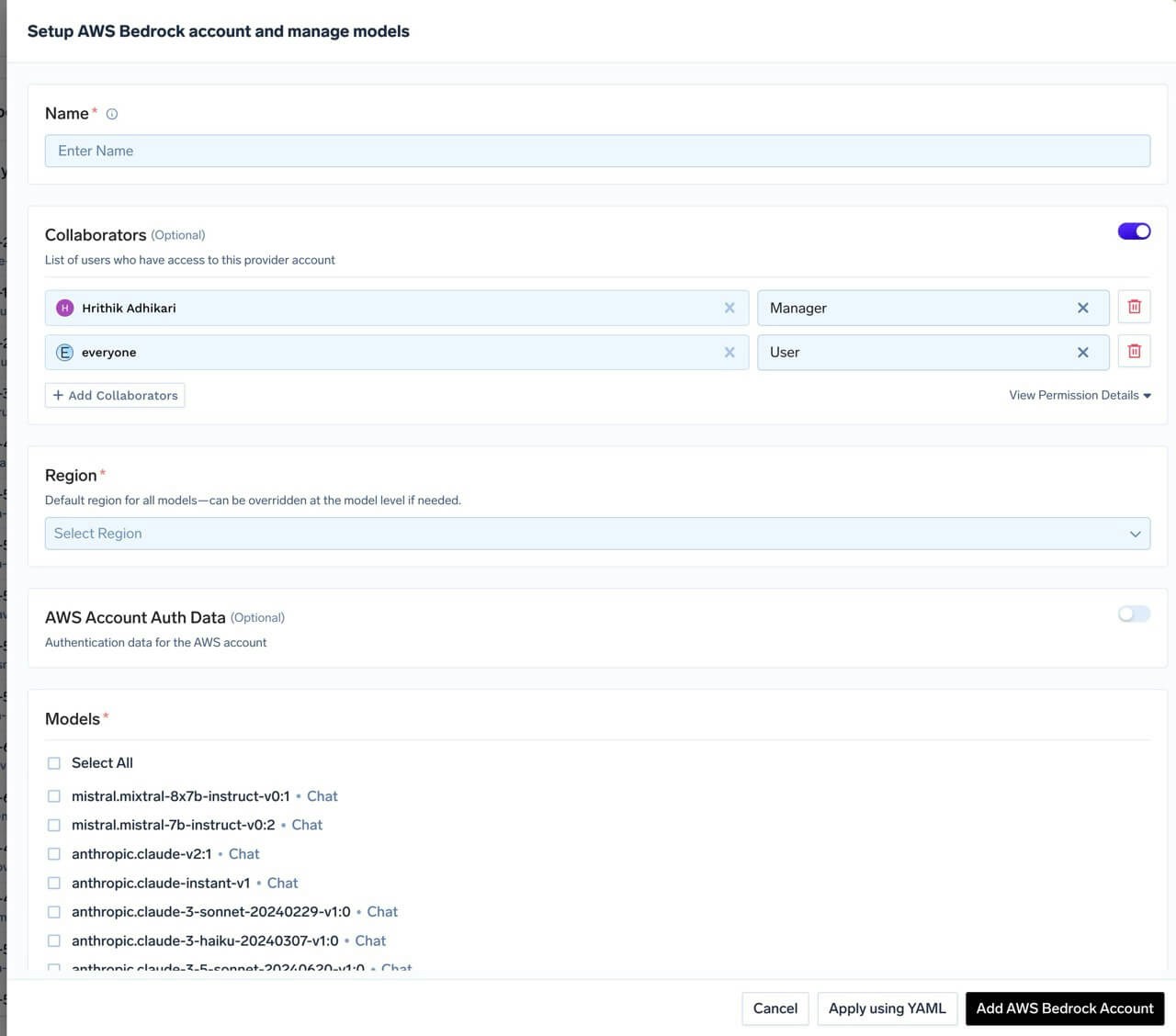 Select the default AWS region for the models in this account. **The account-level region serves as the default for all models unless explicitly overridden at the model level.** Provide the authentication details on how the gateway can access the Bedrock models. Truefoundry supports AWS Access Key/Secret Key, Assume Role, and API Key based authentication. You can read below on how to generate the access/secret keys, roles, or API keys.
**Required IAM Policy**
First, create the IAM policy that grants permission to invoke Bedrock models. This policy can be attached to an IAM user (for access key or API key authentication) or an IAM role (for assumed role authentication).
The following policy grants permission to invoke any foundation model and resolve inference profiles in your available regions (To check the list of available regions for different models, refer to [AWS Bedrock](https://docs.aws.amazon.com/bedrock/latest/userguide/inference-profiles-support.html)):
`bedrock:GetInferenceProfile` is required when invoking models through an inference profile (system-defined or custom). The gateway uses it to resolve the profile to its underlying foundation model.
```json JSON lines theme={"dark"}
{
"Version": "2012-10-17",
"Statement": [
{
"Effect": "Allow",
"Sid": "InvokeAllModels",
"Action": [
"bedrock:InvokeModel",
"bedrock:InvokeModelWithResponseStream"
],
"Resource": [
"arn:aws:bedrock:*::foundation-model/*",
"arn:aws:bedrock:*::inference-profile/*",
"arn:aws:bedrock:*::application-inference-profile/*"
]
},
{
"Effect": "Allow",
"Sid": "ResolveInferenceProfiles",
"Action": ["bedrock:GetInferenceProfile"],
"Resource": [
"arn:aws:bedrock:*::inference-profile/*",
"arn:aws:bedrock:*::application-inference-profile/*"
]
}
]
}
```
**Using AWS Access Key and Secret**
1. Create an IAM user (or choose an existing IAM user) following [these steps](https://docs.aws.amazon.com/IAM/latest/UserGuide/id_users_create.html).
2. Attach the IAM policy created above to this user.
3. Create an access key for this user [as per this doc](https://docs.aws.amazon.com/IAM/latest/UserGuide/access-keys-admin-managed.html#admin-create-access-key).
4. Use this access key and secret while adding the provider account to authenticate requests to the Bedrock model.
**Using Assumed Role**
The gateway role assumes your role, which in turn accesses Bedrock models.
1. Create an IAM role in your AWS account that has access to Bedrock. Attach the IAM policy with Bedrock permissions (shown above) to this role.
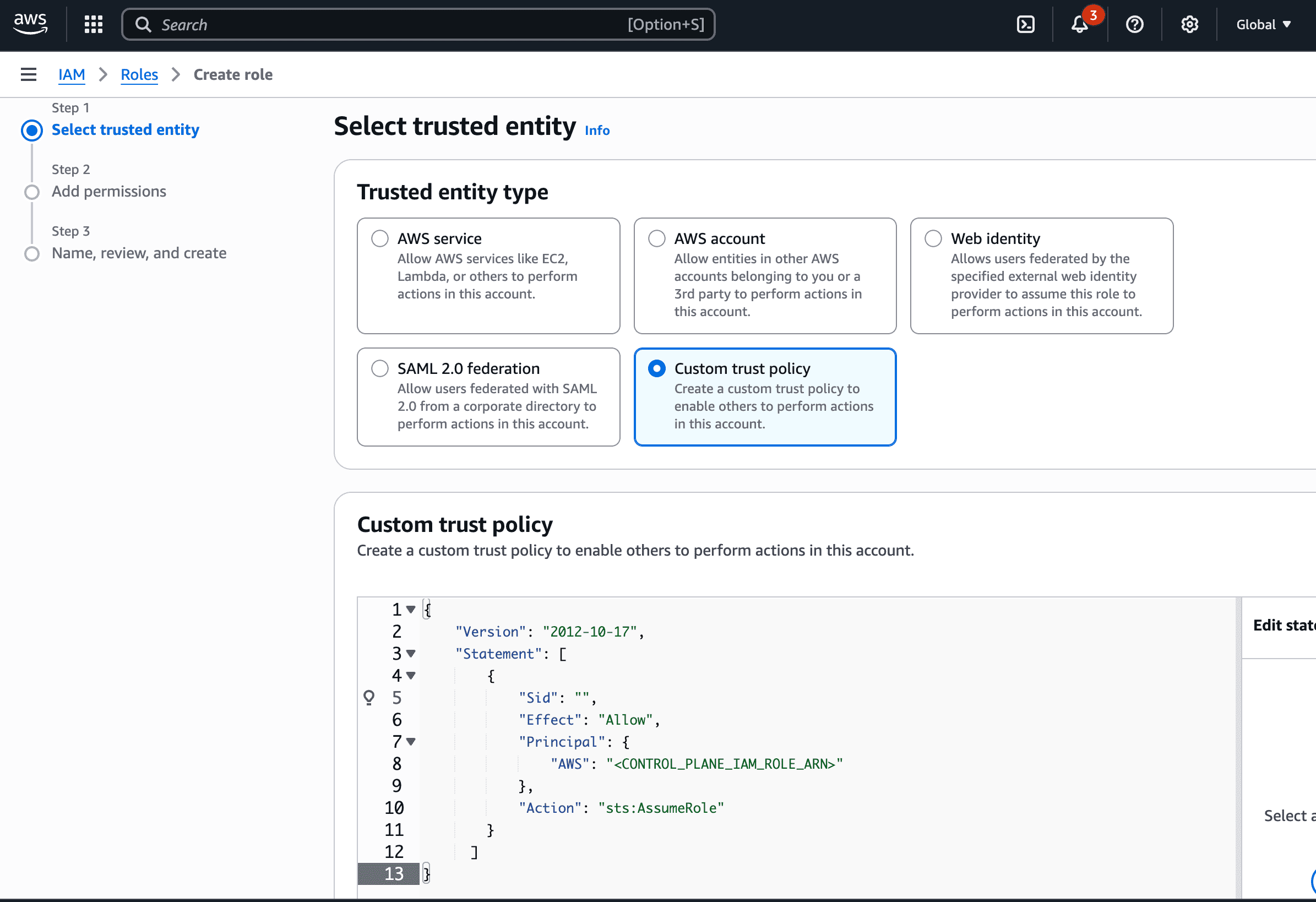
2. Configure the trust policy for this role to allow the gateway role to assume it. Use the appropriate role ARN based on your deployment:
**For SAAS deployments:**
* Gateway role ARN: `arn:aws:iam::416964291864:role/tfy-ctl-production-ai-gateway-deps`
**For on-prem deployments:**
* Your gateway role ARN will look like: `arn:aws:iam:::role/-truefoundry-deps`
Select the default AWS region for the models in this account. **The account-level region serves as the default for all models unless explicitly overridden at the model level.** Provide the authentication details on how the gateway can access the Bedrock models. Truefoundry supports AWS Access Key/Secret Key, Assume Role, and API Key based authentication. You can read below on how to generate the access/secret keys, roles, or API keys.
**Required IAM Policy**
First, create the IAM policy that grants permission to invoke Bedrock models. This policy can be attached to an IAM user (for access key or API key authentication) or an IAM role (for assumed role authentication).
The following policy grants permission to invoke any foundation model and resolve inference profiles in your available regions (To check the list of available regions for different models, refer to [AWS Bedrock](https://docs.aws.amazon.com/bedrock/latest/userguide/inference-profiles-support.html)):
`bedrock:GetInferenceProfile` is required when invoking models through an inference profile (system-defined or custom). The gateway uses it to resolve the profile to its underlying foundation model.
```json JSON lines theme={"dark"}
{
"Version": "2012-10-17",
"Statement": [
{
"Effect": "Allow",
"Sid": "InvokeAllModels",
"Action": [
"bedrock:InvokeModel",
"bedrock:InvokeModelWithResponseStream"
],
"Resource": [
"arn:aws:bedrock:*::foundation-model/*",
"arn:aws:bedrock:*::inference-profile/*",
"arn:aws:bedrock:*::application-inference-profile/*"
]
},
{
"Effect": "Allow",
"Sid": "ResolveInferenceProfiles",
"Action": ["bedrock:GetInferenceProfile"],
"Resource": [
"arn:aws:bedrock:*::inference-profile/*",
"arn:aws:bedrock:*::application-inference-profile/*"
]
}
]
}
```
**Using AWS Access Key and Secret**
1. Create an IAM user (or choose an existing IAM user) following [these steps](https://docs.aws.amazon.com/IAM/latest/UserGuide/id_users_create.html).
2. Attach the IAM policy created above to this user.
3. Create an access key for this user [as per this doc](https://docs.aws.amazon.com/IAM/latest/UserGuide/access-keys-admin-managed.html#admin-create-access-key).
4. Use this access key and secret while adding the provider account to authenticate requests to the Bedrock model.
**Using Assumed Role**
The gateway role assumes your role, which in turn accesses Bedrock models.
1. Create an IAM role in your AWS account that has access to Bedrock. Attach the IAM policy with Bedrock permissions (shown above) to this role.
2. Configure the trust policy for this role to allow the gateway role to assume it. Use the appropriate role ARN based on your deployment:
**For SAAS deployments:**
* Gateway role ARN: `arn:aws:iam::416964291864:role/tfy-ctl-production-ai-gateway-deps`
**For on-prem deployments:**
* Your gateway role ARN will look like: `arn:aws:iam:::role/-truefoundry-deps`
 ```json theme={"dark"}
{
"Version": "2012-10-17",
"Statement": [
{
"Sid": "Statement1",
"Effect": "Allow",
"Principal": {
// for SAAS deployments:
"AWS": "arn:aws:iam::416964291864:role/tfy-ctl-production-ai-gateway-deps"
// or for on-prem deployments:
// "AWS": "arn:aws:iam:::role/-truefoundry-deps"
},
"Action": "sts:AssumeRole",
// (Optional) For additional security use external ID.
"Condition": {
"StringEquals": {
"sts:ExternalId": "your-external-id"
}
}
}
]
}
```
Replace the Principal AWS ARN in the trust policy with the appropriate gateway role ARN based on your deployment type (SAAS or on-prem).
You can optionally configure an external ID in the trust policy (as shown in the example above) for additional security. If you use an external ID, make sure to provide the same external ID when creating the Bedrock model integration in TrueFoundry.
3. Read more about how assumed roles work [here](https://docs.aws.amazon.com/STS/latest/APIReference/API_AssumeRole.html).
**Using AWS Bedrock API Key**
AWS Bedrock API keys provide a simpler authentication method using Bearer token authentication. This method is ideal for exploration and development use cases.
1. Navigate to the AWS Management Console and open the Amazon Bedrock console at [https://console.aws.amazon.com/bedrock](https://console.aws.amazon.com/bedrock).
2. In the left navigation pane, select **API keys**.
3. Choose **Generate long-term API keys** in the **Long-term API keys** tab.
4. In the **API key expiration** section, choose a time after which the key will expire.
5. Choose **Generate** and copy the API key value.
6. Use this API key while adding the provider account to authenticate requests to the Bedrock model.
```json Provider Account Configuration lines theme={"dark"}
{
"type": "provider-account/aws-bedrock",
"name": "my-aws-bedrock-account",
"region": "us-east-1",
"auth_data": {
"type": "api-key",
"api_key": "your-bedrock-api-key"
}
}
```
For more information on generating API keys, see the [AWS Bedrock API key generation documentation](https://docs.aws.amazon.com/bedrock/latest/userguide/api-keys-generate.html). For details on required permissions, refer to the [IAM credentials for Bedrock documentation](https://docs.aws.amazon.com/IAM/latest/UserGuide/id_credentials_bedrock.html).
Select the models from the list that you want to add. You can use `Select All` to select all the models.
If the model you are looking for is not present in the options, you can add it using `+ Add Model` at the end of list.
TrueFoundry AI Gateway supports all text and image models in Bedrock.The complete list of models supported by Bedrock can be found [here](https://docs.aws.amazon.com/bedrock/latest/userguide/models-supported.html#model-ids-arns).
### Inference
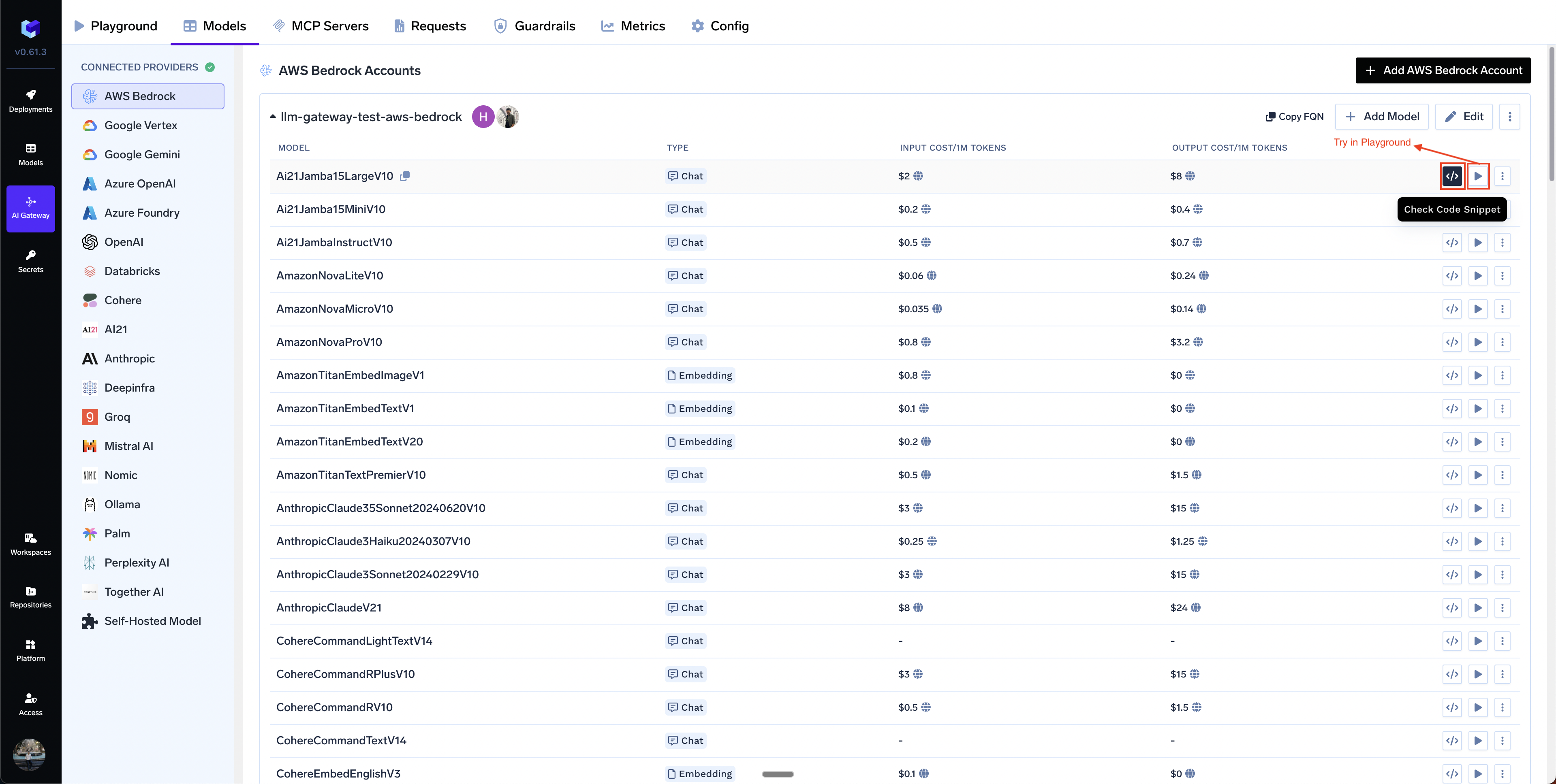
After adding the models, you can perform inference using an OpenAI-compatible API via the Playground or integrate with your own application.
```json theme={"dark"}
{
"Version": "2012-10-17",
"Statement": [
{
"Sid": "Statement1",
"Effect": "Allow",
"Principal": {
// for SAAS deployments:
"AWS": "arn:aws:iam::416964291864:role/tfy-ctl-production-ai-gateway-deps"
// or for on-prem deployments:
// "AWS": "arn:aws:iam:::role/-truefoundry-deps"
},
"Action": "sts:AssumeRole",
// (Optional) For additional security use external ID.
"Condition": {
"StringEquals": {
"sts:ExternalId": "your-external-id"
}
}
}
]
}
```
Replace the Principal AWS ARN in the trust policy with the appropriate gateway role ARN based on your deployment type (SAAS or on-prem).
You can optionally configure an external ID in the trust policy (as shown in the example above) for additional security. If you use an external ID, make sure to provide the same external ID when creating the Bedrock model integration in TrueFoundry.
3. Read more about how assumed roles work [here](https://docs.aws.amazon.com/STS/latest/APIReference/API_AssumeRole.html).
**Using AWS Bedrock API Key**
AWS Bedrock API keys provide a simpler authentication method using Bearer token authentication. This method is ideal for exploration and development use cases.
1. Navigate to the AWS Management Console and open the Amazon Bedrock console at [https://console.aws.amazon.com/bedrock](https://console.aws.amazon.com/bedrock).
2. In the left navigation pane, select **API keys**.
3. Choose **Generate long-term API keys** in the **Long-term API keys** tab.
4. In the **API key expiration** section, choose a time after which the key will expire.
5. Choose **Generate** and copy the API key value.
6. Use this API key while adding the provider account to authenticate requests to the Bedrock model.
```json Provider Account Configuration lines theme={"dark"}
{
"type": "provider-account/aws-bedrock",
"name": "my-aws-bedrock-account",
"region": "us-east-1",
"auth_data": {
"type": "api-key",
"api_key": "your-bedrock-api-key"
}
}
```
For more information on generating API keys, see the [AWS Bedrock API key generation documentation](https://docs.aws.amazon.com/bedrock/latest/userguide/api-keys-generate.html). For details on required permissions, refer to the [IAM credentials for Bedrock documentation](https://docs.aws.amazon.com/IAM/latest/UserGuide/id_credentials_bedrock.html).
Select the models from the list that you want to add. You can use `Select All` to select all the models.
If the model you are looking for is not present in the options, you can add it using `+ Add Model` at the end of list.
TrueFoundry AI Gateway supports all text and image models in Bedrock.The complete list of models supported by Bedrock can be found [here](https://docs.aws.amazon.com/bedrock/latest/userguide/models-supported.html#model-ids-arns).
### Inference
After adding the models, you can perform inference using an OpenAI-compatible API via the Playground or integrate with your own application.
 ### Supported APIs
Once your Bedrock provider account is configured, the following API surfaces are available through the gateway. The table below summarizes each endpoint alongside platform feature support (tracing, cost tracking).
Legend:
* **✅** Supported by Provider and Truefoundry
* Supported by Provider, but not by Truefoundry
* Provider does not support this feature
| API | Endpoint | Tracing | Cost Tracking |
| ------------------------------------- | --------------------- | ------- | ----------------------------------------------------------- |
| [Chat Completions](#chat-completions) | `/chat/completions` | **✅** | **✅** |
| [Embeddings](#embeddings) | `/embeddings` | **✅** | **✅** |
| [Image Generation](#image-generation) | `/images/generations` | **✅** | |
| [Image Edit](#image-edit) | `/images/edits` | **✅** | |
| [Batch API](#batch-api) | `/batches` | **✅** | |
| [Files API](#files-api) | `/files` | **✅** | |
**Not supported for Bedrock:** Messages API (Anthropic-only), Responses API, Text-to-Speech, Speech-to-Text, Audio Translation, Moderation, Fine-tuning, Image Variation, and Realtime API. Bedrock has no upstream
for these surfaces. See the [OpenAI](/docs/ai-gateway/openai) and [Anthropic](/docs/ai-gateway/anthropic) provider docs if you need them.
Bedrock's chat completions endpoint is the most widely used — it supports streaming, tools, multimodal input (images, PDF), structured JSON outputs, prompt caching, extended
thinking, and multi-family model swapping. The gateway translates OpenAI-compatible requests into Bedrock's native Converse or InvokeModel API based on the model family.
Full provider capability matrix: [Chat Completions API](/docs/ai-gateway/chat-completions-overview).
```python Python lines theme={"dark"}
import os
from openai import OpenAI
client = OpenAI(
api_key="your-truefoundry-api-key",
base_url="{GATEWAY_BASE_URL}",
)
response = client.chat.completions.create(
model="tfy-ai-bedrock/global-anthropic-claude-sonnet-4-5-20250929-v1-0",
messages=[
{"role": "user", "content": "What is TrueFoundry in one line?"},
],
)
print(response.choices[0].message.content)
```
Set `stream=True` and iterate over delta chunks. Defensively check that `chunk.choices` is non-empty and `delta.content` is not `None`.
```python Python lines theme={"dark"}
stream = client.chat.completions.create(
model="tfy-ai-bedrock/global-anthropic-claude-sonnet-4-5-20250929-v1-0",
messages=[{"role": "user", "content": "Count from 1 to 5."}],
stream=True,
)
for chunk in stream:
if (
chunk.choices
and len(chunk.choices) > 0
and chunk.choices[0].delta.content is not None
):
print(chunk.choices[0].delta.content, end="", flush=True)
```
Advertise a tool, hand the model's `tool_calls` back as a `tool` role message, then request the final response.
Every request with `toolUse` or `toolResult` blocks in the message history must include `tools=...` — not just the initial call. OpenAI tolerates its absence on follow-ups;
Bedrock's Converse API rejects with `toolConfig field must be defined when using toolUse and toolResult content blocks`.
```python Python lines theme={"dark"}
import json
tools = [{
"type": "function",
"function": {
"name": "get_weather",
"description": "Get the current weather for a city.",
"parameters": {
"type": "object",
"properties": {"city": {"type": "string"}},
"required": ["city"],
},
},
}]
messages = [{"role": "user", "content": "Weather in Bengaluru?"}]
first = client.chat.completions.create(
model="tfy-ai-bedrock/global-anthropic-claude-sonnet-4-5-20250929-v1-0",
messages=messages,
tools=tools,
tool_choice={"type": "function", "function": {"name": "get_weather"}},
)
assistant_msg = first.choices[0].message
tool_calls = assistant_msg.tool_calls or []
if tool_calls:
tool_call = tool_calls[0]
messages.append(assistant_msg)
messages.append({
"role": "tool",
"tool_call_id": tool_call.id,
"content": json.dumps({"city": "Bengaluru", "temp_c": 28}),
})
# Note: tools=tools required on the follow-up too
second = client.chat.completions.create(
model="tfy-ai-bedrock/global-anthropic-claude-sonnet-4-5-20250929-v1-0",
messages=messages,
tools=tools,
)
print(second.choices[0].message.content)
```
Claude 3+, Nova, and Llama Vision models on Bedrock support image inputs via the `image_url` content part.
```python Python lines theme={"dark"}
import base64
from io import BytesIO
from PIL import Image as PILImage, ImageDraw
img = PILImage.new("RGB", (256, 256), (30, 144, 255))
draw = ImageDraw.Draw(img)
draw.ellipse((48, 48, 208, 208), fill=(255, 215, 0))
draw.rectangle((96, 96, 160, 160), fill=(220, 20, 60))
buf = BytesIO()
img.save(buf, format="PNG")
data_uri = f"data:image/png;base64,{base64.b64encode(buf.getvalue()).decode('ascii')}"
response = client.chat.completions.create(
model="tfy-ai-bedrock/global-anthropic-claude-sonnet-4-5-20250929-v1-0",
messages=[{
"role": "user",
"content": [
{"type": "text", "text": "Describe this image in one sentence."},
{"type": "image_url", "image_url": {"url": data_uri}},
],
}],
)
print(response.choices[0].message.content)
```
Claude models on Bedrock support PDF documents via the `file` content type with base64 encoding.
```python Python lines theme={"dark"}
import base64
with open("sample.pdf", "rb") as f:
pdf_b64 = base64.b64encode(f.read()).decode("ascii")
response = client.chat.completions.create(
model="tfy-ai-bedrock/global-anthropic-claude-sonnet-4-5-20250929-v1-0",
messages=[{
"role": "user",
"content": [
{"type": "text", "text": "What text is in this PDF?"},
{
"type": "file",
"file": {
"filename": "sample.pdf",
"file_data": f"data:application/pdf;base64,{pdf_b64}",
},
},
],
}],
)
print(response.choices[0].message.content)
```
Bedrock has no native JSON schema mode — the gateway converts your schema into a required tool call and extracts the result into `message.content`.
Works across all Bedrock model families.
Anthropic-via-Bedrock inherits direct-Anthropic's constraint rejection: `ge`, `le`, `minimum`, `maximum` must be stripped from Pydantic-generated schemas.
```python Python lines theme={"dark"}
import json
schema = {
"name": "person",
"schema": {
"type": "object",
"properties": {
"name": {"type": "string"},
"age": {"type": "integer"},
"hobbies": {"type": "array", "items": {"type": "string"}},
},
"required": ["name", "age", "hobbies"],
"additionalProperties": False,
},
"strict": True,
}
response = client.chat.completions.create(
model="tfy-ai-bedrock/global-anthropic-claude-sonnet-4-5-20250929-v1-0",
messages=[{"role": "user", "content": "Invent a fictional person with name, age, and three hobbies."}],
response_format={"type": "json_schema", "json_schema": schema},
)
message = response.choices[0].message
if getattr(message, "refusal", None):
print("model refused:", message.refusal)
elif message.content:
print(json.dumps(json.loads(message.content), indent=2))
```
For Claude-via-Bedrock, the gateway translates `cache_control` hints into Bedrock's native `cachePoint` format.
Minimum cacheable prefix varies by model: **1024 tokens** for Sonnet 4 and earlier, **2048** for Haiku 3.5/3, **4096** for Claude 4.5+ and Opus 4.5+.
Titan models don't support `cache_control` on tool definitions (the gateway skips them automatically).
```python Python lines theme={"dark"}
response = client.chat.completions.create(
model="tfy-ai-bedrock/global-anthropic-claude-sonnet-4-5-20250929-v1-0",
messages=[
{
"role": "system",
"content": [
{
"type": "text",
"text": "",
"cache_control": {"type": "ephemeral"},
},
],
},
{"role": "user", "content": "What is a Kubernetes pod?"},
],
)
print(response.choices[0].message.content)
print("usage:", response.usage)
```
Claude 3.7+, Claude 4, and Claude 4.5 series models on Bedrock support extended thinking. Use `reasoning_effort` — the gateway translates it into Bedrock's native `thinking` parameter at ratios (none=0%,
low=30%, medium=60%, high=90% of `max_tokens`). Bedrock requires a minimum `budget_tokens` of 1024.
```python Python lines theme={"dark"}
response = client.chat.completions.create(
model="tfy-ai-bedrock/global-anthropic-claude-sonnet-4-5-20250929-v1-0",
messages=[{"role": "user", "content": "A bat and ball cost $1.10. The bat costs $1.00 more than the ball. How much is the ball?"}],
reasoning_effort="high",
max_tokens=8000,
)
msg = response.choices[0].message
print("answer:", msg.content)
print("reasoning:", getattr(msg, "reasoning_content", None))
# thinking_blocks carry signatures for multi-turn continuity
for block in getattr(msg, "thinking_blocks", []) or []:
print(" block:", block.get("type"), "signature:", block.get("signature", "")[:30])
```
Always echo `thinking_blocks` exactly as returned when continuing a conversation. Blocks with missing or modified `signature` fields are rejected by Anthropic/Bedrock.
Bedrock exposes embedding models from Amazon (Titan) and Cohere. All use the same OpenAI-compatible `/embeddings` endpoint.
Full docs: [Embed API](/docs/ai-gateway/embed).
```python Python lines theme={"dark"}
response = client.embeddings.create(
model="tfy-ai-bedrock/amazon-titan-embed-text-v2-0",
input=[
"TrueFoundry is an AI platform.",
"TrueFoundry helps teams deploy LLMs.",
],
)
print(len(response.data), "vectors of dim", len(response.data[0].embedding))
```
Supported embedding models: `amazon.titan-embed-text-v1`, `amazon.titan-embed-text-v2:0`, `cohere.embed-english-v3`, `cohere.embed-multilingual-v3`.
Bedrock exposes Amazon Nova Canvas, Amazon Titan Image Generator (v1/v2), and Stability AI text-to-image models through `/images/generations`.
Full docs: [Image Generation](/docs/ai-gateway/image-generation).
```python Python lines theme={"dark"}
import base64
response = client.images.generate(
model="tfy-ai-bedrock/amazon-nova-canvas-v1-0",
prompt="A minimalist isometric illustration of a cloud with a lightning bolt, flat colors.",
size="1024x1024",
n=1,
)
item = response.data[0]
if getattr(item, "b64_json", None):
image_bytes = base64.b64decode(item.b64_json)
else:
import requests
image_bytes = requests.get(item.url, timeout=60).content
with open("generated.png", "wb") as f:
f.write(image_bytes)
```
Supported text-to-image models: `amazon.nova-canvas-v1:0`, `amazon.titan-image-generator-v1`, `amazon.titan-image-generator-v2:0` + Stability AI models
**Stability Image Services** (inpaint, outpaint, search-replace, recolor, remove-background, style-guide, style-transfer, upscale, control-structure, control-sketch) are **not** text-to-image — they
require an input image and won't work with `client.images.generate()`. Use them with `client.images.edit()` or specialized endpoints.
Only **Amazon Nova Canvas** supports `client.images.edit` on Bedrock. Titan v2 supports inpaint/outpaint via its own tool-specific model IDs.
```python Python lines theme={"dark"}
with open("generated.png", "rb") as image_file:
response = client.images.edit(
model="tfy-ai-bedrock/amazon-nova-canvas-v1-0",
image=image_file,
prompt="Add a bright yellow sun in the top-right corner.",
size="1024x1024",
n=1,
)
item = response.data[0]
if getattr(item, "b64_json", None):
image_bytes = base64.b64decode(item.b64_json)
else:
import requests
image_bytes = requests.get(item.url, timeout=60).content
with open("generated.png", "wb") as f:
f.write(image_bytes)
```
Bedrock batch is **S3-backed** — the gateway uploads JSONL to an S3 bucket configured on your provider account, creates a Bedrock `ModelInvocationJob`, and serves aggregated results via a gateway REST endpoint.
Full docs:[Batch Predictions](/docs/ai-gateway/batch-predictions-with-truefoundry-llm-gateway).
**Bedrock batch prerequisites:**
* **S3 bucket** — must be in the same region as your Bedrock provider account
* **IAM execution role** — with S3 R/W + `bedrock:InvokeModel`
* **`iam:PassRole`** on the execution role, granted to the principal that invokes the batch API
* **100 records minimum per batch** (AWS-enforced; the gateway does not relax this)
### Workflow Steps
The batch process follows these steps for all providers:
1. **Upload**: Upload JSONL file → Get file ID
2. **Create**: Create batch job → Get batch ID
3. **Monitor**: Check status until complete
4. **Fetch**: Download results
#### Step-by-Step Examples
Client setup with batch-specific headers
```python Python lines theme={"dark"}
from openai import OpenAI
batch_client = OpenAI(
api_key="your-truefoundry-api-key",
base_url="{GATEWAY_BASE_URL}",
default_headers={
"x-tfy-provider-name": "tfy-ai-bedrock",
"x-tfy-aws-s3-bucket": "your-s3-bucket-name",
"x-tfy-aws-bedrock-model": "anthropic.claude-3-haiku-20240307-v1:0", # bare AWS ID
},
)
```
Build and upload the input JSONL
```python Python lines theme={"dark"}
import json, uuid
batch_requests = [
{
"custom_id": f"req-{i}",
"method": "POST",
"url": "/v1/chat/completions",
"body": {
"model": "anthropic.claude-3-haiku-20240307-v1:0",
"messages": [{"role": "user", "content": f"Say hello in prompt {i}."}],
"max_tokens": 50,
},
}
for i in range(100)
]
with open("batch_input.jsonl", "w") as f:
for req in batch_requests:
f.write(json.dumps(req) + "\n")
with open("batch_input.jsonl", "rb") as f:
uploaded = batch_client.files.create(file=f, purpose="batch")
print(uploaded.id) # Example: s3://bucket/uuid.jsonl
```
OpenAI's SDK doesn't expose Bedrock-specific fields on `batches.create`, so inject them via `extra_body`.
```python Python lines theme={"dark"}
batch = batch_client.batches.create(
input_file_id=uploaded.id,
endpoint="/v1/chat/completions",
completion_window="24h",
extra_body={
"model": "tfy-ai-bedrock/anthropic-claude-3-haiku-20240307-v1-0", # TF-prefixed
"role_arn": "arn:aws:iam:::role/BedrockBatchExecutionRole",
"job_name": f"bedrock-batch-{uuid.uuid4().hex[:8]}", # MUST be unique per run
},
)
print(batch.id) # Example: arn:aws:bedrock:us-east-1:ACCOUNT:model-invocation-job/JOB_ID
```
`job_name` must be unique per submission — AWS rejects duplicate in-flight names. Always suffix with a UUID or timestamp.
Poll the batch status until complete. The gateway returns `batch.id` **URL-encoded**. Decode once before subsequent `retrieve()` calls or the SDK double-encodes and Bedrock rejects the ARN.
```python Python lines theme={"dark"}
import time
from urllib.parse import unquote
TERMINAL = {"completed", "failed", "expired", "cancelled"}
batch_id = unquote(batch.id)
while batch.status not in TERMINAL:
time.sleep(30)
batch = batch_client.batches.retrieve(batch_id)
print("status:", batch.status)
print("final:", batch.status, "output_file_id:", batch.output_file_id)
```
Bedrock writes outputs across **multiple files** in S3, so `files.content(output_file_id)` doesn't work.
Use the gateway's Bedrock-specific `GET /batches/{id}/output` endpoint to fetch aggregated results.
```python Python lines theme={"dark"}
import requests
if batch.status == "completed":
response = requests.get(
f"{{GATEWAY_BASE_URL}}/batches/{batch.id}/output",
headers={
"Authorization": f"Bearer {your-truefoundry-api-key}",
"x-tfy-provider-name": "tfy-ai-bedrock",
},
timeout=60,
)
response.raise_for_status()
for row in response.json()[:5]:
print(row.get("recordId"), ":", row.get("modelOutput"))
```
**Gateway behaviour to be aware of:**
* `batch.id` and `output_file_id` come back **URL-encoded**; decode with `unquote()` before reuse.
* `batches.create` returns a **sparse `Batch`** with `status=None` and most fields empty. Call `batches.retrieve()` to get real state.
* `output_file_id` is a **bucket prefix**, not a file. Use `GET /batches/{id}/output` instead of `files.content()`.
Bedrock's Files API uses an **S3 backend**. Upload and retrieve work; **list and delete are not supported** because the S3 backend doesn't expose those operations through the gateway.
Full docs: [Files API](/docs/ai-gateway/file-endpoints).
```python Python lines theme={"dark"}
import json
files_client = OpenAI(
api_key="your-truefoundry-api-key",
base_url="{GATEWAY_BASE_URL}",
default_headers={"x-tfy-provider-name": "tfy-ai-bedrock"},
)
# Bedrock only accepts purpose="batch" and validates content as batch-style JSONL
test_file = "files_api_test.jsonl"
with open(test_file, "w") as f:
f.write(json.dumps({
"custom_id": "demo",
"method": "POST",
"url": "/v1/chat/completions",
"body": {
"model": "anthropic.claude-3-haiku-20240307-v1:0",
"messages": [{"role": "user", "content": "hi"}],
"max_tokens": 5,
},
}) + "\n")
# Upload (returns s3://... URL as id)
with open(test_file, "rb") as f:
uploaded = files_client.files.create(file=f, purpose="batch")
print(uploaded.id)
# Retrieve metadata
meta = files_client.files.retrieve(uploaded.id)
# Retrieve content
content = files_client.files.content(uploaded.id).read()
```
`files.list()` and `files.delete()` will error on Bedrock — the S3 backend doesn't expose them. Plan lifecycle management via S3 bucket policies and lifecycle rules instead of through the gateway.
Bedrock's Files API only accepts `purpose="batch"` and validates the file content as batch-style JSONL. Uploading plain text or a non-conforming JSONL will fail validation.
### FAQ:
In case you have custom pricing for your models, you can override the default cost by clicking on Edit Model button and then choosing the `Private Cost Metric` option.
### Supported APIs
Once your Bedrock provider account is configured, the following API surfaces are available through the gateway. The table below summarizes each endpoint alongside platform feature support (tracing, cost tracking).
Legend:
* **✅** Supported by Provider and Truefoundry
* Supported by Provider, but not by Truefoundry
* Provider does not support this feature
| API | Endpoint | Tracing | Cost Tracking |
| ------------------------------------- | --------------------- | ------- | ----------------------------------------------------------- |
| [Chat Completions](#chat-completions) | `/chat/completions` | **✅** | **✅** |
| [Embeddings](#embeddings) | `/embeddings` | **✅** | **✅** |
| [Image Generation](#image-generation) | `/images/generations` | **✅** | |
| [Image Edit](#image-edit) | `/images/edits` | **✅** | |
| [Batch API](#batch-api) | `/batches` | **✅** | |
| [Files API](#files-api) | `/files` | **✅** | |
**Not supported for Bedrock:** Messages API (Anthropic-only), Responses API, Text-to-Speech, Speech-to-Text, Audio Translation, Moderation, Fine-tuning, Image Variation, and Realtime API. Bedrock has no upstream
for these surfaces. See the [OpenAI](/docs/ai-gateway/openai) and [Anthropic](/docs/ai-gateway/anthropic) provider docs if you need them.
Bedrock's chat completions endpoint is the most widely used — it supports streaming, tools, multimodal input (images, PDF), structured JSON outputs, prompt caching, extended
thinking, and multi-family model swapping. The gateway translates OpenAI-compatible requests into Bedrock's native Converse or InvokeModel API based on the model family.
Full provider capability matrix: [Chat Completions API](/docs/ai-gateway/chat-completions-overview).
```python Python lines theme={"dark"}
import os
from openai import OpenAI
client = OpenAI(
api_key="your-truefoundry-api-key",
base_url="{GATEWAY_BASE_URL}",
)
response = client.chat.completions.create(
model="tfy-ai-bedrock/global-anthropic-claude-sonnet-4-5-20250929-v1-0",
messages=[
{"role": "user", "content": "What is TrueFoundry in one line?"},
],
)
print(response.choices[0].message.content)
```
Set `stream=True` and iterate over delta chunks. Defensively check that `chunk.choices` is non-empty and `delta.content` is not `None`.
```python Python lines theme={"dark"}
stream = client.chat.completions.create(
model="tfy-ai-bedrock/global-anthropic-claude-sonnet-4-5-20250929-v1-0",
messages=[{"role": "user", "content": "Count from 1 to 5."}],
stream=True,
)
for chunk in stream:
if (
chunk.choices
and len(chunk.choices) > 0
and chunk.choices[0].delta.content is not None
):
print(chunk.choices[0].delta.content, end="", flush=True)
```
Advertise a tool, hand the model's `tool_calls` back as a `tool` role message, then request the final response.
Every request with `toolUse` or `toolResult` blocks in the message history must include `tools=...` — not just the initial call. OpenAI tolerates its absence on follow-ups;
Bedrock's Converse API rejects with `toolConfig field must be defined when using toolUse and toolResult content blocks`.
```python Python lines theme={"dark"}
import json
tools = [{
"type": "function",
"function": {
"name": "get_weather",
"description": "Get the current weather for a city.",
"parameters": {
"type": "object",
"properties": {"city": {"type": "string"}},
"required": ["city"],
},
},
}]
messages = [{"role": "user", "content": "Weather in Bengaluru?"}]
first = client.chat.completions.create(
model="tfy-ai-bedrock/global-anthropic-claude-sonnet-4-5-20250929-v1-0",
messages=messages,
tools=tools,
tool_choice={"type": "function", "function": {"name": "get_weather"}},
)
assistant_msg = first.choices[0].message
tool_calls = assistant_msg.tool_calls or []
if tool_calls:
tool_call = tool_calls[0]
messages.append(assistant_msg)
messages.append({
"role": "tool",
"tool_call_id": tool_call.id,
"content": json.dumps({"city": "Bengaluru", "temp_c": 28}),
})
# Note: tools=tools required on the follow-up too
second = client.chat.completions.create(
model="tfy-ai-bedrock/global-anthropic-claude-sonnet-4-5-20250929-v1-0",
messages=messages,
tools=tools,
)
print(second.choices[0].message.content)
```
Claude 3+, Nova, and Llama Vision models on Bedrock support image inputs via the `image_url` content part.
```python Python lines theme={"dark"}
import base64
from io import BytesIO
from PIL import Image as PILImage, ImageDraw
img = PILImage.new("RGB", (256, 256), (30, 144, 255))
draw = ImageDraw.Draw(img)
draw.ellipse((48, 48, 208, 208), fill=(255, 215, 0))
draw.rectangle((96, 96, 160, 160), fill=(220, 20, 60))
buf = BytesIO()
img.save(buf, format="PNG")
data_uri = f"data:image/png;base64,{base64.b64encode(buf.getvalue()).decode('ascii')}"
response = client.chat.completions.create(
model="tfy-ai-bedrock/global-anthropic-claude-sonnet-4-5-20250929-v1-0",
messages=[{
"role": "user",
"content": [
{"type": "text", "text": "Describe this image in one sentence."},
{"type": "image_url", "image_url": {"url": data_uri}},
],
}],
)
print(response.choices[0].message.content)
```
Claude models on Bedrock support PDF documents via the `file` content type with base64 encoding.
```python Python lines theme={"dark"}
import base64
with open("sample.pdf", "rb") as f:
pdf_b64 = base64.b64encode(f.read()).decode("ascii")
response = client.chat.completions.create(
model="tfy-ai-bedrock/global-anthropic-claude-sonnet-4-5-20250929-v1-0",
messages=[{
"role": "user",
"content": [
{"type": "text", "text": "What text is in this PDF?"},
{
"type": "file",
"file": {
"filename": "sample.pdf",
"file_data": f"data:application/pdf;base64,{pdf_b64}",
},
},
],
}],
)
print(response.choices[0].message.content)
```
Bedrock has no native JSON schema mode — the gateway converts your schema into a required tool call and extracts the result into `message.content`.
Works across all Bedrock model families.
Anthropic-via-Bedrock inherits direct-Anthropic's constraint rejection: `ge`, `le`, `minimum`, `maximum` must be stripped from Pydantic-generated schemas.
```python Python lines theme={"dark"}
import json
schema = {
"name": "person",
"schema": {
"type": "object",
"properties": {
"name": {"type": "string"},
"age": {"type": "integer"},
"hobbies": {"type": "array", "items": {"type": "string"}},
},
"required": ["name", "age", "hobbies"],
"additionalProperties": False,
},
"strict": True,
}
response = client.chat.completions.create(
model="tfy-ai-bedrock/global-anthropic-claude-sonnet-4-5-20250929-v1-0",
messages=[{"role": "user", "content": "Invent a fictional person with name, age, and three hobbies."}],
response_format={"type": "json_schema", "json_schema": schema},
)
message = response.choices[0].message
if getattr(message, "refusal", None):
print("model refused:", message.refusal)
elif message.content:
print(json.dumps(json.loads(message.content), indent=2))
```
For Claude-via-Bedrock, the gateway translates `cache_control` hints into Bedrock's native `cachePoint` format.
Minimum cacheable prefix varies by model: **1024 tokens** for Sonnet 4 and earlier, **2048** for Haiku 3.5/3, **4096** for Claude 4.5+ and Opus 4.5+.
Titan models don't support `cache_control` on tool definitions (the gateway skips them automatically).
```python Python lines theme={"dark"}
response = client.chat.completions.create(
model="tfy-ai-bedrock/global-anthropic-claude-sonnet-4-5-20250929-v1-0",
messages=[
{
"role": "system",
"content": [
{
"type": "text",
"text": "",
"cache_control": {"type": "ephemeral"},
},
],
},
{"role": "user", "content": "What is a Kubernetes pod?"},
],
)
print(response.choices[0].message.content)
print("usage:", response.usage)
```
Claude 3.7+, Claude 4, and Claude 4.5 series models on Bedrock support extended thinking. Use `reasoning_effort` — the gateway translates it into Bedrock's native `thinking` parameter at ratios (none=0%,
low=30%, medium=60%, high=90% of `max_tokens`). Bedrock requires a minimum `budget_tokens` of 1024.
```python Python lines theme={"dark"}
response = client.chat.completions.create(
model="tfy-ai-bedrock/global-anthropic-claude-sonnet-4-5-20250929-v1-0",
messages=[{"role": "user", "content": "A bat and ball cost $1.10. The bat costs $1.00 more than the ball. How much is the ball?"}],
reasoning_effort="high",
max_tokens=8000,
)
msg = response.choices[0].message
print("answer:", msg.content)
print("reasoning:", getattr(msg, "reasoning_content", None))
# thinking_blocks carry signatures for multi-turn continuity
for block in getattr(msg, "thinking_blocks", []) or []:
print(" block:", block.get("type"), "signature:", block.get("signature", "")[:30])
```
Always echo `thinking_blocks` exactly as returned when continuing a conversation. Blocks with missing or modified `signature` fields are rejected by Anthropic/Bedrock.
Bedrock exposes embedding models from Amazon (Titan) and Cohere. All use the same OpenAI-compatible `/embeddings` endpoint.
Full docs: [Embed API](/docs/ai-gateway/embed).
```python Python lines theme={"dark"}
response = client.embeddings.create(
model="tfy-ai-bedrock/amazon-titan-embed-text-v2-0",
input=[
"TrueFoundry is an AI platform.",
"TrueFoundry helps teams deploy LLMs.",
],
)
print(len(response.data), "vectors of dim", len(response.data[0].embedding))
```
Supported embedding models: `amazon.titan-embed-text-v1`, `amazon.titan-embed-text-v2:0`, `cohere.embed-english-v3`, `cohere.embed-multilingual-v3`.
Bedrock exposes Amazon Nova Canvas, Amazon Titan Image Generator (v1/v2), and Stability AI text-to-image models through `/images/generations`.
Full docs: [Image Generation](/docs/ai-gateway/image-generation).
```python Python lines theme={"dark"}
import base64
response = client.images.generate(
model="tfy-ai-bedrock/amazon-nova-canvas-v1-0",
prompt="A minimalist isometric illustration of a cloud with a lightning bolt, flat colors.",
size="1024x1024",
n=1,
)
item = response.data[0]
if getattr(item, "b64_json", None):
image_bytes = base64.b64decode(item.b64_json)
else:
import requests
image_bytes = requests.get(item.url, timeout=60).content
with open("generated.png", "wb") as f:
f.write(image_bytes)
```
Supported text-to-image models: `amazon.nova-canvas-v1:0`, `amazon.titan-image-generator-v1`, `amazon.titan-image-generator-v2:0` + Stability AI models
**Stability Image Services** (inpaint, outpaint, search-replace, recolor, remove-background, style-guide, style-transfer, upscale, control-structure, control-sketch) are **not** text-to-image — they
require an input image and won't work with `client.images.generate()`. Use them with `client.images.edit()` or specialized endpoints.
Only **Amazon Nova Canvas** supports `client.images.edit` on Bedrock. Titan v2 supports inpaint/outpaint via its own tool-specific model IDs.
```python Python lines theme={"dark"}
with open("generated.png", "rb") as image_file:
response = client.images.edit(
model="tfy-ai-bedrock/amazon-nova-canvas-v1-0",
image=image_file,
prompt="Add a bright yellow sun in the top-right corner.",
size="1024x1024",
n=1,
)
item = response.data[0]
if getattr(item, "b64_json", None):
image_bytes = base64.b64decode(item.b64_json)
else:
import requests
image_bytes = requests.get(item.url, timeout=60).content
with open("generated.png", "wb") as f:
f.write(image_bytes)
```
Bedrock batch is **S3-backed** — the gateway uploads JSONL to an S3 bucket configured on your provider account, creates a Bedrock `ModelInvocationJob`, and serves aggregated results via a gateway REST endpoint.
Full docs:[Batch Predictions](/docs/ai-gateway/batch-predictions-with-truefoundry-llm-gateway).
**Bedrock batch prerequisites:**
* **S3 bucket** — must be in the same region as your Bedrock provider account
* **IAM execution role** — with S3 R/W + `bedrock:InvokeModel`
* **`iam:PassRole`** on the execution role, granted to the principal that invokes the batch API
* **100 records minimum per batch** (AWS-enforced; the gateway does not relax this)
### Workflow Steps
The batch process follows these steps for all providers:
1. **Upload**: Upload JSONL file → Get file ID
2. **Create**: Create batch job → Get batch ID
3. **Monitor**: Check status until complete
4. **Fetch**: Download results
#### Step-by-Step Examples
Client setup with batch-specific headers
```python Python lines theme={"dark"}
from openai import OpenAI
batch_client = OpenAI(
api_key="your-truefoundry-api-key",
base_url="{GATEWAY_BASE_URL}",
default_headers={
"x-tfy-provider-name": "tfy-ai-bedrock",
"x-tfy-aws-s3-bucket": "your-s3-bucket-name",
"x-tfy-aws-bedrock-model": "anthropic.claude-3-haiku-20240307-v1:0", # bare AWS ID
},
)
```
Build and upload the input JSONL
```python Python lines theme={"dark"}
import json, uuid
batch_requests = [
{
"custom_id": f"req-{i}",
"method": "POST",
"url": "/v1/chat/completions",
"body": {
"model": "anthropic.claude-3-haiku-20240307-v1:0",
"messages": [{"role": "user", "content": f"Say hello in prompt {i}."}],
"max_tokens": 50,
},
}
for i in range(100)
]
with open("batch_input.jsonl", "w") as f:
for req in batch_requests:
f.write(json.dumps(req) + "\n")
with open("batch_input.jsonl", "rb") as f:
uploaded = batch_client.files.create(file=f, purpose="batch")
print(uploaded.id) # Example: s3://bucket/uuid.jsonl
```
OpenAI's SDK doesn't expose Bedrock-specific fields on `batches.create`, so inject them via `extra_body`.
```python Python lines theme={"dark"}
batch = batch_client.batches.create(
input_file_id=uploaded.id,
endpoint="/v1/chat/completions",
completion_window="24h",
extra_body={
"model": "tfy-ai-bedrock/anthropic-claude-3-haiku-20240307-v1-0", # TF-prefixed
"role_arn": "arn:aws:iam:::role/BedrockBatchExecutionRole",
"job_name": f"bedrock-batch-{uuid.uuid4().hex[:8]}", # MUST be unique per run
},
)
print(batch.id) # Example: arn:aws:bedrock:us-east-1:ACCOUNT:model-invocation-job/JOB_ID
```
`job_name` must be unique per submission — AWS rejects duplicate in-flight names. Always suffix with a UUID or timestamp.
Poll the batch status until complete. The gateway returns `batch.id` **URL-encoded**. Decode once before subsequent `retrieve()` calls or the SDK double-encodes and Bedrock rejects the ARN.
```python Python lines theme={"dark"}
import time
from urllib.parse import unquote
TERMINAL = {"completed", "failed", "expired", "cancelled"}
batch_id = unquote(batch.id)
while batch.status not in TERMINAL:
time.sleep(30)
batch = batch_client.batches.retrieve(batch_id)
print("status:", batch.status)
print("final:", batch.status, "output_file_id:", batch.output_file_id)
```
Bedrock writes outputs across **multiple files** in S3, so `files.content(output_file_id)` doesn't work.
Use the gateway's Bedrock-specific `GET /batches/{id}/output` endpoint to fetch aggregated results.
```python Python lines theme={"dark"}
import requests
if batch.status == "completed":
response = requests.get(
f"{{GATEWAY_BASE_URL}}/batches/{batch.id}/output",
headers={
"Authorization": f"Bearer {your-truefoundry-api-key}",
"x-tfy-provider-name": "tfy-ai-bedrock",
},
timeout=60,
)
response.raise_for_status()
for row in response.json()[:5]:
print(row.get("recordId"), ":", row.get("modelOutput"))
```
**Gateway behaviour to be aware of:**
* `batch.id` and `output_file_id` come back **URL-encoded**; decode with `unquote()` before reuse.
* `batches.create` returns a **sparse `Batch`** with `status=None` and most fields empty. Call `batches.retrieve()` to get real state.
* `output_file_id` is a **bucket prefix**, not a file. Use `GET /batches/{id}/output` instead of `files.content()`.
Bedrock's Files API uses an **S3 backend**. Upload and retrieve work; **list and delete are not supported** because the S3 backend doesn't expose those operations through the gateway.
Full docs: [Files API](/docs/ai-gateway/file-endpoints).
```python Python lines theme={"dark"}
import json
files_client = OpenAI(
api_key="your-truefoundry-api-key",
base_url="{GATEWAY_BASE_URL}",
default_headers={"x-tfy-provider-name": "tfy-ai-bedrock"},
)
# Bedrock only accepts purpose="batch" and validates content as batch-style JSONL
test_file = "files_api_test.jsonl"
with open(test_file, "w") as f:
f.write(json.dumps({
"custom_id": "demo",
"method": "POST",
"url": "/v1/chat/completions",
"body": {
"model": "anthropic.claude-3-haiku-20240307-v1:0",
"messages": [{"role": "user", "content": "hi"}],
"max_tokens": 5,
},
}) + "\n")
# Upload (returns s3://... URL as id)
with open(test_file, "rb") as f:
uploaded = files_client.files.create(file=f, purpose="batch")
print(uploaded.id)
# Retrieve metadata
meta = files_client.files.retrieve(uploaded.id)
# Retrieve content
content = files_client.files.content(uploaded.id).read()
```
`files.list()` and `files.delete()` will error on Bedrock — the S3 backend doesn't expose them. Plan lifecycle management via S3 bucket policies and lifecycle rules instead of through the gateway.
Bedrock's Files API only accepts `purpose="batch"` and validates the file content as batch-style JSONL. Uploading plain text or a non-conforming JSONL will fail validation.
### FAQ:
In case you have custom pricing for your models, you can override the default cost by clicking on Edit Model button and then choosing the `Private Cost Metric` option.
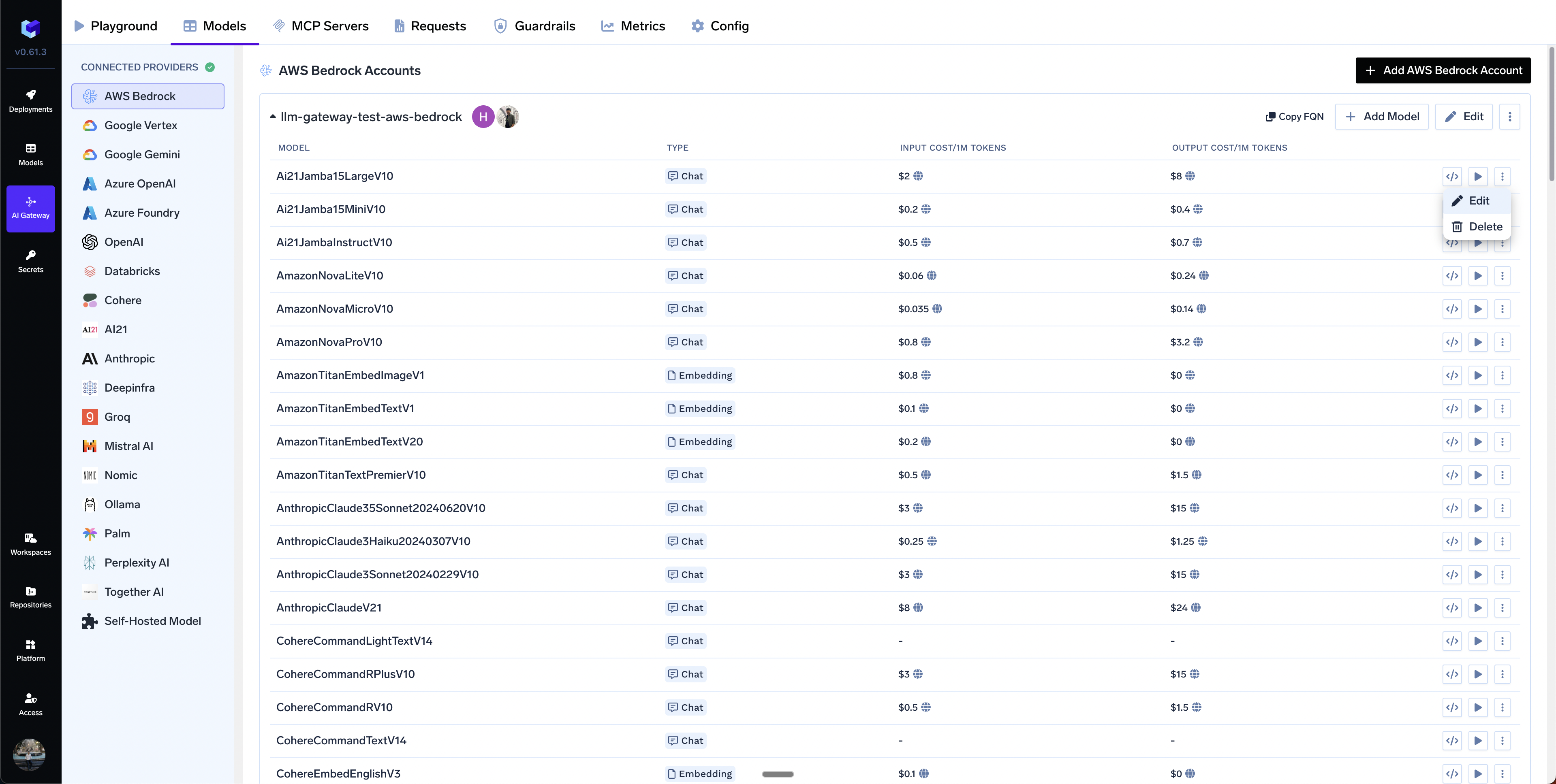
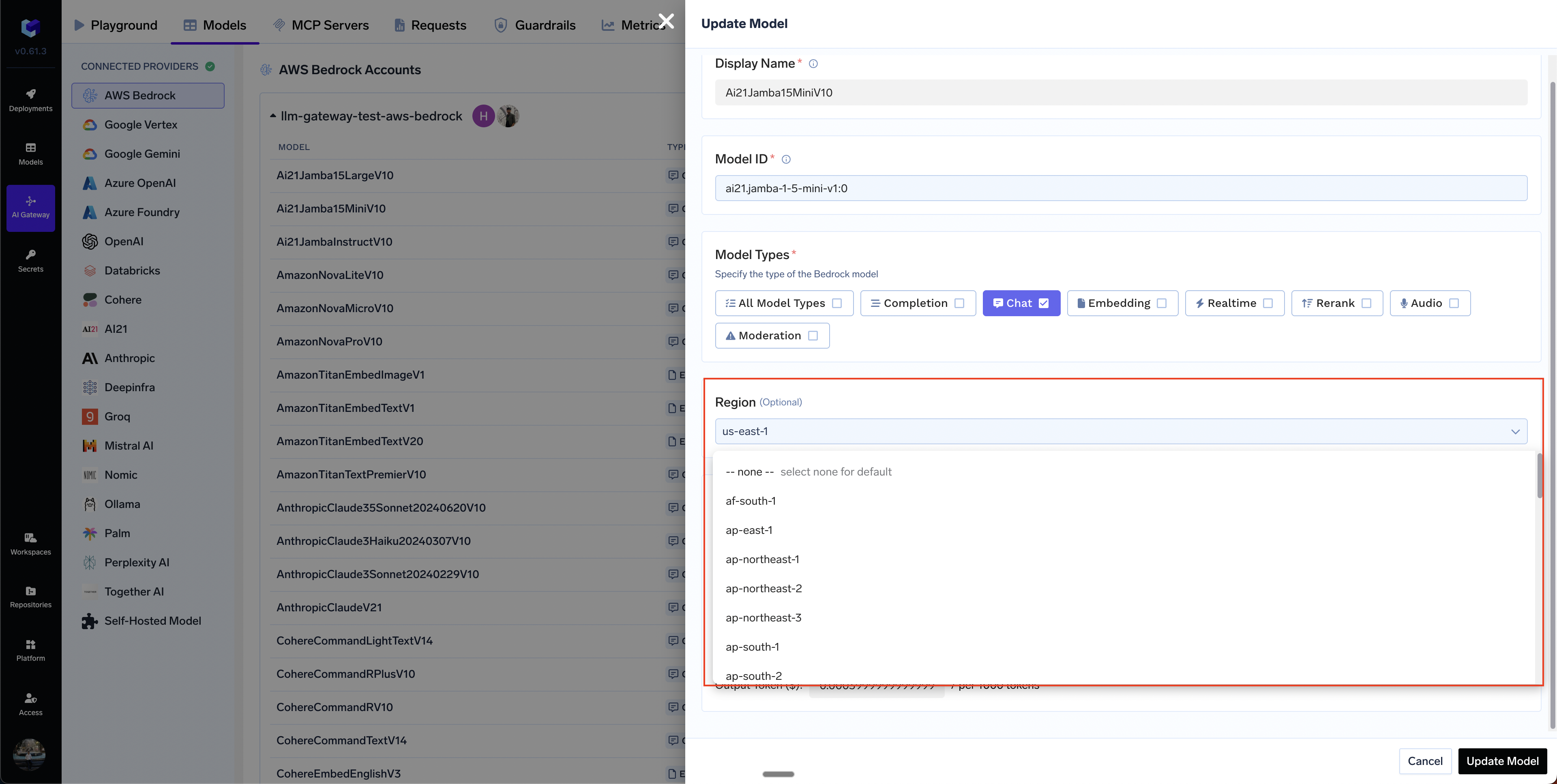
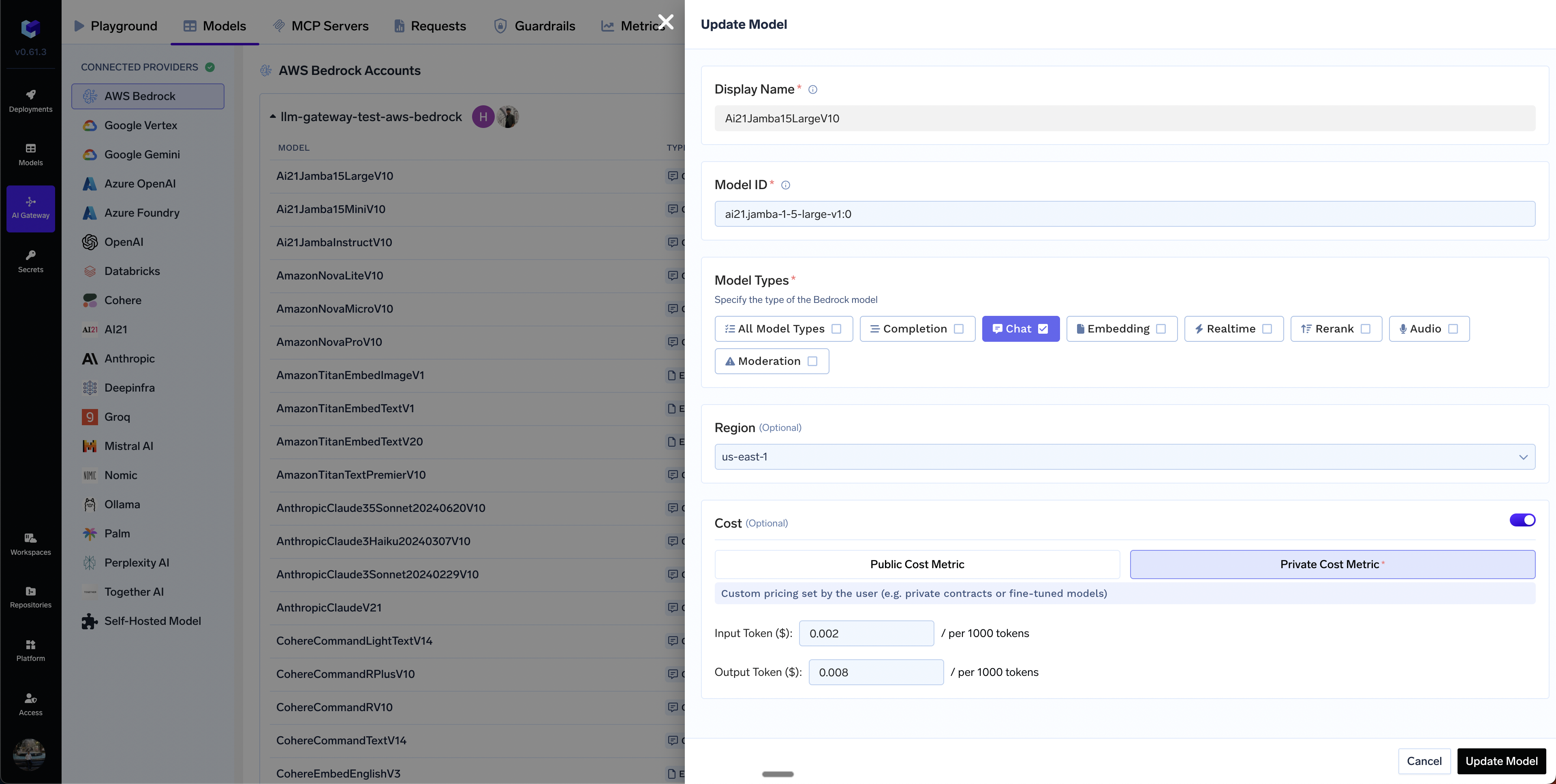 Yes, you can add models from different regions. You can provide a top level default region for the account and also override it at the model level.
 **What is Cross-Region Inference?**
Cross-Region Inference dynamically routes your inference requests across multiple AWS regions to optimize performance and handle traffic bursts. Bedrock selects the best region based on load, latency, and availability. Learn more in the [AWS Bedrock Cross-Region Inference documentation](https://docs.aws.amazon.com/bedrock/latest/userguide/cross-region-inference.html).
**Key Difference: Inference Profile ID vs Model ID**
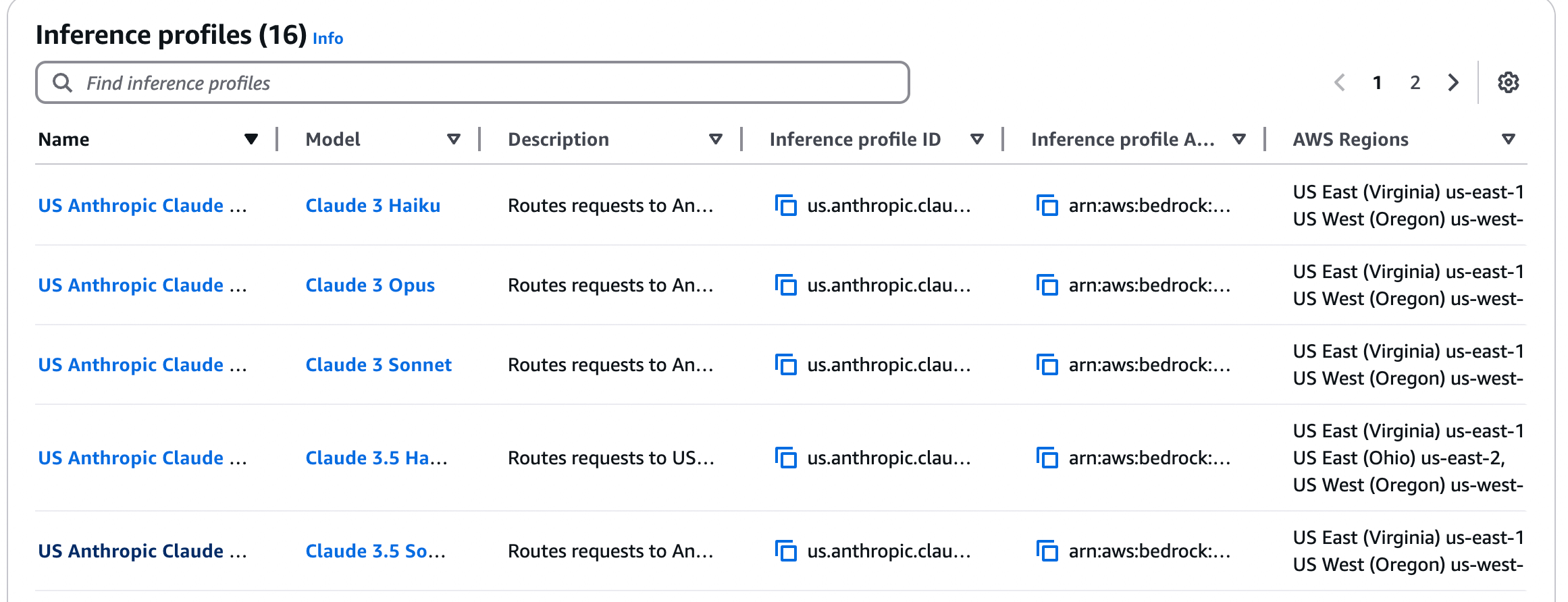
To use cross-region inference, you **must use an Inference Profile ID** instead of a regular model ID. Inference profiles define the foundation model and the AWS regions where requests can be routed.
* **Regular Model ID**: `anthropic.claude-3-5-sonnet-20240620-v1:0` (single region)
* **Inference Profile ID**: `us.anthropic.claude-3-5-sonnet-20240620-v1:0` (cross-region routing)
Inference profile IDs can be:
* **System-defined geographic profiles**: Use geographic prefixes (`us.`, `eu.`, `apac.`) followed by the model ID (e.g., `us.anthropic.claude-3-5-sonnet-20240620-v1:0`). The prefix indicates routing within that geography.
* **Custom inference profiles**: Use full ARN format (e.g., `arn:aws:bedrock:us-east-1:123456789012:inference-profile/my-profile`)
**Important**: Some models in AWS Bedrock are exclusively accessible through cross-region inference profiles and cannot be invoked directly using their standard foundation model IDs. For these models, you must use the inference profile ID (e.g., `us.anthropic.claude-3-7-sonnet-20250219-v1:0`) instead of the regular model ID.
To identify which models require inference profiles, refer to the [Supported Regions and models for inference profiles](https://docs.aws.amazon.com/bedrock/latest/userguide/inference-profiles-support.html), which provides a complete list of models and their inference profile availability.
**How to Use It**
**1. Add the inference profile ID as a model**: When adding a model in TrueFoundry, use the inference profile ID (e.g., `us.anthropic.claude-3-5-sonnet-20240620-v1:0`) instead of the regular model ID. If it's not in the dropdown, use `+ Add Model` and enter it manually.
**What is Cross-Region Inference?**
Cross-Region Inference dynamically routes your inference requests across multiple AWS regions to optimize performance and handle traffic bursts. Bedrock selects the best region based on load, latency, and availability. Learn more in the [AWS Bedrock Cross-Region Inference documentation](https://docs.aws.amazon.com/bedrock/latest/userguide/cross-region-inference.html).
**Key Difference: Inference Profile ID vs Model ID**
To use cross-region inference, you **must use an Inference Profile ID** instead of a regular model ID. Inference profiles define the foundation model and the AWS regions where requests can be routed.
* **Regular Model ID**: `anthropic.claude-3-5-sonnet-20240620-v1:0` (single region)
* **Inference Profile ID**: `us.anthropic.claude-3-5-sonnet-20240620-v1:0` (cross-region routing)
Inference profile IDs can be:
* **System-defined geographic profiles**: Use geographic prefixes (`us.`, `eu.`, `apac.`) followed by the model ID (e.g., `us.anthropic.claude-3-5-sonnet-20240620-v1:0`). The prefix indicates routing within that geography.
* **Custom inference profiles**: Use full ARN format (e.g., `arn:aws:bedrock:us-east-1:123456789012:inference-profile/my-profile`)
**Important**: Some models in AWS Bedrock are exclusively accessible through cross-region inference profiles and cannot be invoked directly using their standard foundation model IDs. For these models, you must use the inference profile ID (e.g., `us.anthropic.claude-3-7-sonnet-20250219-v1:0`) instead of the regular model ID.
To identify which models require inference profiles, refer to the [Supported Regions and models for inference profiles](https://docs.aws.amazon.com/bedrock/latest/userguide/inference-profiles-support.html), which provides a complete list of models and their inference profile availability.
**How to Use It**
**1. Add the inference profile ID as a model**: When adding a model in TrueFoundry, use the inference profile ID (e.g., `us.anthropic.claude-3-5-sonnet-20240620-v1:0`) instead of the regular model ID. If it's not in the dropdown, use `+ Add Model` and enter it manually.
 **2. Configure IAM permissions for ALL destination regions**: This is **critical**. When Bedrock routes to a different region, your IAM role/access key must have permissions in **that region**. You must grant permissions for both the inference profile and the foundation model in all destination regions.
Update your IAM policy to use `*` for the region to allow access across all regions:
```json theme={"dark"}
{
"Version": "2012-10-17",
"Statement": [
{
"Effect": "Allow",
"Action": ["bedrock:InvokeModel", "bedrock:InvokeModelWithResponseStream"],
"Resource": ["arn:aws:bedrock:*::foundation-model/*", "arn:aws:bedrock:*:YOUR-AWS-ACCOUNT-ID:inference-profile/*"]
}
]
}
```
Replace `YOUR-AWS-ACCOUNT-ID` in the policy above with your actual AWS account ID. The `*` in the region position allows access across all regions.
**Most Common Mistake**: Users grant permissions only in their default region. If Bedrock routes to a different region without permissions, requests will fail with "Access Denied". Always grant permissions in ALL potential destination regions. For geographic profiles, ensure permissions in both source and destination regions.
**3. Check Service Control Policies (SCPs)**: If your organization uses SCPs to restrict region access, ensure they allow access to all destination regions in your inference profile. Blocking any destination region will prevent cross-region inference from working.
**Troubleshooting**
**Cause**: Missing IAM permissions in the destination region where Bedrock routed the request.
**Solution**:
* Ensure your IAM policy grants Bedrock permissions across all regions (use `*` in the region part of the ARN)
* For geographic profiles, grant permissions in both source and destination regions
* Check if Service Control Policies (SCPs) are blocking access to certain regions
**Cause**: You're using a regular model ID instead of an inference profile ID.
**Solution**: Use the inference profile ID format (e.g., `us.anthropic.claude-3-5-sonnet-20240620-v1:0`) instead of the regular model ID.
**Learn More**
For detailed AWS documentation, see:
* [Cross-Region inference overview](https://docs.aws.amazon.com/bedrock/latest/userguide/cross-region-inference.html) - How cross-region inference works
* [Geographic cross-Region inference](https://docs.aws.amazon.com/bedrock/latest/userguide/geographic-cross-region-inference.html) - Geographic boundary routing and IAM policy requirements
* [Using inference profiles](https://docs.aws.amazon.com/bedrock/latest/userguide/inference-profiles-use.html) - How to use inference profiles in API calls
* [Supported models and regions](https://docs.aws.amazon.com/bedrock/latest/userguide/inference-profiles-support.html) - List of models that support cross-region inference
**2. Configure IAM permissions for ALL destination regions**: This is **critical**. When Bedrock routes to a different region, your IAM role/access key must have permissions in **that region**. You must grant permissions for both the inference profile and the foundation model in all destination regions.
Update your IAM policy to use `*` for the region to allow access across all regions:
```json theme={"dark"}
{
"Version": "2012-10-17",
"Statement": [
{
"Effect": "Allow",
"Action": ["bedrock:InvokeModel", "bedrock:InvokeModelWithResponseStream"],
"Resource": ["arn:aws:bedrock:*::foundation-model/*", "arn:aws:bedrock:*:YOUR-AWS-ACCOUNT-ID:inference-profile/*"]
}
]
}
```
Replace `YOUR-AWS-ACCOUNT-ID` in the policy above with your actual AWS account ID. The `*` in the region position allows access across all regions.
**Most Common Mistake**: Users grant permissions only in their default region. If Bedrock routes to a different region without permissions, requests will fail with "Access Denied". Always grant permissions in ALL potential destination regions. For geographic profiles, ensure permissions in both source and destination regions.
**3. Check Service Control Policies (SCPs)**: If your organization uses SCPs to restrict region access, ensure they allow access to all destination regions in your inference profile. Blocking any destination region will prevent cross-region inference from working.
**Troubleshooting**
**Cause**: Missing IAM permissions in the destination region where Bedrock routed the request.
**Solution**:
* Ensure your IAM policy grants Bedrock permissions across all regions (use `*` in the region part of the ARN)
* For geographic profiles, grant permissions in both source and destination regions
* Check if Service Control Policies (SCPs) are blocking access to certain regions
**Cause**: You're using a regular model ID instead of an inference profile ID.
**Solution**: Use the inference profile ID format (e.g., `us.anthropic.claude-3-5-sonnet-20240620-v1:0`) instead of the regular model ID.
**Learn More**
For detailed AWS documentation, see:
* [Cross-Region inference overview](https://docs.aws.amazon.com/bedrock/latest/userguide/cross-region-inference.html) - How cross-region inference works
* [Geographic cross-Region inference](https://docs.aws.amazon.com/bedrock/latest/userguide/geographic-cross-region-inference.html) - Geographic boundary routing and IAM policy requirements
* [Using inference profiles](https://docs.aws.amazon.com/bedrock/latest/userguide/inference-profiles-use.html) - How to use inference profiles in API calls
* [Supported models and regions](https://docs.aws.amazon.com/bedrock/latest/userguide/inference-profiles-support.html) - List of models that support cross-region inference