> ## Documentation Index
> Fetch the complete documentation index at: https://www.truefoundry.com/llms.txt
> Use this file to discover all available pages before exploring further.
# Agno AI
> Documentation on integrating Agno with the TrueFoundry AI Gateway.
This guide provides instructions for integrating [Agno AI](https://docs.agno.com/) with the Truefoundry AI Gateway.
## What is Agno AI?
Agno is a powerful multi-agent AI framework designed for building AI systems with multiple agents that can work together autonomously.
### Key Features of Agno AI
* **[Multi-Agent Systems](https://docs.agno.com/introduction/multi-agent-systems)**: Build teams of agents that work together towards a common goal, with industry-leading architecture for reasoning, collaboration, and coordination. Create deterministic, stateful workflows with pure Python for maximum flexibility and control
* **[Interactive Playground](https://docs.agno.com/introduction/playground)**: Test and interact with your AI agents through an intuitive interface featuring real-time streaming, session history, user memory, multimodal support, and comprehensive configuration options
* **[Monitoring & Debugging](https://docs.agno.com/introduction/monitoring)**: Monitor your agents, teams, and workflows in real-time with built-in debugging capabilities, session tracking, and detailed logs for system prompts, user messages, and tool calls
## Prerequisites
Before integrating Agno AI with TrueFoundry, ensure you have:
1. **TrueFoundry Account**: Create a [Truefoundry account](https://www.truefoundry.com/register) and follow the instructions in our [Gateway Quick Start Guide](https://docs.truefoundry.com/gateway/quick-start)
2. **Agno Installation**: In your project directory, install Agno using pip: `pip install agno` #See [PyPI](https://pypi.org/project/agno/1.1.6/) for latest updates
## Setup Process
### 1. Configure Environment Variables (Optional)
Set up your environment variables to connect Agno with TrueFoundry Gateway:
```bash lines theme={"dark"}
export API_KEY="your-truefoundry-api-key"
export BASE_URL="your-truefoundry-gateway-url"
```
You will get your 'truefoundry-api-key', 'truefoundry-gateway-url' and model name directly from the unified code snippet
 ### 2. Configure Agno Agents
Create your Agno agents with TrueFoundry Gateway configuration:
```python lines theme={"dark"}
from agno.agent import Agent
from agno.models.openai import OpenAIChat
# Configure agent with TrueFoundry Gateway
agent = Agent(
model=OpenAIChat(
id="openai-main/gpt-4o", # Use TrueFoundry model name. Similarly you can call any model from any model provider like anthropic, gemini etc
api_key="your-truefoundry-api-key",
base_url="your-truefoundry-gateway-url"
),
description="AI assistant powered by TrueFoundry Gateway",
instructions=[
"You are a helpful AI assistant",
"Provide accurate and concise responses"
]
)
```
## Usage Examples
### Basic Single Agent
Create a simple agent using the configured TrueFoundry Gateway:
```python lines theme={"dark"}
from agno.agent import Agent
from agno.models.openai import OpenAIChat
# Single agent with TrueFoundry Gateway
agent = Agent(
model=OpenAIChat(
id="openai-main/gpt-4o",
api_key="your-truefoundry-api-key",
base_url="your-truefoundry-gateway-url"
),
name="Assistant",
description="General purpose AI assistant"
)
# Run the agent
response = agent.run("What is the capital of Brazil?")
print(response.content)
```
### Environment Variables Configuration
For persistent configuration across all Agno agents, set these environment variables:
```bash lines theme={"dark"}
# Add to your ~/.bashrc, ~/.zshrc, or equivalent
export TRUEFOUNDRY_API_KEY="your-truefoundry-api-key"
export TRUEFOUNDRY_BASE_URL="your-truefoundry-gateway-url"
# Optional: Set default model
export TRUEFOUNDRY_MODEL="openai-main/gpt-4o"
```
### Multi-Agent Team
Create a team of specialized agents for complex tasks:
```python lines theme={"dark"}
from agno.agent import Agent
from agno.team import Team
from agno.models.openai import OpenAIChat
TRUEFOUNDRY_API_KEY = os.getenv("TRUEFOUNDRY_API_KEY") # export TRUEFOuNDRY_API_KEY='your-truefoundry-api-key'
TRUEFOUNDRY_BASE_URL = os.getenv("TRUEFOUNDRY_BASE_URL")
# Research Agent
researcher = Agent(
model=OpenAIChat(
id="openai-main/gpt-4o",
api_key="your-truefoundry-api-key",
base_url="your-truefoundry-gateway-url"
),
name="Researcher",
description="Conducts thorough research on topics",
instructions=[
"Research the given topic thoroughly",
"Provide factual and well-sourced information"
]
)
# Writer Agent
writer = Agent(
model=OpenAIChat(
id="openai-main/gpt-4o",
api_key="your-truefoundry-api-key",
base_url="your-truefoundry-gateway-url"
),
name="Writer",
description="Creates well-structured content",
instructions=[
"Write clear and engaging content",
"Structure information logically"
]
)
# Create team
research_team = Team(
agents=[researcher, writer],
instructions=[
"Researcher should investigate the topic first",
"Writer should create content based on research findings"
]
)
# Execute team task
result = research_team.run("Research and write about sustainable energy solutions")
```
## Benefits of Using TrueFoundry Gateway with Agno AI
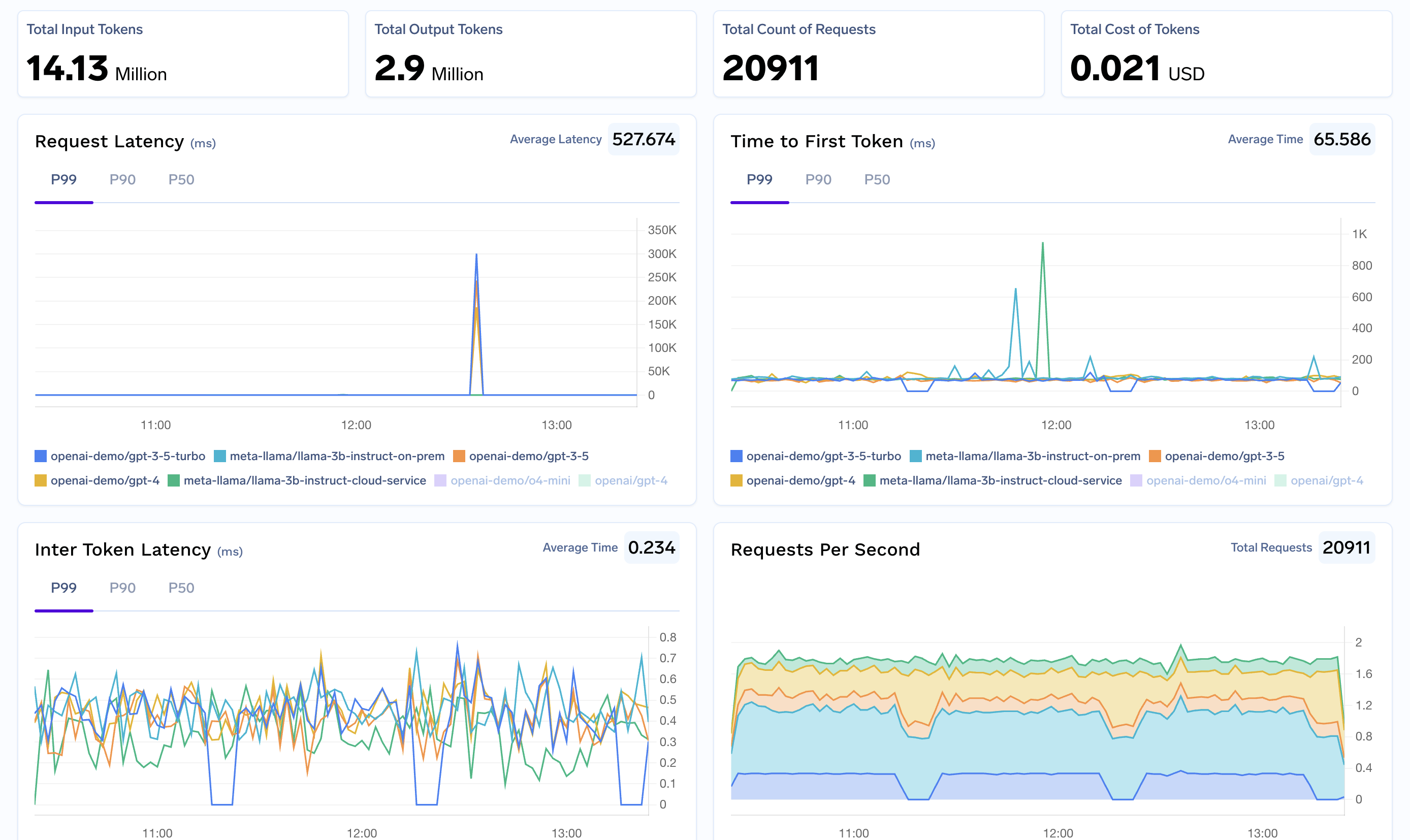
1. **Cost Tracking**: Monitor and track costs across all your Agno AI agents and teams
2. **Security**: Enhanced security with centralized API key management
3. **Access Controls**: Implement fine-grained access controls for different teams and agents
4. **Rate Limiting**: Prevent API quota exhaustion with intelligent rate limiting
5. **Fallback Support**: Automatic failover to alternative providers when needed
6. **Analytics**: Detailed analytics and monitoring for all LLM calls across your agent ecosystem
7. **Multi-Provider Support**: Seamlessly switch between different model providers
### 2. Configure Agno Agents
Create your Agno agents with TrueFoundry Gateway configuration:
```python lines theme={"dark"}
from agno.agent import Agent
from agno.models.openai import OpenAIChat
# Configure agent with TrueFoundry Gateway
agent = Agent(
model=OpenAIChat(
id="openai-main/gpt-4o", # Use TrueFoundry model name. Similarly you can call any model from any model provider like anthropic, gemini etc
api_key="your-truefoundry-api-key",
base_url="your-truefoundry-gateway-url"
),
description="AI assistant powered by TrueFoundry Gateway",
instructions=[
"You are a helpful AI assistant",
"Provide accurate and concise responses"
]
)
```
## Usage Examples
### Basic Single Agent
Create a simple agent using the configured TrueFoundry Gateway:
```python lines theme={"dark"}
from agno.agent import Agent
from agno.models.openai import OpenAIChat
# Single agent with TrueFoundry Gateway
agent = Agent(
model=OpenAIChat(
id="openai-main/gpt-4o",
api_key="your-truefoundry-api-key",
base_url="your-truefoundry-gateway-url"
),
name="Assistant",
description="General purpose AI assistant"
)
# Run the agent
response = agent.run("What is the capital of Brazil?")
print(response.content)
```
### Environment Variables Configuration
For persistent configuration across all Agno agents, set these environment variables:
```bash lines theme={"dark"}
# Add to your ~/.bashrc, ~/.zshrc, or equivalent
export TRUEFOUNDRY_API_KEY="your-truefoundry-api-key"
export TRUEFOUNDRY_BASE_URL="your-truefoundry-gateway-url"
# Optional: Set default model
export TRUEFOUNDRY_MODEL="openai-main/gpt-4o"
```
### Multi-Agent Team
Create a team of specialized agents for complex tasks:
```python lines theme={"dark"}
from agno.agent import Agent
from agno.team import Team
from agno.models.openai import OpenAIChat
TRUEFOUNDRY_API_KEY = os.getenv("TRUEFOUNDRY_API_KEY") # export TRUEFOuNDRY_API_KEY='your-truefoundry-api-key'
TRUEFOUNDRY_BASE_URL = os.getenv("TRUEFOUNDRY_BASE_URL")
# Research Agent
researcher = Agent(
model=OpenAIChat(
id="openai-main/gpt-4o",
api_key="your-truefoundry-api-key",
base_url="your-truefoundry-gateway-url"
),
name="Researcher",
description="Conducts thorough research on topics",
instructions=[
"Research the given topic thoroughly",
"Provide factual and well-sourced information"
]
)
# Writer Agent
writer = Agent(
model=OpenAIChat(
id="openai-main/gpt-4o",
api_key="your-truefoundry-api-key",
base_url="your-truefoundry-gateway-url"
),
name="Writer",
description="Creates well-structured content",
instructions=[
"Write clear and engaging content",
"Structure information logically"
]
)
# Create team
research_team = Team(
agents=[researcher, writer],
instructions=[
"Researcher should investigate the topic first",
"Writer should create content based on research findings"
]
)
# Execute team task
result = research_team.run("Research and write about sustainable energy solutions")
```
## Benefits of Using TrueFoundry Gateway with Agno AI
1. **Cost Tracking**: Monitor and track costs across all your Agno AI agents and teams
2. **Security**: Enhanced security with centralized API key management
3. **Access Controls**: Implement fine-grained access controls for different teams and agents
4. **Rate Limiting**: Prevent API quota exhaustion with intelligent rate limiting
5. **Fallback Support**: Automatic failover to alternative providers when needed
6. **Analytics**: Detailed analytics and monitoring for all LLM calls across your agent ecosystem
7. **Multi-Provider Support**: Seamlessly switch between different model providers