> ## Documentation Index
> Fetch the complete documentation index at: https://www.truefoundry.com/llms.txt
> Use this file to discover all available pages before exploring further.
# Agent Harness
> Build and run managed AI agents on TrueFoundry with MCP tools, skills, sandboxing, approvals, governance, and observability built in.
## What Is An Agent Harness?
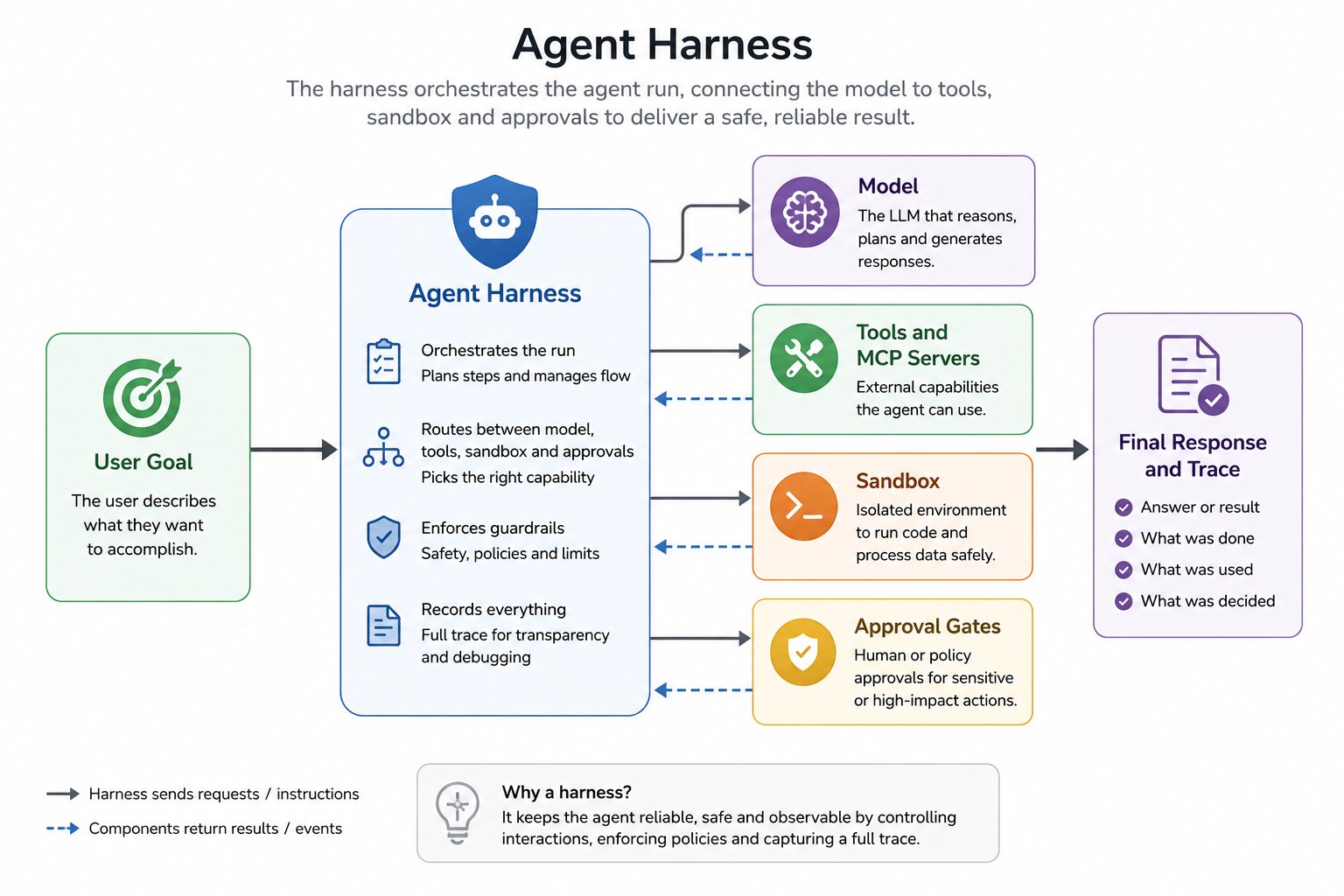
An agent harness is the runtime layer around an LLM that turns it into a reliable, long-running agent. Instead of only generating text, the harness manages the full execution loop: planning, tool calling, context management, approvals, state, and observability.
For the full concept and how the runtime fits together, see [What is an agent harness?](https://trueforge.dev/introduction) on the TrueForge docs.
 ## TrueFoundry Agent Harness
TrueFoundry Agent Harness is the **hosted version of [TrueForge](https://trueforge.dev/introduction)** — the open-source agent harness maintained by TrueFoundry ([github.com/truefoundry/trueforge](https://github.com/truefoundry/trueforge)).
TrueForge runs the core agent loop — model calls, MCP tools, skills, sandboxing, approvals, context management, and session state. TrueFoundry runs that same harness for you and adds the layers needed to operate agents across a team:
* **Governance** — Models, MCP servers, and skills are managed through the AI Gateway, MCP Gateway, and Skills Registry. No API keys in agent definitions, plus RBAC, budgets, rate limits, and guardrails.
* **Observability** — Every agent session is captured with cost, tokens, turns, tool calls, and end-to-end traces in one place. See [Observability](/docs/agent-platform/agent-harness/observability).
* **Enterprise hosting** — Run as SaaS, self-hosted, or on-prem in your own cloud and region.
For the full breakdown — including how it compares to other hosted runtimes — see [What TrueFoundry Adds on Top of TrueForge](/docs/agent-platform/agent-harness/what-truefoundry-adds).
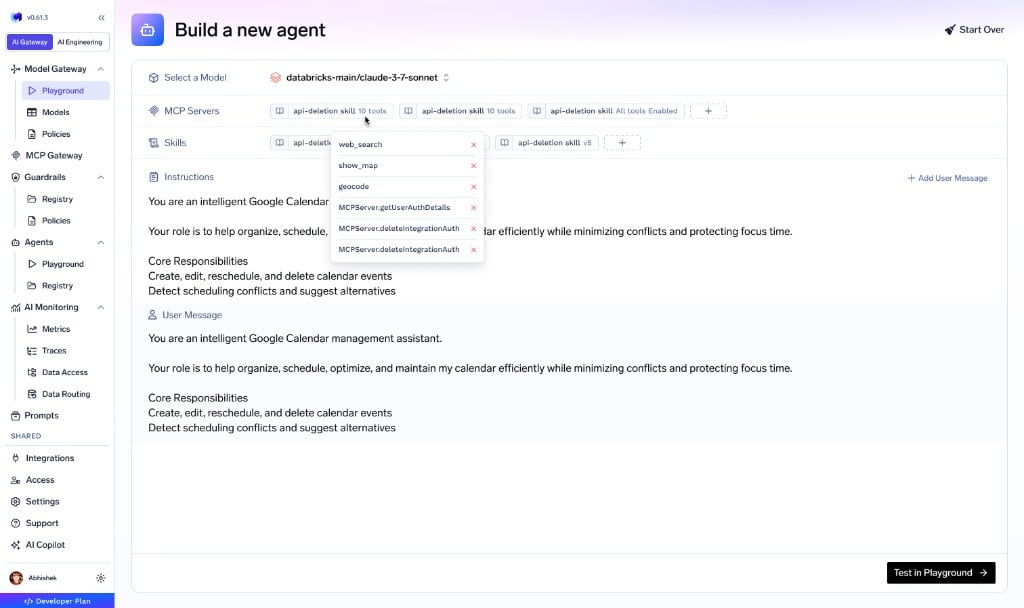
You choose a model, connect MCP servers, add skills, and write instructions. TrueFoundry manages orchestration, sandbox lifecycle, tool execution, approvals, governance, and observability.
## TrueFoundry Agent Harness
TrueFoundry Agent Harness is the **hosted version of [TrueForge](https://trueforge.dev/introduction)** — the open-source agent harness maintained by TrueFoundry ([github.com/truefoundry/trueforge](https://github.com/truefoundry/trueforge)).
TrueForge runs the core agent loop — model calls, MCP tools, skills, sandboxing, approvals, context management, and session state. TrueFoundry runs that same harness for you and adds the layers needed to operate agents across a team:
* **Governance** — Models, MCP servers, and skills are managed through the AI Gateway, MCP Gateway, and Skills Registry. No API keys in agent definitions, plus RBAC, budgets, rate limits, and guardrails.
* **Observability** — Every agent session is captured with cost, tokens, turns, tool calls, and end-to-end traces in one place. See [Observability](/docs/agent-platform/agent-harness/observability).
* **Enterprise hosting** — Run as SaaS, self-hosted, or on-prem in your own cloud and region.
For the full breakdown — including how it compares to other hosted runtimes — see [What TrueFoundry Adds on Top of TrueForge](/docs/agent-platform/agent-harness/what-truefoundry-adds).
You choose a model, connect MCP servers, add skills, and write instructions. TrueFoundry manages orchestration, sandbox lifecycle, tool execution, approvals, governance, and observability.
 ## Harness Capabilities
You configure four things on TrueFoundry — models, MCP servers, skills, and how you monitor them — and the harness runs the rest of the execution loop.
Any provider through AI Gateway, with model-level RBAC, budgets, and routing.
Governed MCP tools with centralized auth, in-chat OAuth, and per-user delegation.
Versioned `SKILL.md` instructions from the Skills Registry, mounted on demand.
Inspect every agent session with cost, tokens, turns, tool calls, and end-to-end traces.
### Capabilities that run in the harness
Sandboxing, context engineering, human checkpoints, and Generative UI are part of the open-source [TrueForge](https://trueforge.dev/introduction) harness. The mechanics are documented in the [TrueForge docs](https://trueforge.dev/key-features/overview); TrueFoundry runs them for you as a managed, governed service.
| Capability | What it does | TrueForge reference |
| --------------------- | ----------------------------------------------------------------------------------- | --------------------------------------------------------------------------------- |
| Sandbox | Isolated code, file, and shell execution, provisioned only when the agent needs one | [Setup Sandbox](https://trueforge.dev/sandbox) |
| Subagents | Delegate focused subtasks to parallel agents with their own clean context | [Subagents](https://trueforge.dev/key-features/subagents) |
| Deferred tool loading | Load MCP tool definitions on demand instead of upfront to keep context lean | [Deferred Tool Loading](https://trueforge.dev/key-features/deferred-tool-loading) |
| Code Mode | Chain and aggregate MCP tool calls in a single sandbox script | [Code Mode](https://trueforge.dev/key-features/code-mode) |
| Large tool responses | Offload oversized tool output to the sandbox instead of flooding context | [Large Tool Responses](https://trueforge.dev/key-features/large-tool-responses) |
| Context compaction | Summarize older history when context nears the model limit | [Harness Capabilities](https://trueforge.dev/key-features/overview) |
| Human checkpoints | Pause for tool approval or ask the user a structured question | [Harness Capabilities](https://trueforge.dev/key-features/overview) |
| Generative UI | Respond with interactive charts, tables, cards, and forms | [Harness Capabilities](https://trueforge.dev/key-features/overview) |
TrueFoundry runs these as a managed, governed service — with a colocated low-latency sandbox, sensible defaults, org-wide approval policy, and full observability. See [What TrueFoundry Adds on Top of TrueForge](/docs/agent-platform/agent-harness/what-truefoundry-adds) for governance, the managed runtime, enterprise hosting, and how it compares to other hosted runtimes.
## Architecture
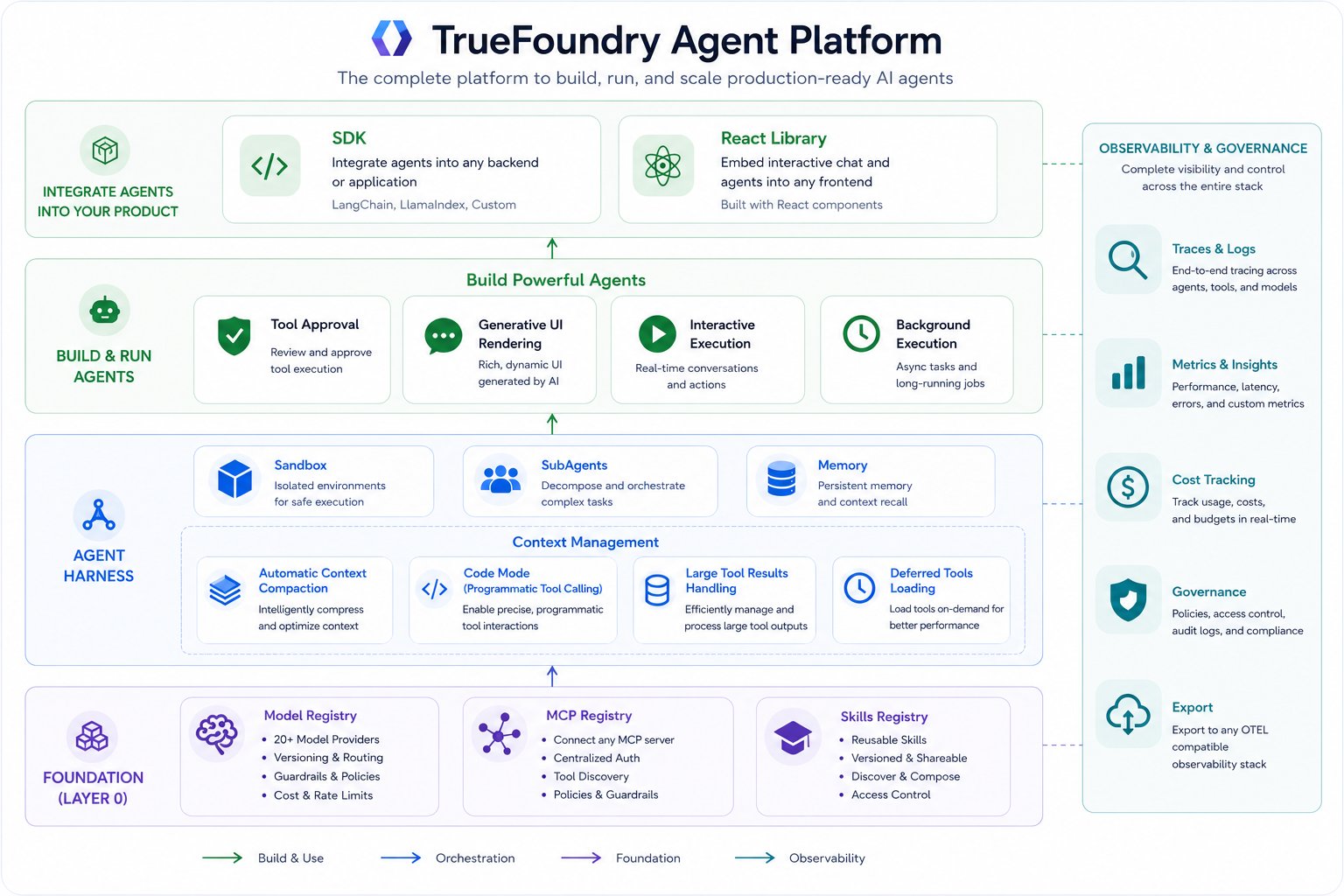
Agent Harness runs in the same gateway plane as model and MCP traffic, so orchestration, governance, and observability stay in one system.
## Harness Capabilities
You configure four things on TrueFoundry — models, MCP servers, skills, and how you monitor them — and the harness runs the rest of the execution loop.
Any provider through AI Gateway, with model-level RBAC, budgets, and routing.
Governed MCP tools with centralized auth, in-chat OAuth, and per-user delegation.
Versioned `SKILL.md` instructions from the Skills Registry, mounted on demand.
Inspect every agent session with cost, tokens, turns, tool calls, and end-to-end traces.
### Capabilities that run in the harness
Sandboxing, context engineering, human checkpoints, and Generative UI are part of the open-source [TrueForge](https://trueforge.dev/introduction) harness. The mechanics are documented in the [TrueForge docs](https://trueforge.dev/key-features/overview); TrueFoundry runs them for you as a managed, governed service.
| Capability | What it does | TrueForge reference |
| --------------------- | ----------------------------------------------------------------------------------- | --------------------------------------------------------------------------------- |
| Sandbox | Isolated code, file, and shell execution, provisioned only when the agent needs one | [Setup Sandbox](https://trueforge.dev/sandbox) |
| Subagents | Delegate focused subtasks to parallel agents with their own clean context | [Subagents](https://trueforge.dev/key-features/subagents) |
| Deferred tool loading | Load MCP tool definitions on demand instead of upfront to keep context lean | [Deferred Tool Loading](https://trueforge.dev/key-features/deferred-tool-loading) |
| Code Mode | Chain and aggregate MCP tool calls in a single sandbox script | [Code Mode](https://trueforge.dev/key-features/code-mode) |
| Large tool responses | Offload oversized tool output to the sandbox instead of flooding context | [Large Tool Responses](https://trueforge.dev/key-features/large-tool-responses) |
| Context compaction | Summarize older history when context nears the model limit | [Harness Capabilities](https://trueforge.dev/key-features/overview) |
| Human checkpoints | Pause for tool approval or ask the user a structured question | [Harness Capabilities](https://trueforge.dev/key-features/overview) |
| Generative UI | Respond with interactive charts, tables, cards, and forms | [Harness Capabilities](https://trueforge.dev/key-features/overview) |
TrueFoundry runs these as a managed, governed service — with a colocated low-latency sandbox, sensible defaults, org-wide approval policy, and full observability. See [What TrueFoundry Adds on Top of TrueForge](/docs/agent-platform/agent-harness/what-truefoundry-adds) for governance, the managed runtime, enterprise hosting, and how it compares to other hosted runtimes.
## Architecture
Agent Harness runs in the same gateway plane as model and MCP traffic, so orchestration, governance, and observability stay in one system.
 ## Start Building
Create an agent by choosing a model, connecting MCP servers, adding skills, and writing instructions. Then test in playground, integrate via API, monitor through traces and metrics, and ship it to users.
Governance, observability, managed runtime, and hosting on top of TrueForge.
Create and test a managed agent from the TrueFoundry console.
Create sessions, stream progress, and integrate Agent Harness into your application.
Track sessions, cost, and traces across every agent run.
## Start Building
Create an agent by choosing a model, connecting MCP servers, adding skills, and writing instructions. Then test in playground, integrate via API, monitor through traces and metrics, and ship it to users.
Governance, observability, managed runtime, and hosting on top of TrueForge.
Create and test a managed agent from the TrueFoundry console.
Create sessions, stream progress, and integrate Agent Harness into your application.
Track sessions, cost, and traces across every agent run.