


September 19, 2026
|
5 min read


Published: September 11, 2026
Blazingly fast way to build, track and deploy your models!
Anthropic introduced the Model Context Protocol in November 2024, and within a year nearly every API tooling vendor and several independent generators had shipped a way to mechanically convert an OpenAPI specification into a working MCP server. The basic mapping is mostly clean: path becomes tool name, parameters become input schema, success response becomes output schema. The interesting parts are where the mapping is lossy — pagination, multipart uploads, webhooks, streaming responses — and the operational pieces that determine whether the generated server is actually usable: auth injection, schema validation, description quality. This post walks the full algorithm and the specific patterns that don't translate.
Tuesday at Northwind. Priya, integrations lead on the logistics platform team, gets a ticket: "Make shipment-tracking-svc callable by the routing optimizer agent." The service has 47 REST endpoints, a maintained OpenAPI 3.1 spec, OAuth2 auth, cursor-based pagination, two webhook endpoints, and a streaming endpoint for live truck telemetry. The agent's MCP toolbox is currently 12 tools across three other services, each hand-coded over roughly a week. Forty-seven endpoints at that rate would be most of a quarter of engineering time.
The OpenAPI spec already describes the service in machine-readable form — paths, parameters, schemas, response shapes, even the OAuth2 scopes per operation. None of the hand-coding she's been doing is adding information the spec doesn't already contain. The work has mostly been translation from one schema language to another, with a small set of well-defined edge cases. That work belongs to a build step, not to a quarter of engineering.
This post is the conversion algorithm — what maps cleanly, what doesn't, and the operational pieces (auth, validation, description quality) that make the generated server actually usable.
The conversion walks the OpenAPI document and emits one MCP tool per (path, method) pair. For each pair, it computes four things: the tool name, the description, the input schema, and (where the target MCP revision supports it) the output schema.
Tool name. Prefer the operationId if the spec author provided one — operationIds are idiomatic identifiers, usually already chosen for readability. If absent, synthesize from method and path: lowercase the method, append the path with non-alphanumerics replaced by underscores, collapse duplicate underscores. GET /users/{user_id}/repos becomes get_users_user_id_repos. The synthesized form is syntactically valid but verbose; operationIds win where they exist.
Tool description. Prefer summary, then description, then a generated stub from method + path. Section 6 covers why this seemingly minor field matters more than people expect.
Input schema. A merge of path parameters, query parameters, and the request body schema into a single JSON Schema object, with the right required/optional markers. Details in section 2.
Output schema. The schema attached to the first 2xx response for application/json. Other content types and non-2xx responses are not represented. Details in section 3.
YAML — OpenAPI path item (excerpt from shipment-tracking-svc)
paths:
  /users/{user_id}/repos:
    get:
      operationId: listUserRepos
      summary: List a user's repositories
      description: Returns repositories accessible to the
        authenticated user, owned by user_id, paginated by cursor.
      parameters:
        - name: user_id
          in: path
          required: true
          schema: { type: string }
        - name: per_page
          in: query
          schema: { type: integer, default: 30, maximum: 100 }
        - name: cursor
          in: query
          schema: { type: string, nullable: true }
      responses:
        '200':
          description: OK
          content:
            application/json:
              schema:
                $ref: '#/components/schemas/RepoListPage'
        '401': { $ref: '#/components/responses/Unauthorized' }
        '404': { $ref: '#/components/responses/NotFound' }
      security:
        - oauth2: [repo:read]
JSON — generated MCP tool
{
  "name": "list_user_repos",
  "description": "List a user's repositories. Returns repositories accessible to the authenticated user, owned by user_id, paginated by cursor.",
  "inputSchema": {
    "type": "object",
    "properties": {
      "user_id":  { "type": "string" },
      "per_page": { "type": "integer", "default": 30, "maximum": 100 },
      "cursor":   { "type": "string", "nullable": true }
    },
    "required": ["user_id"]
  },
  "outputSchema": { "$ref": "#/$defs/RepoListPage" }
}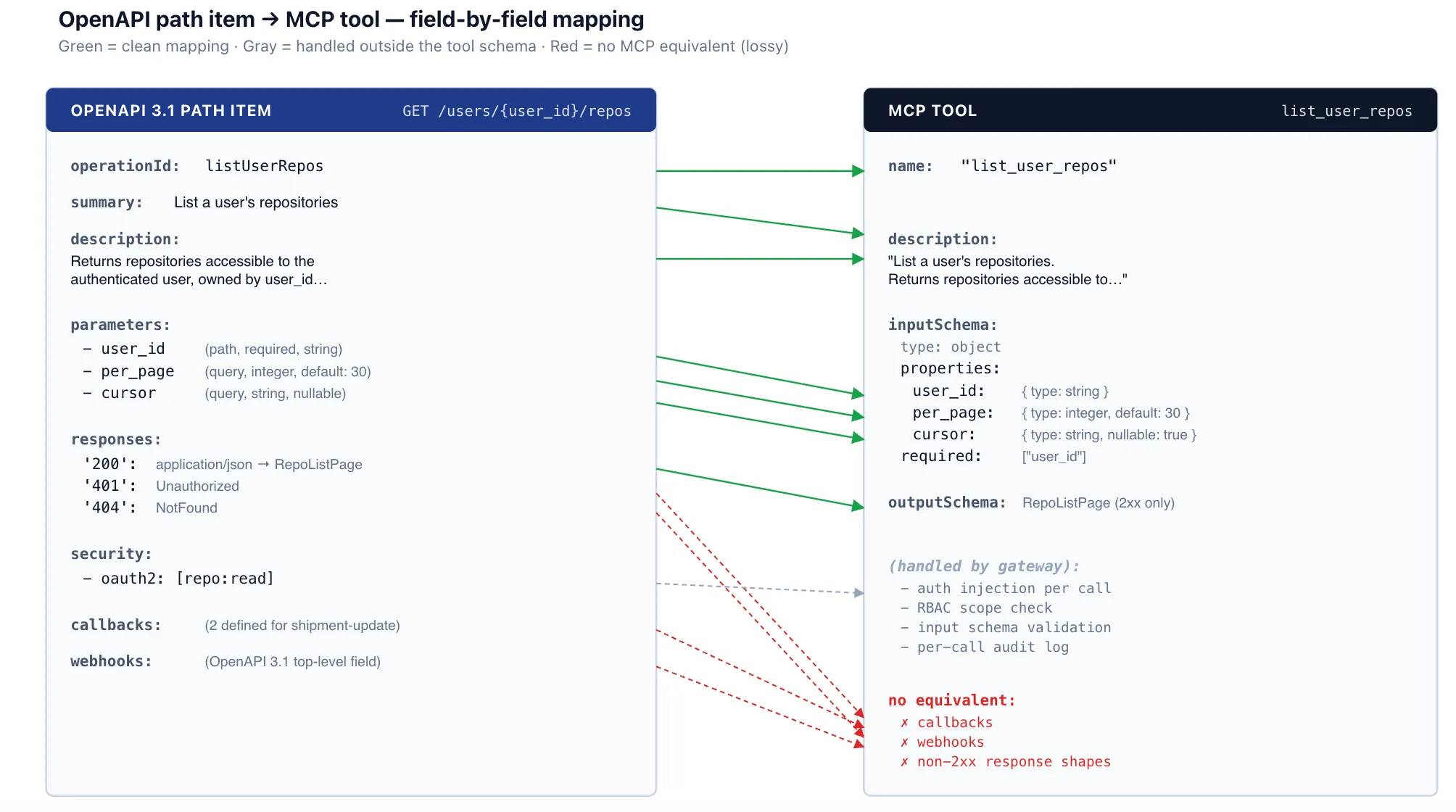
Path parameters are always required and become required entries in the input schema. Query parameters are optional unless explicitly marked required, and any default value carries over. Headers are usually omitted from the agent-facing input — the agent should not be picking Content-Type — with explicit exceptions for headers carrying semantic information (X-Org-Id, X-Idempotency-Key).
application/json request bodies map to a nested object in the input schema. The entire request body becomes one structured argument, typically named after the body schema's $ref (so a request body referencing #/components/schemas/CreateRepoRequest becomes a "create_repo_request" property). This is the cleanest case in the conversion, because OpenAPI request bodies are already JSON Schema and the input schema is JSON Schema — the conversion is mostly a copy.
multipart/form-data and application/x-www-form-urlencoded are the partial-support case. MCP tools accept JSON arguments; the generated server has to re-serialize JSON into the appropriate body format before forwarding. Binary file uploads — the most common reason for multipart — have no clean equivalent: MCP can pass base64-encoded strings, but most APIs don't accept that on multipart endpoints. The honest answer for binary uploads is that they often require a hand-coded tool rather than the generated one.
Only the success response is exposed as the tool's output schema (and only where the target MCP revision supports outputSchema at all — the field was added in the 2025-06-18 spec revision, so older runtimes ignore it). The conversion picks the first 2xx response (200, 201, 202) for application/json content. Other content types are not exposed; non-2xx responses are returned to the agent as tool errors, not as alternative output shapes.
This has a subtle consequence: the agent sees the success-path response shape, never the structured error response shape. That is almost always the right thing — agents don't usefully plan against error response schemas — but it means error handling has to be generic (HTTP status code plus message) rather than typed. For APIs with rich structured errors (validation details, partial-success responses), this loses information.
It is also where pagination first breaks: the output schema for a paginated list endpoint is the single-page response shape, not the conceptual full-list result. The agent calling the tool gets one page, not the list — which leads to the next section.
REST APIs paginate. MCP tools, by protocol design, return single results. Reconciling them is the conversion's hardest decision. Three real options, each with different tradeoffs:
agent has to be smart enough to paginate (many models take the first page and stop)(b) Fetch-all internallyGenerated server loops over pages and returns the flat aggregateAgent sees one clean result; latency and memory scale with result size; tail-latency disaster on a query that hits many pages(c) Separate next-page toolFirst tool returns a page plus a next_cursor; second tool fetches subsequent pages by cursorPredictable cost; agent's tool inventory doubles per paginated endpoint and the relationship between the two tools is not always obvious to the modelMost generators (including TrueFoundry's) default to option (a). The discipline that makes it work is the description quality from section 6: the tool description has to spell out the pagination contract explicitly, with the cursor parameter named and the "call again with next_cursor for more" instruction stated. Without that, agents reliably take page one and call the task done.
Option (b) is occasionally right — small bounded datasets where the agent genuinely needs the whole list (a 50-row config table, a fixed list of regions) — and is usually wrong for everything else. Option (c) shows up in domains where the next-page semantics are non-trivial (cursor expiry, snapshot isolation), where the explicit separation is worth the larger tool surface.
The generated MCP server makes HTTP requests to the underlying API; those requests need credentials. The architectural rule: the generated server does not hold credentials. They live in the gateway, and the gateway injects them at call time.
The chain, in order:
Auth injection chain for a tool call against shipment-tracking-svc
1. User (or service identity) authenticates to the MCP gateway
   - Personal access token or OAuth, established once
   - Gateway stores no per-tool secrets in agent code

2. Gateway resolves which underlying-API token corresponds to this
   identity × this MCP server
   - Tokens live in the gateway's secret store
   - Refreshed automatically before expiry
   - Per-tool OAuth scopes enforced from the OpenAPI security spec

3. Gateway forwards the tool call to the generated MCP server with
   the resolved token already attached
   - Typically as an Authorization: Bearer header on the HTTP client
     the server uses for its outbound requests
   - The credential never lands in the generated server's code path

4. Generated MCP server constructs the HTTP request from the tool
   arguments and dispatches on the auth'd client
   - Pure function: (tool name, arguments, http_client) -> response
This is the gateway pattern from earlier posts in this series applied to a specific kind of MCP server. The decoupling is what makes the generated server stateless and disposable — it is a pure transformation, with credentials, RBAC, audit logging, and rate limiting living one layer up.
Auto-generated descriptions are syntactically valid and semantically miserable. "Get users user id repos" is what a synthesizer produces for GET /users/{user_id}/repos when the OpenAPI spec has no summary or description. In practice, agents tend to make worse tool selections from descriptions like that — they pick the wrong tool, fill in wrong arguments, or skip the tool when it was the right one. The effect is most visible on tool inventories where several endpoints have similar shapes and the model has to lean on the description to disambiguate.
The conversion pipeline can do better in three steps:
First, prefer the OpenAPI summary and description fields. Good spec authors write these well; using them costs nothing.
Second, if the summary is missing or unhelpful, apply an LLM enhancement pass: feed the path, method, parameters, response schema, and any docstrings to a cheap model and ask for an agent-friendly description. "Retrieve all repositories accessible to the authenticated user, owned by a specified user ID, paginated 30 per page by default; returns repository metadata including name, owner, primary language, and last-update timestamp." At Claude Haiku 4.5 pricing (roughly $1 per million input tokens, $5 per million output) the enhancement is on the order of $0.0005 per tool and only has to run when the spec changes.
Third, include examples in the description for non-obvious arguments. Format strings, ID conventions, and enum values often need an example to be unambiguous. "user_id is the numeric user ID (e.g., '12345'), not the username."
The cost of getting this wrong is paid every time the agent runs. The cost of doing it right is paid once at generation time and amortized across every tool call thereafter.
Auto-generation makes the spec's quality the conversion's quality. Common real-world issues, in roughly the order they bite:
None of these are conversion bugs — they are spec bugs the conversion faithfully propagates. The pragmatic response is to treat OpenAPI-to-MCP generation as a spec-quality forcing function: the first regeneration of a poorly-maintained spec produces a poor MCP server, which is usually visible quickly, which is usually enough motivation to fix the spec. The conversion makes spec quality observable in a way that internal use of the OpenAPI document alone often does not.
A naive one-endpoint-per-tool conversion of a large API produces a tool list that itself becomes a problem. A 500-endpoint API yields a 500-tool MCP server; loading that tool inventory into the agent's context consumes tens of thousands of tokens before the agent has done anything useful, and model tool-selection accuracy reportedly degrades as the available-tool count grows. The shipment-tracking-svc Priya is converting has 47 endpoints, which is manageable; a large public REST surface (Stripe's, GitHub's, AWS') generated wholesale is not.
Four practical strategies, usually combined:
Operator-level filtering at registration. Most generators (TrueFoundry's included, and the openapi-mcp-generator CLI uses OpenAPI x-mcp extensions for this) let the operator pick which endpoints to expose. The default of "everything in the spec" is rarely right past a few dozen endpoints.
Tag-based grouping. OpenAPI tags map to logical groupings; the gateway can expose one MCP server per tag set ("shipment-tracking-reads" for the read-only operations, "shipment-tracking-admin" for the destructive ones). This pairs naturally with per-tool RBAC — the reading agent only sees the reads server.
Virtual MCP servers (TrueFoundry's pattern, similar concepts elsewhere). A logical server that aggregates a curated subset of tools across multiple physical MCP servers. The agent sees a small, task-specific tool inventory ("billing-agent-tools" exposing 12 tools drawn from Stripe, the internal invoice service, and the CRM) instead of the union of every backend.
Dynamic discovery. The agent does not load the full tool list upfront. Instead, the gateway exposes a meta-tool the agent can call to search or filter tools by description, returning only the relevant subset for the task. This is more complex to implement and to reason about — the agent now has to be smart about discovery — but it scales further than any static filtering strategy.
The right combination depends on the use case. A focused per-team agent platform typically uses operator filtering + virtual MCP servers and avoids dynamic discovery. A general-purpose agent expected to work across the whole platform's tool surface eventually needs dynamic discovery because no static curation is small enough.
A non-exhaustive list of what OpenAPI describes that MCP, as of mid-2026, does not have a clean equivalent for:
The honest pattern across all of these: when an OpenAPI feature has no MCP equivalent, the conversion should omit the endpoint, not silently generate a broken tool. Most production generators (including TrueFoundry's) flag these at conversion time and require explicit operator action to skip or hand-code the affected operations.
Every tool call to the generated MCP server passes through the gateway. The gateway validates the call arguments against the input schema before forwarding to the server, catching three classes of error early: type mismatches (string where integer required), missing required fields (agent omitted a required path parameter), and enum violations (agent passed a value not in the enum set).
The validation error is returned to the agent in a structured form it can reason about, not as a raw 400 from the underlying API:
JSON — validation error returned to the agent on a bad tool call
{
  "isError": true,
  "content": [{
    "type": "text",
    "text": "Argument validation failed for tool 'list_user_repos'."
  }],
  "errorDetails": {
    "type": "schema_validation",
    "tool": "list_user_repos",
    "issues": [
      { "path": "per_page", "code": "type",
        "expected": "integer", "got": "string", "value": "thirty" },
      { "path": "user_id", "code": "required" }
    ]
  }
}
Why at the gateway and not in the generated server? Two reasons. First, consistency — every MCP server, generated or hand-coded, gets the same validation behavior. Second, the gateway can apply validation policies (strict vs lenient, custom error formatting) without changing generated code. The generated server stays the simplest possible thing: a validated request goes in, an HTTP call goes out, a response comes back.
Do we have to use a generator? Why not hand-code the MCP server?
For APIs with fewer than about ten endpoints, or where the generated tools need substantial post-processing (custom argument names, merged endpoints, complex business logic), hand-coding can be reasonable. Past that, the generated server is usually cheaper to maintain — when the API adds an endpoint, regeneration picks it up automatically. Hand-coded servers drift.
How do we version-control the generated server?
The generated server is a build artifact, not source you edit. Regenerate on every OpenAPI spec change, ideally in CI. Tool names stay stable as long as operationIds do, which is the discipline spec authors should maintain anyway. Long-running agents that have cached the previous tool list see updates on their next MCP discovery call.
What about APIs that don't have an OpenAPI spec?
The hard case. Three real options, none ideal. (a) Generate the spec from observed traffic or from SDK source — several tools do this with mixed accuracy. (b) Skip conversion and hand-code the MCP server directly. (c) Write the OpenAPI spec by hand. Option (c) is more work than (b) for a small API and less for a large one, with the side benefit of producing an OpenAPI spec the rest of the org can use.
How does this interact with the AI gateway's per-trace cost attribution?
Each tool call through the MCP gateway emits an OTel span carrying the team and app metadata from earlier posts in this series. Tool latency, success rate, and any cost attached to the underlying API attribute to the calling agent and team.
What's the right granularity for the generator's auth scope?
Per-tool. The OpenAPI spec's security requirements per operation translate to a list of OAuth2 scopes (or other auth schemes), and the gateway enforces these at the tool granularity, not per server. An agent with read scope on the repos endpoints but no write scope can call list_user_repos but not delete_repo.
Where does TrueFoundry fit?
TrueFoundry's MCP Gateway ships an OpenAPI-to-MCP generator that runs in the gateway control plane. Conversion happens at registration time; the generated server runs as a managed proxy the gateway routes through. The auth-injection chain, schema validation, RBAC, and audit logging described in this post are gateway primitives the generated server inherits by sitting behind the gateway — the same primitives that apply to any other MCP server registered with it. The generator is one of several production options (Speakeasy, Stainless, FastMCP, and a handful of open-source equivalents do similar conversions); the choice usually comes down to where the resulting server hosts, how it integrates with the team's existing auth and observability, and what the team already runs.
Forty-seven endpoints at one engineer-week each is most of a quarter of engineering. Forty-seven endpoints through a generator is a build step. The work that remains — curating descriptions, deciding pagination strategy per endpoint, hand-coding the half-dozen operations that don't translate — is real but bounded. The mechanics are not where the engineering should go.
Northwind, Priya, and shipment-tracking-svc are illustrative; the conversion architecture, mapping rules, and edge cases reflect how production OpenAPI-to-MCP generators (TrueFoundry's, Speakeasy's, Stainless's, FastMCP's, and several open-source equivalents) actually behave as of May 2026. The OpenAPI and MCP specifications continue to evolve; mappings for newer features (OpenAPI webhooks, MCP elicitations, MCP tool annotations like readOnlyHint) may change in future revisions.
TrueFoundry AI Gateway delivers ~3–4 ms latency, handles 350+ RPS on 1 vCPU, scales horizontally with ease, and is production-ready, while LiteLLM suffers from high latency, struggles beyond moderate RPS, lacks built-in scaling, and is best for light or prototype workloads.






The latest news, articles, and resources sent to your inbox
.png)
.png)
.png)
.png)
.png)
.png)
.png)
.png)
.png)
.png)
.png)


