


September 22, 2026
|
5 min read


Published: September 22, 2026
.png)
Blazingly fast way to build, track and deploy your models!
An MCP server is a process. That is the whole thing. Model Context Protocol defines how a client discovers and calls tools on that process, but says nothing about where it lives or who keeps it alive. That leaves a plain infrastructure question, and it splits on transport.
Stdio servers speak MCP over standard input and standard output. They are CLI-style programs, usually started by the client itself with npx or uvx. No port, no URL, no network listener — the client spawns a child process on the same machine and talks to it through pipes.
HTTP/SSE servers expose HTTP endpoints directly. They listen on a port and behave like any other web service you already know how to operate.
The TrueFoundry docs draw the same line with a consequence: HTTP servers deploy without additional wrappers, while stdio servers must be wrapped with mcp-proxy to convert stdio to HTTP. The docs are also blunt about which to write if you are starting fresh — HTTP-based servers are recommended as more secure and easier to deploy.
Where nearly everyone starts, and correct for one person. You paste a block into your Cursor or Claude config, the client spawns npx -y @some/mcp-server on demand, and the API key sits in an env map below.
It works well. It also does not survive contact with a team. There is no URL to share. Credentials are distributed by copy-paste. Every developer runs their own copy, so each is a separate install that can drift to a different version. And nothing centrally records which tool was called by whom, because the call never crossed a network boundary you control. Local stdio is a development mode, not a hosting strategy.
Some MCP servers are offered as hosted endpoints by their maintainers, and some gateway vendors run servers on your behalf in their own cloud. You get a URL and skip the infrastructure.
This is the fastest path, and for public, read-only, low-sensitivity servers usually the right one. The trade-off is where the process runs. A hosted server that queries your internal systems means either opening those systems to a vendor’s egress ranges, or pushing credentials to infrastructure you do not control. For anything reading a production database, that is often the end of the conversation.
You run the process on your own Kubernetes cluster, in your own VPC, behind your own network policy. This is what teams reach for once the server touches anything internal.
Self-hosting is not hard in the way people expect. An MCP server is a small stateless HTTP service, and every platform team already knows how to run those. The work that shows up is the surrounding layer: a stable URL, deciding who can call it, injecting credentials without baking them into an image, and recording what happened.
Moving a server off a laptop is not a lift-and-shift. Four things appear that the laptop never needed, beyond the obvious stable URL.
Bind address. A stdio server never binds anything. An HTTP one must bind 0.0.0.0, not localhost, or it starts cleanly inside its container and is unreachable from the rest of the cluster. The docs carry a warning about this, which tells you how often it bites.
Auth in two directions. Locally there was one credential — your key, in your config. Remotely: how does a caller prove itself to the server, and how does the server prove itself to whatever it calls downstream? Separate problems, separate answers.
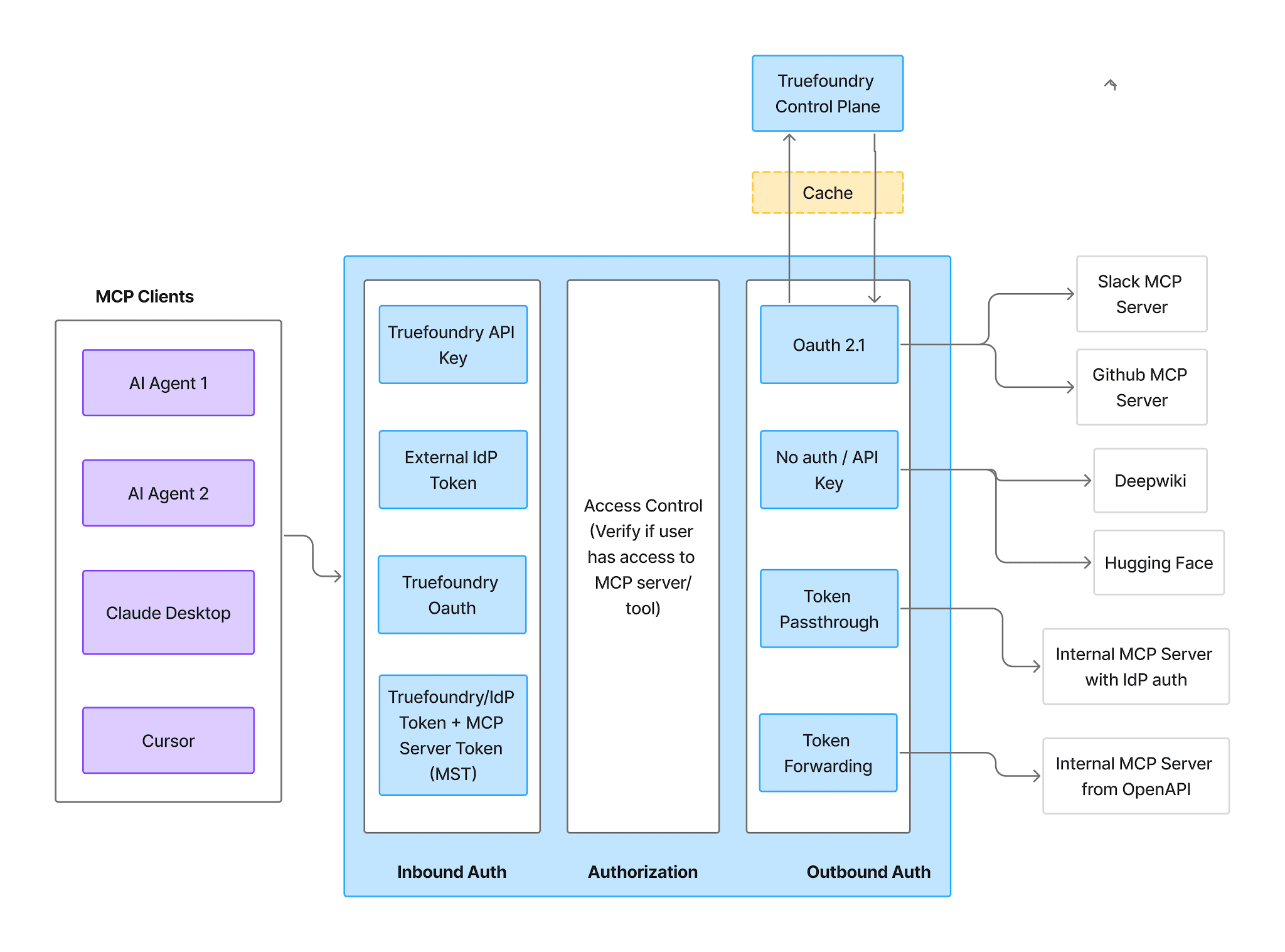
Concurrency and resources. One process served one client. Now it serves a team, and you are setting CPU and memory requests, limits, and replica counts like any other service.
Egress. The server now makes outbound calls from inside your network rather than a laptop on the office wifi. That is usually the point, but it makes the server’s network position a security decision rather than an accident.
Every developer still runs their own copy. The most common failure is not technical. The local config never gets retired, so half the team is on the gateway URL and half is still spawning npx locally with a personal token. That is not centralization; it is a second path.
Tokens in args instead of env. Moving a stdio command into a manifest, it is tempting to inline the token where it sat in the CLI invocation. The docs are explicit: never put tokens in args, because arguments are stored in plain text in the manifest and can appear in process listings. Credentials belong in environment variables backed by a secret store.
Unpinned packages. npx -y some-package resolves to whatever is latest at container start, so two replicas started a week apart can run different tool sets. Pin explicit versions in args.
Treating the URL as the finish line. A deployed server with no access control is a tool endpoint anyone inside the network can call. Hosting solved reachability, not who is allowed to reach it — the harder half.
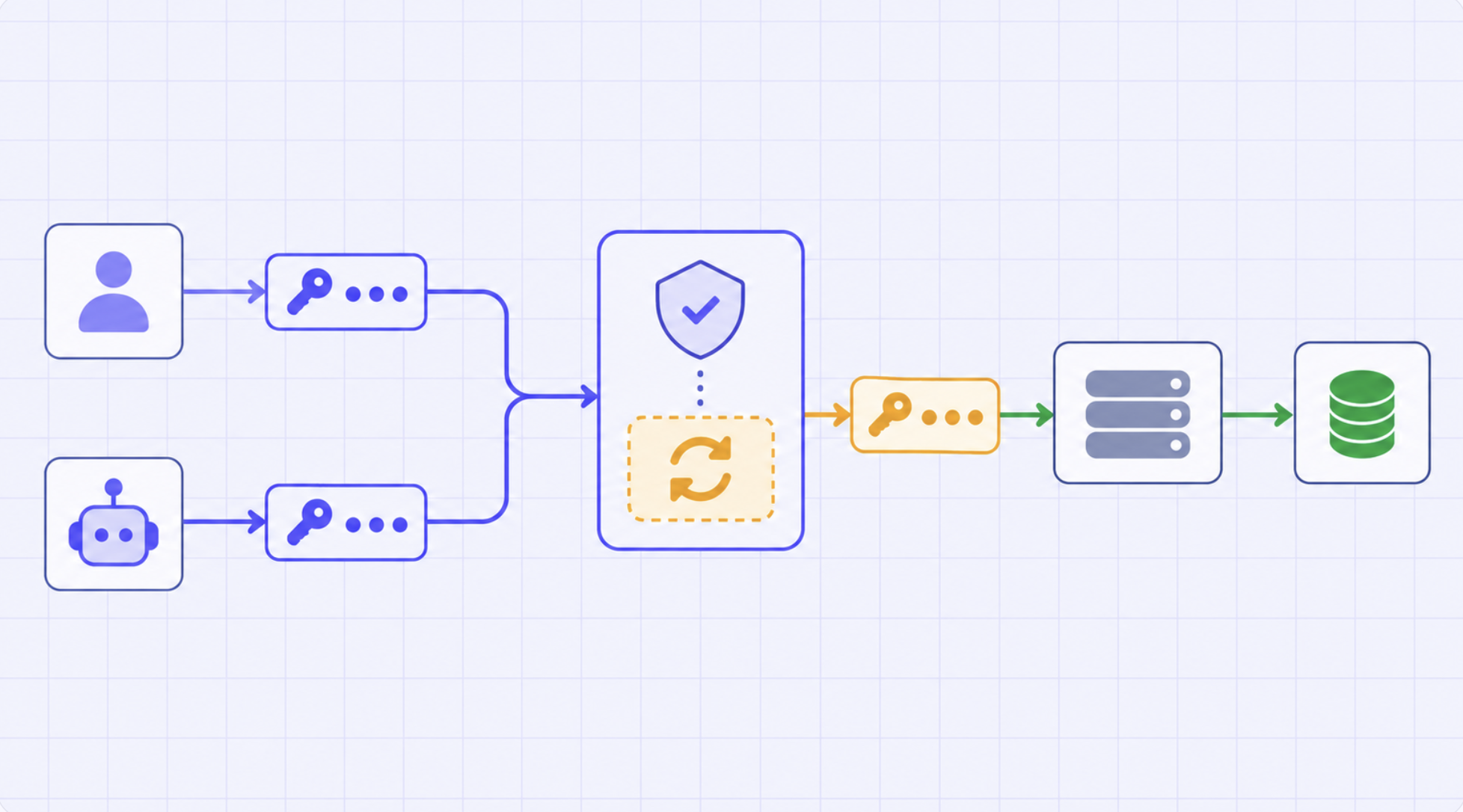
TrueFoundry’s position is that hosting and governance should be one system rather than two. The server deploys as an ordinary service on your own Kubernetes cluster — same workspaces, secrets, autoscaling, and logs as every other workload — then registers behind the MCP Gateway, which owns the URL, the auth, and the access model. Three routes in, depending on where you start.
Use this when you wrote the server yourself or are deploying from a repository you can build.
It is a standard service deployment: Deployments → New Deployment → Service, pick your workspace, then choose Git Repo or Code From Laptop as the source. For a Python HTTP server built with FastMCP and no Dockerfile, the config is a build context path, a requirements.txt path, a Python version, the command (python server.py), and port 8000.
If your source is a stdio server, wrap it. The recommended path is a Dockerfile that installs mcp-proxy and sets a CMD like mcp-proxy --port 8000 --host 0.0.0.0 --server stream python server.py. To skip the Dockerfile, use the Python Build option, declare mcp-proxy as a dependency, and set the same command directly:
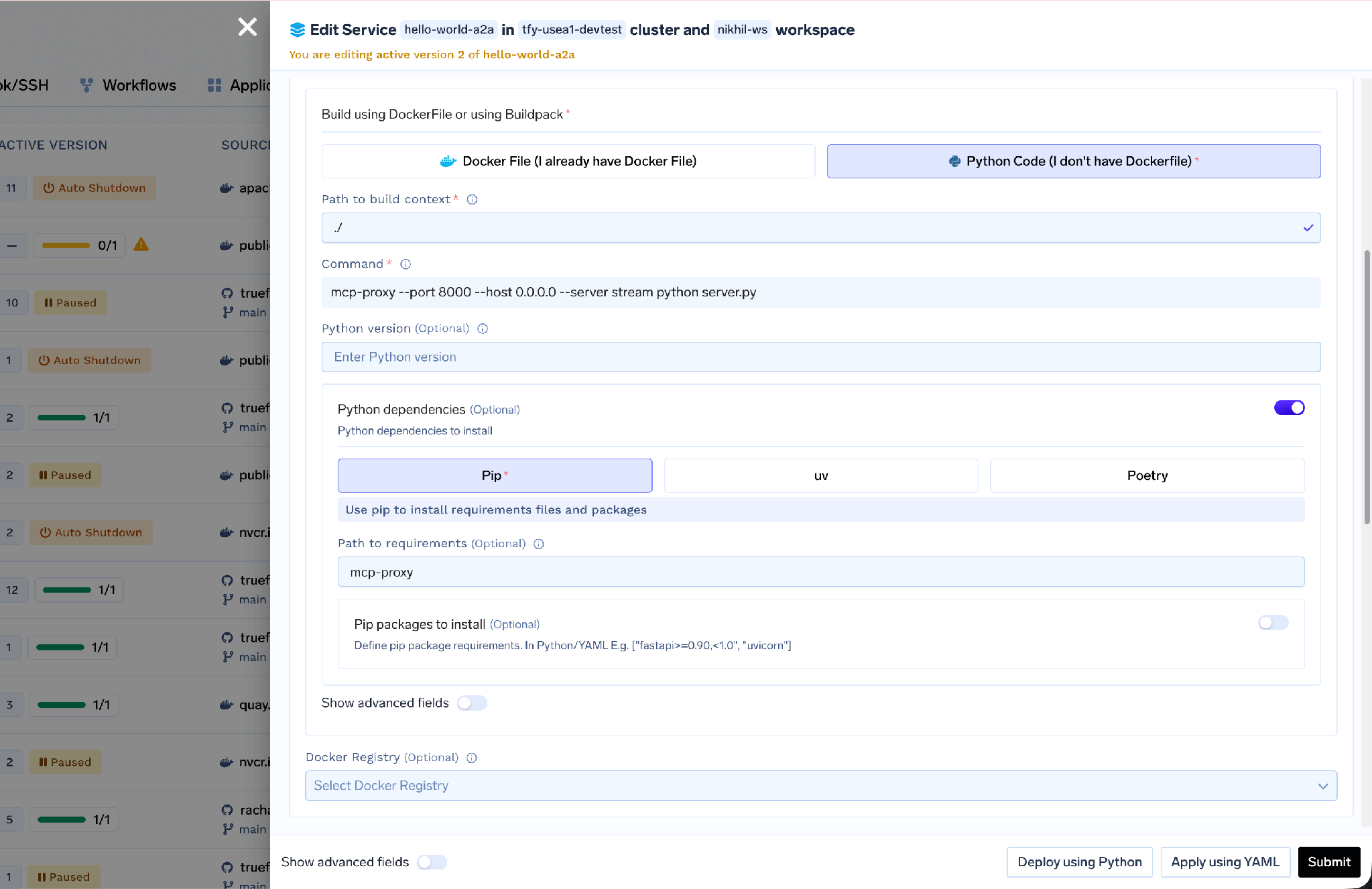
Port config is the same either way: port 8000, protocol TCP, app protocol http, expose set to false if the service should only be reachable inside the cluster. Sensitive values go in TrueFoundry Secrets, referenced as tfy-secret://your-workspace:your-secret-group:API_KEY.
Use this when the server exists as a published package and you have no reason to modify it — the direct translation of the block sitting in your Cursor config today. Both variants deploy from a Docker image, with the command doing the work.
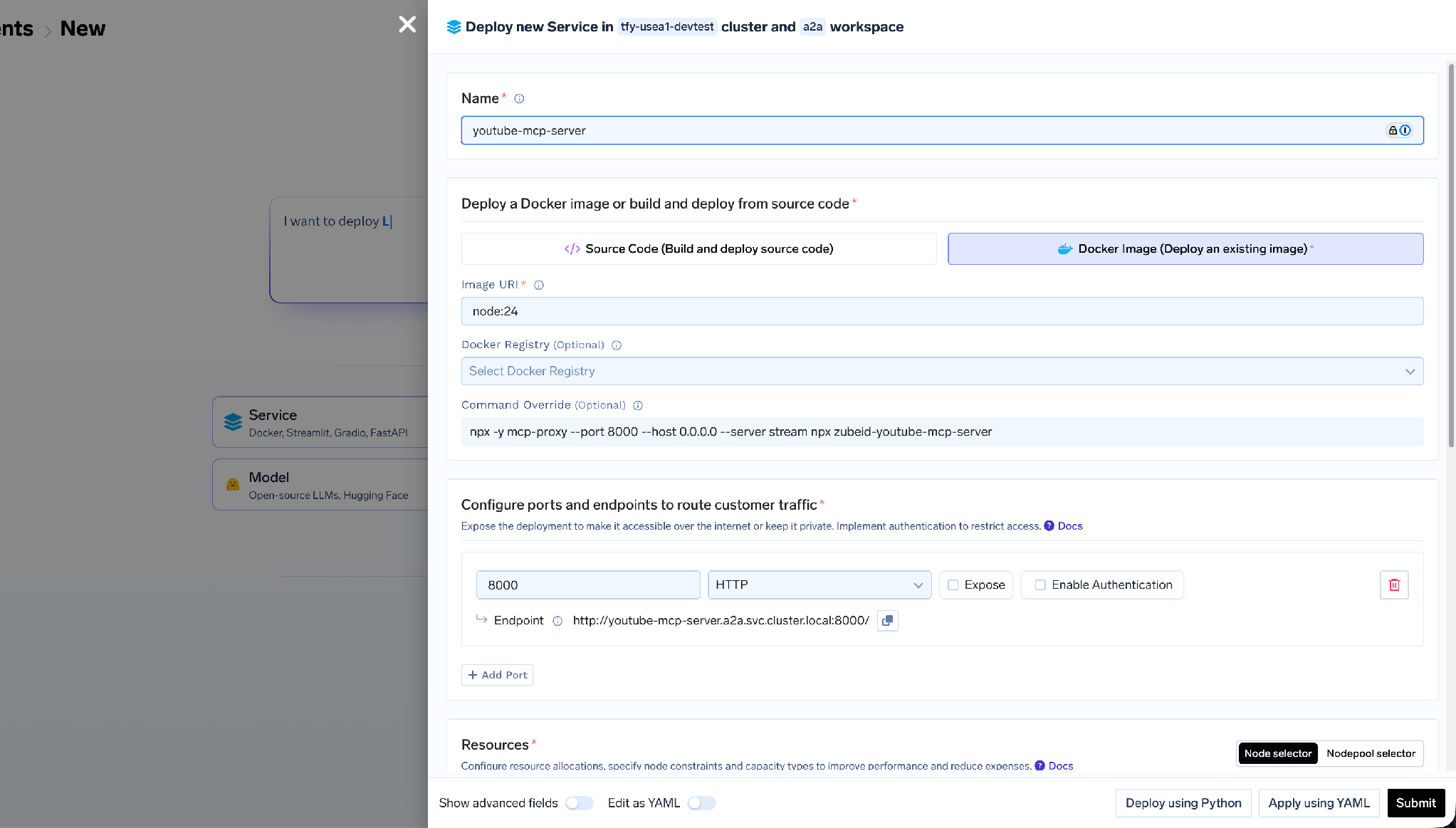
For npm packages, the base image is node:24 and the command is:
npx -y mcp-proxy --port 8000 --host 0.0.0.0 --server stream npx -y <package-name>
The first npx -y mcp-proxy installs and runs the proxy; the second runs your server package. So a Notion server becomes npx -y mcp-proxy --port 8000 --host 0.0.0.0 --server stream npx -y @notionhq/notion-mcp-server.
For Python packages, the base image is public.ecr.aws/docker/library/python:3.11-slim and the command installs the tooling first:
sh -c "pip install uv mcp-proxy && mcp-proxy --host=0.0.0.0 --port=8000 uvx <package-name>"
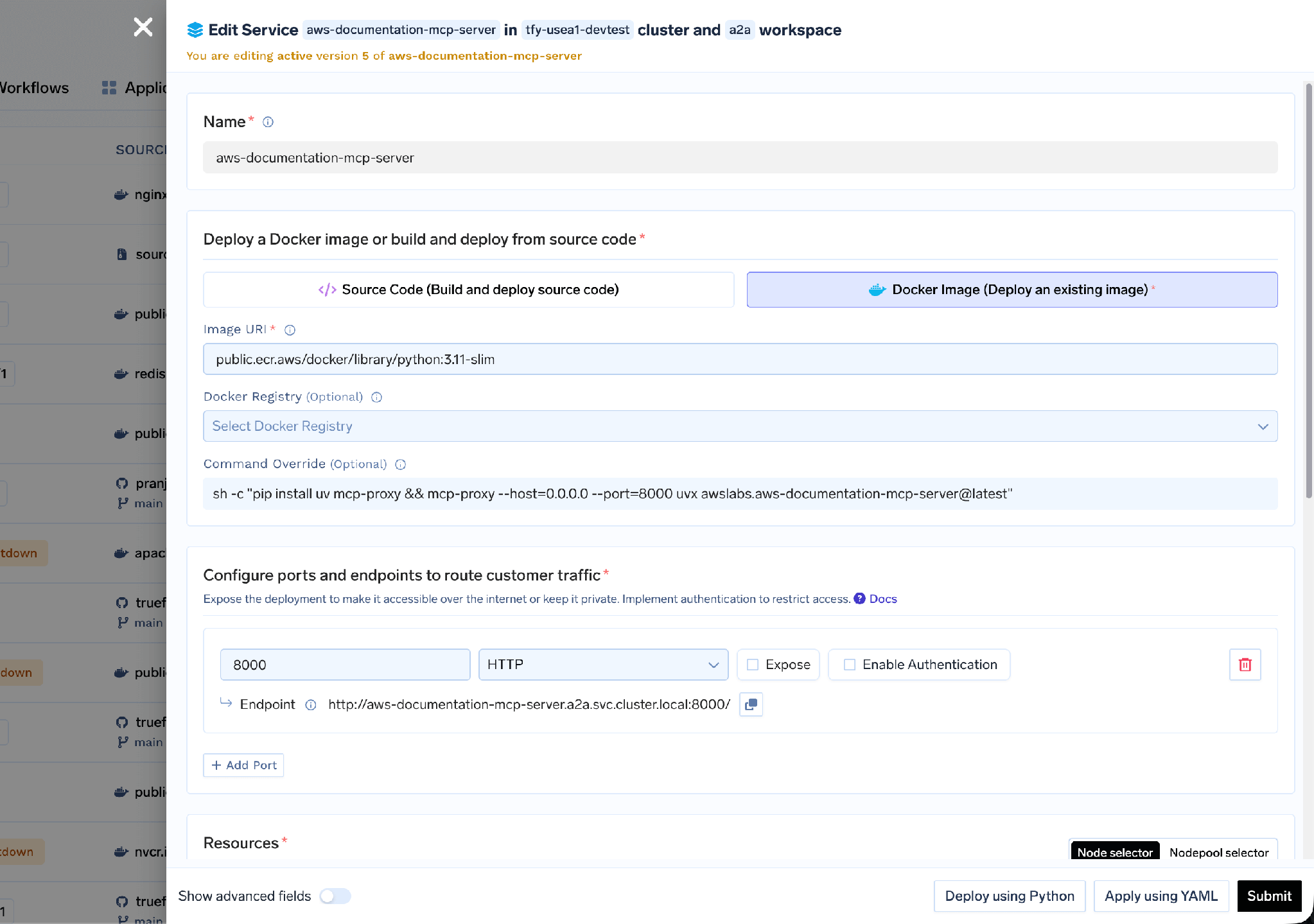
Deploy from Docker Image form with python:3.11-slim base image and mcp-proxy wrapping a uvx MCP package
Environment variables carry over unchanged from your local config — NOTION_API_KEY, GITHUB_TOKEN — with sensitive ones moved into Secrets. One expectation to set: the first startup is slow while npx or uvx downloads the package. If cold starts matter, pre-install it in a custom image.
A third path skips the service deployment entirely: rather than you wrapping a stdio server and deploying it, the gateway runs the process and exposes it at the same URL it uses for remote servers. From MCP Servers → Add Server, pick Hosted Stdio-based MCP Server:
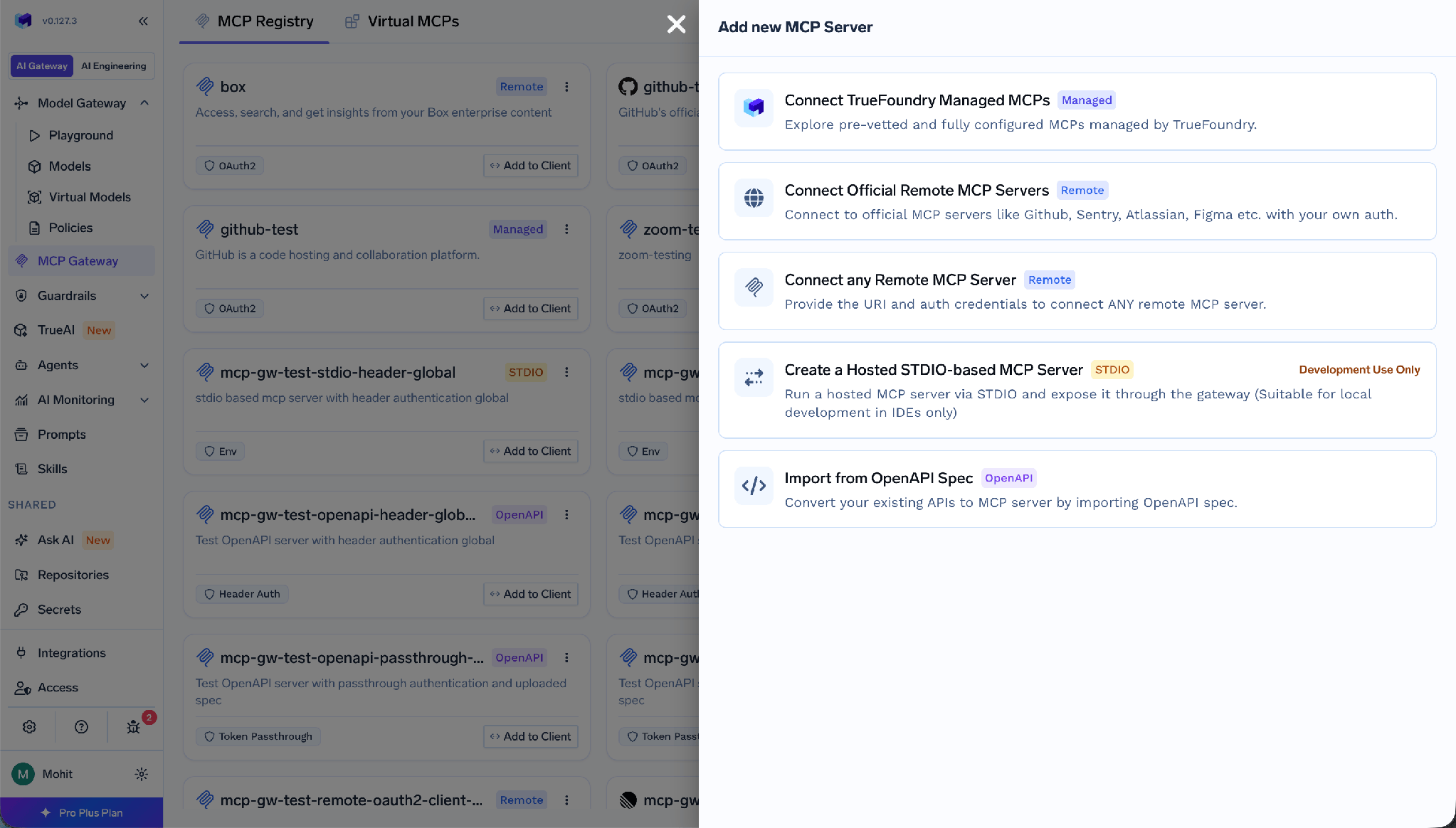
You supply a command, arguments, and environment variables, or paste editor-style JSON — the same single-entry mcpServers shape from Cursor or VS Code — and the form fills itself in. The filesystem reference server is command: npx with args -y, @modelcontextprotocol/server-filesystem, /tmp.
The gateway runs it through the mcp-proxy library in a sandboxed environment in stateless mode, and clients connect over streamable HTTP POST. Environment variables can be global (everyone shares the downstream credential) or per-user, where a value carries exactly one templatized placeholder resolved from that caller’s Auth Overrides. One caveat: the docs recommend this path for local development in IDEs — the fastest way to get a shared, governed URL over a CLI-style server, not the pattern for a high-volume production workload.
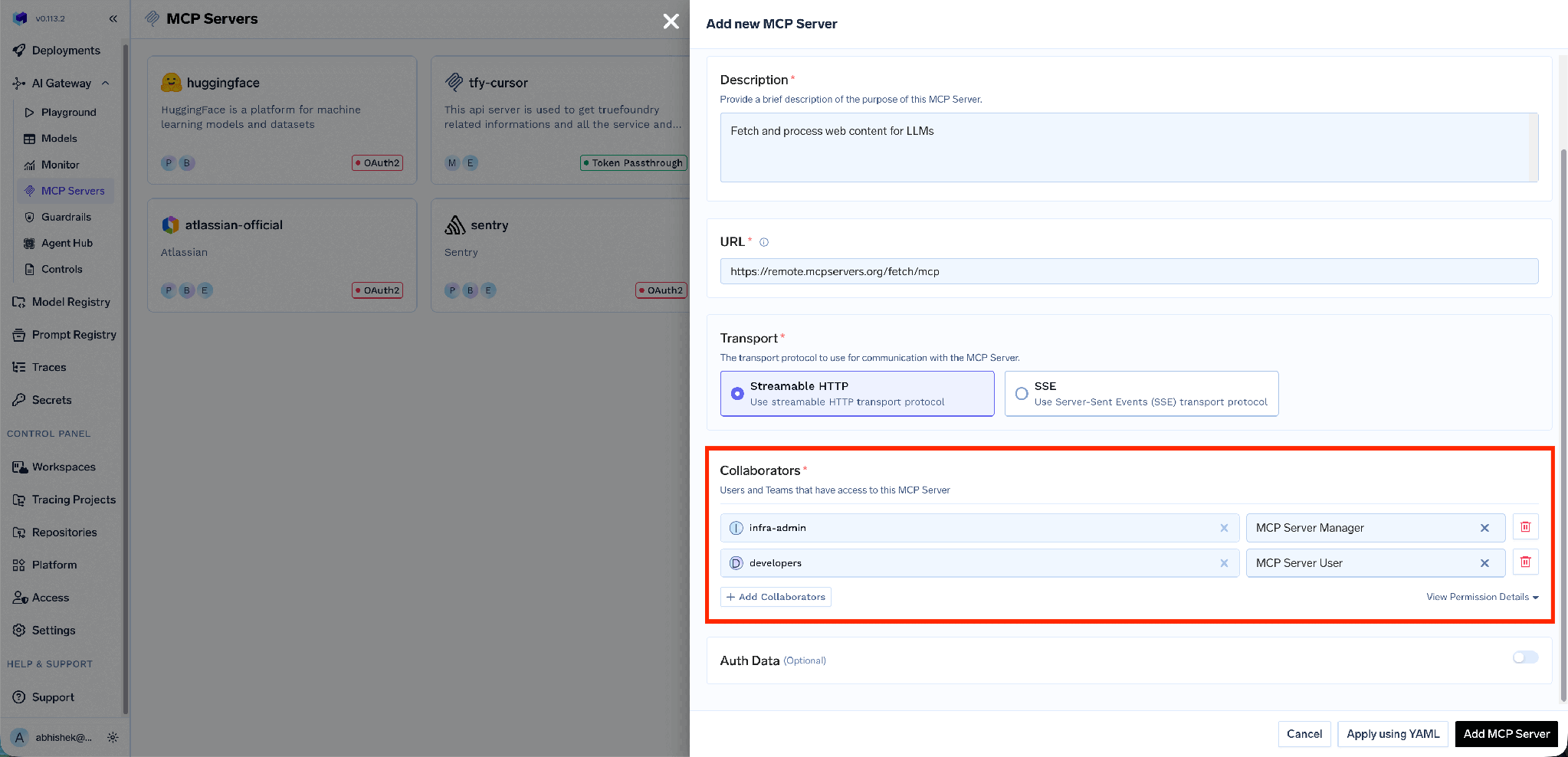
However the server got deployed, the last step is the same. Take the service endpoint URL, go to Add Server → Connect any Remote MCP Server, and provide a name, description, URL, collaborators, and auth data.
Inbound access control attaches here. Collaborators are users or teams, with MCP Server Manager for full configuration rights and MCP Server User for invoking tools without changing settings:
Outbound auth — how the gateway proves itself to the server you deployed — is one of API Key, OAuth2, AWS SigV4, or Token Passthrough. API Key splits into Shared Credentials, where one key serves everyone, and Individual Credentials, where the header value carries a placeholder like Bearer {{API_KEY}} and each user supplies their own through Auth Overrides:
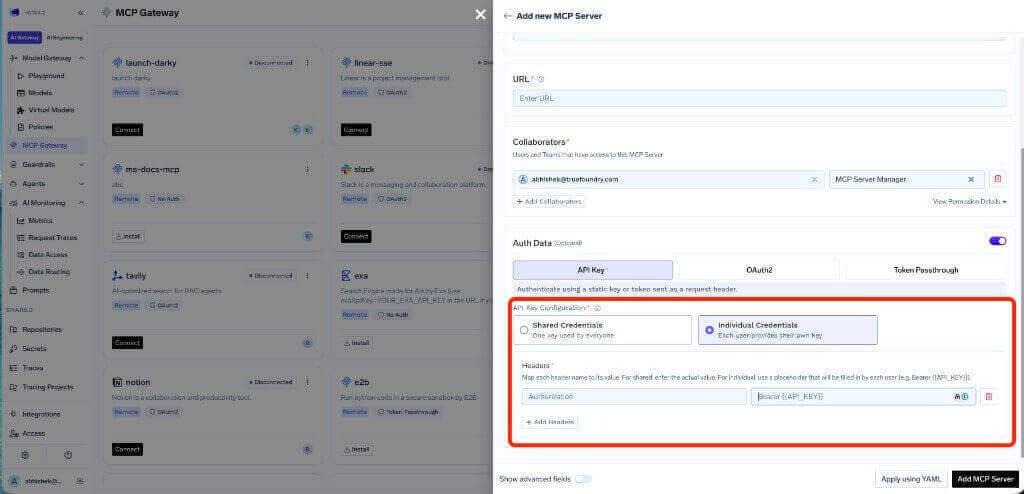
For a server you host yourself, shared credentials are often fine — the access decision already happened at the gateway. For anything fronting per-user data, OAuth2 is the documented production recommendation: it supports scopes, users can revoke their own authorization, and access is limited to what each user is permitted to see.
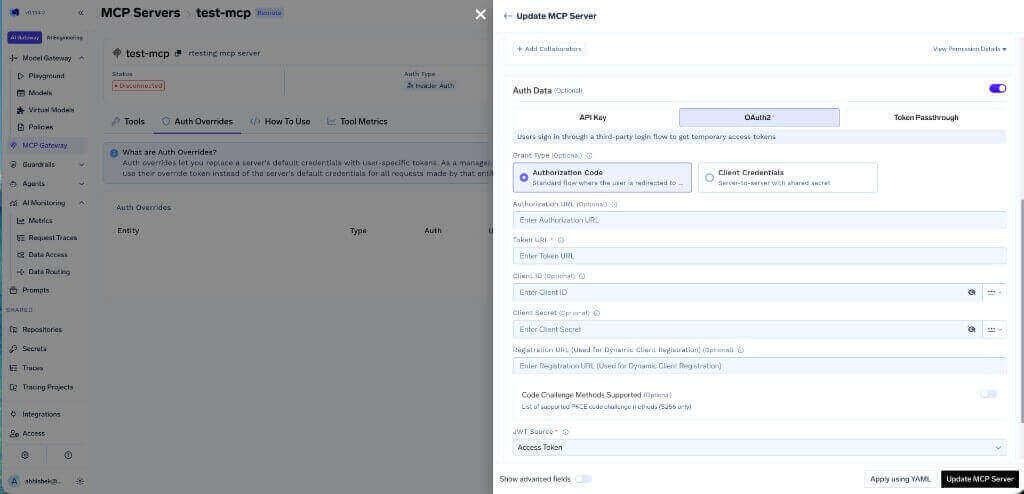
OAuth2 configuration for an MCP server with Authorization Code and Client Credentials grant types
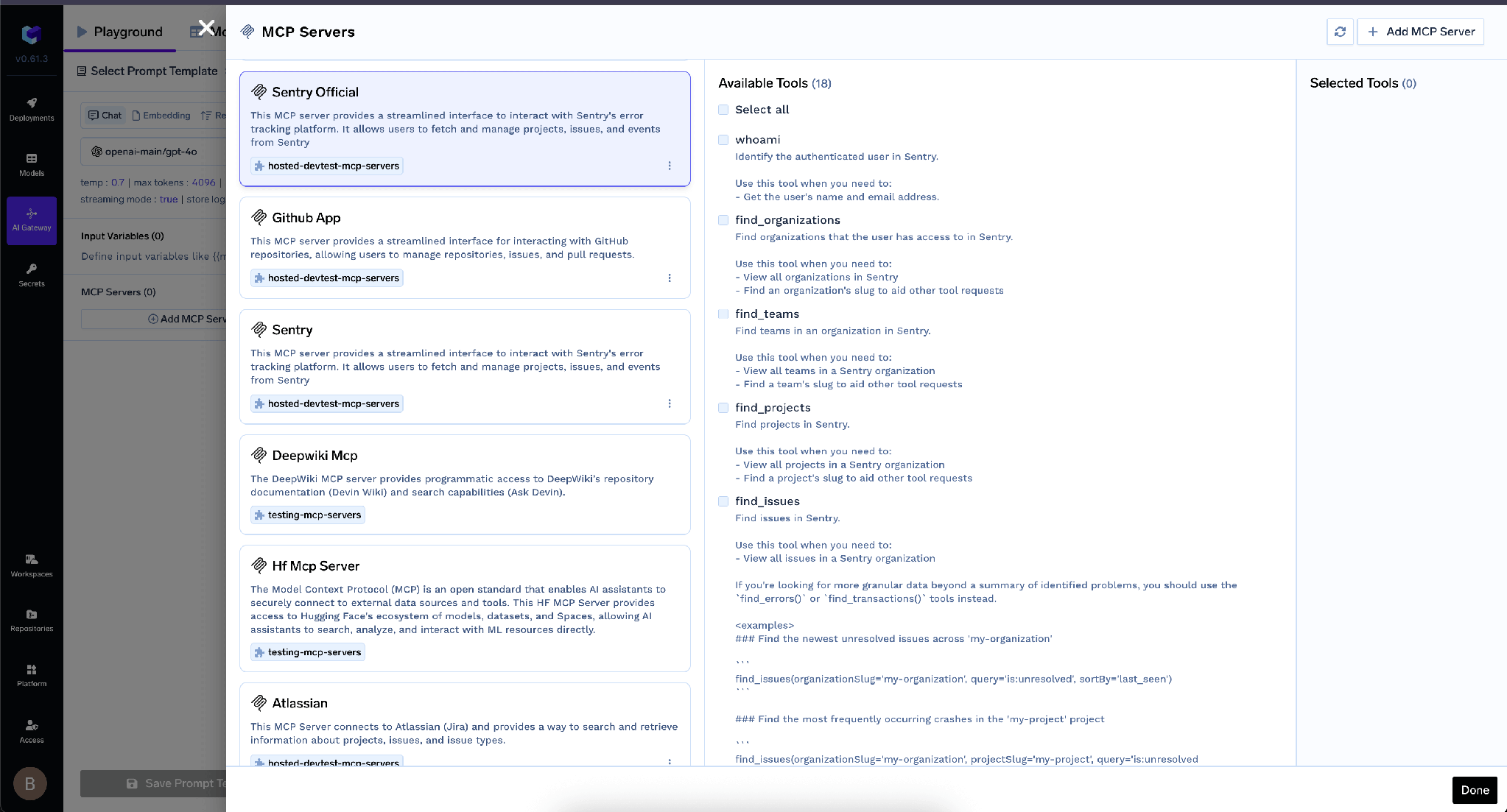
Once registered, tools appear and can be invoked from the Playground:
Eight developers each have the Notion npx block in their Cursor config, each with a personal Notion key. You want one hosted copy.
Step 1 — Deploy it. New Deployment → Service → Deploy from Docker Image, base image node:24, command npx -y mcp-proxy --port 8000 --host 0.0.0.0 --server stream npx -y @notionhq/notion-mcp-server, port 8000, protocol TCP, app protocol http. Pin the package version. Put NOTION_API_KEY in Secrets, not the env field as plain text.
Step 2 — Verify it. Wait for DEPLOY_SUCCESS, then note the service endpoint URL and curl it. It should answer with MCP protocol messages over HTTP. Doing this before you register anything separates “the container will not start” from “the gateway cannot reach it,” which are very different afternoons.
Step 3 — Register it. Add Server → Connect any Remote MCP Server, paste the endpoint URL, name it, add the engineering team as MCP Server User and yourself as MCP Server Manager, then configure auth data.
Step 4 — Hand out the gateway URL. The How To Use tab has tenant-specific connection snippets for Cursor, VS Code, Claude Code, Windsurf, Codex, and the Python and TypeScript SDKs, plus an Add MCP to Cursor button that writes the config for the developer.
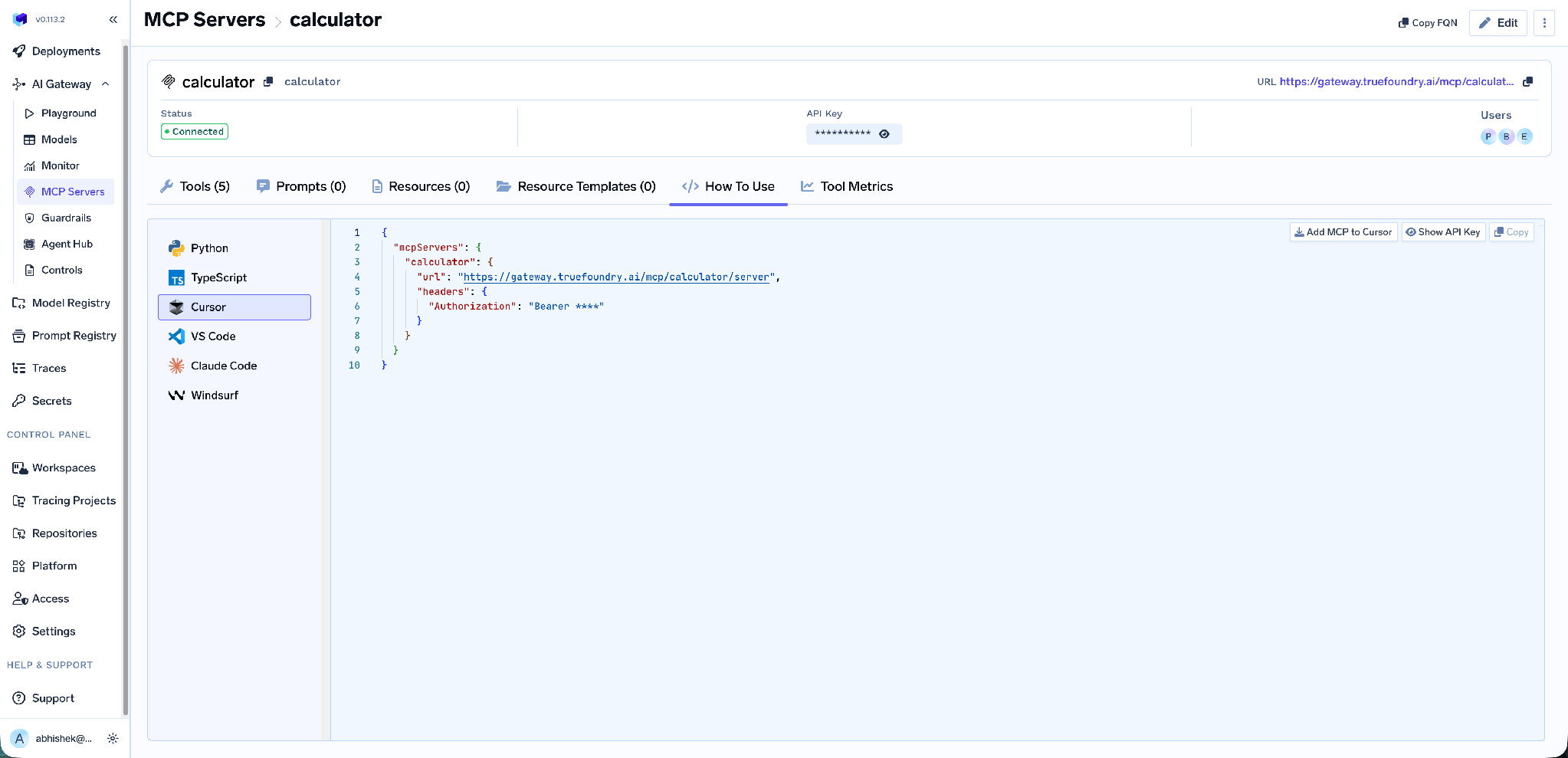
Step 5 — Delete the local blocks. The step teams skip, and the one that makes the other four worth doing. Until the npx entries are gone from everyone’s config, you are running nine copies, not one.
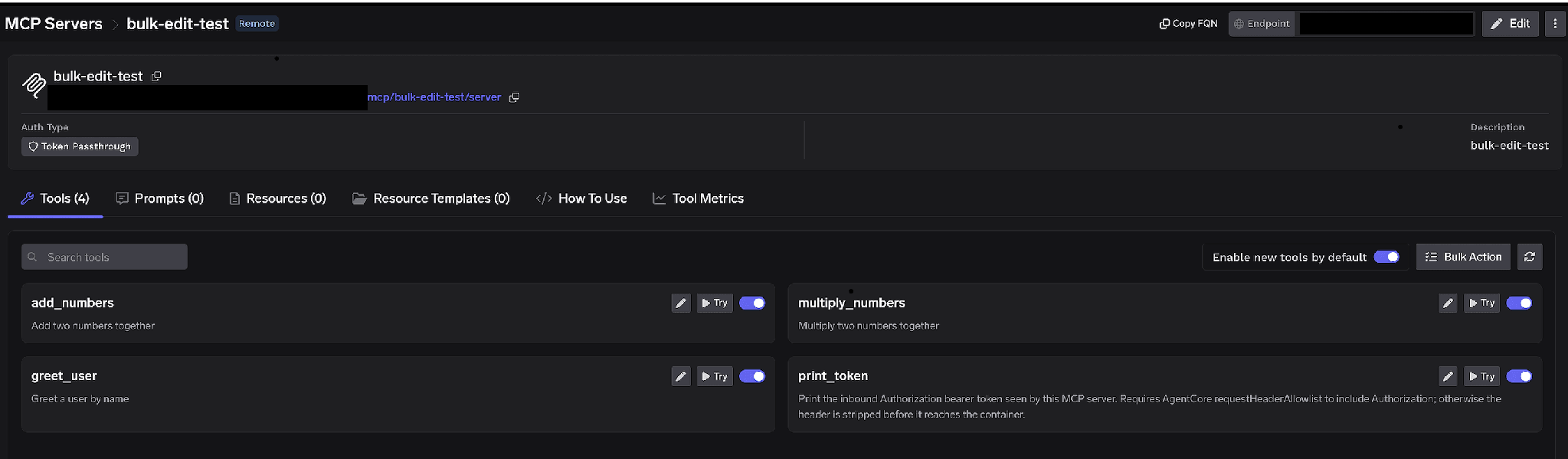
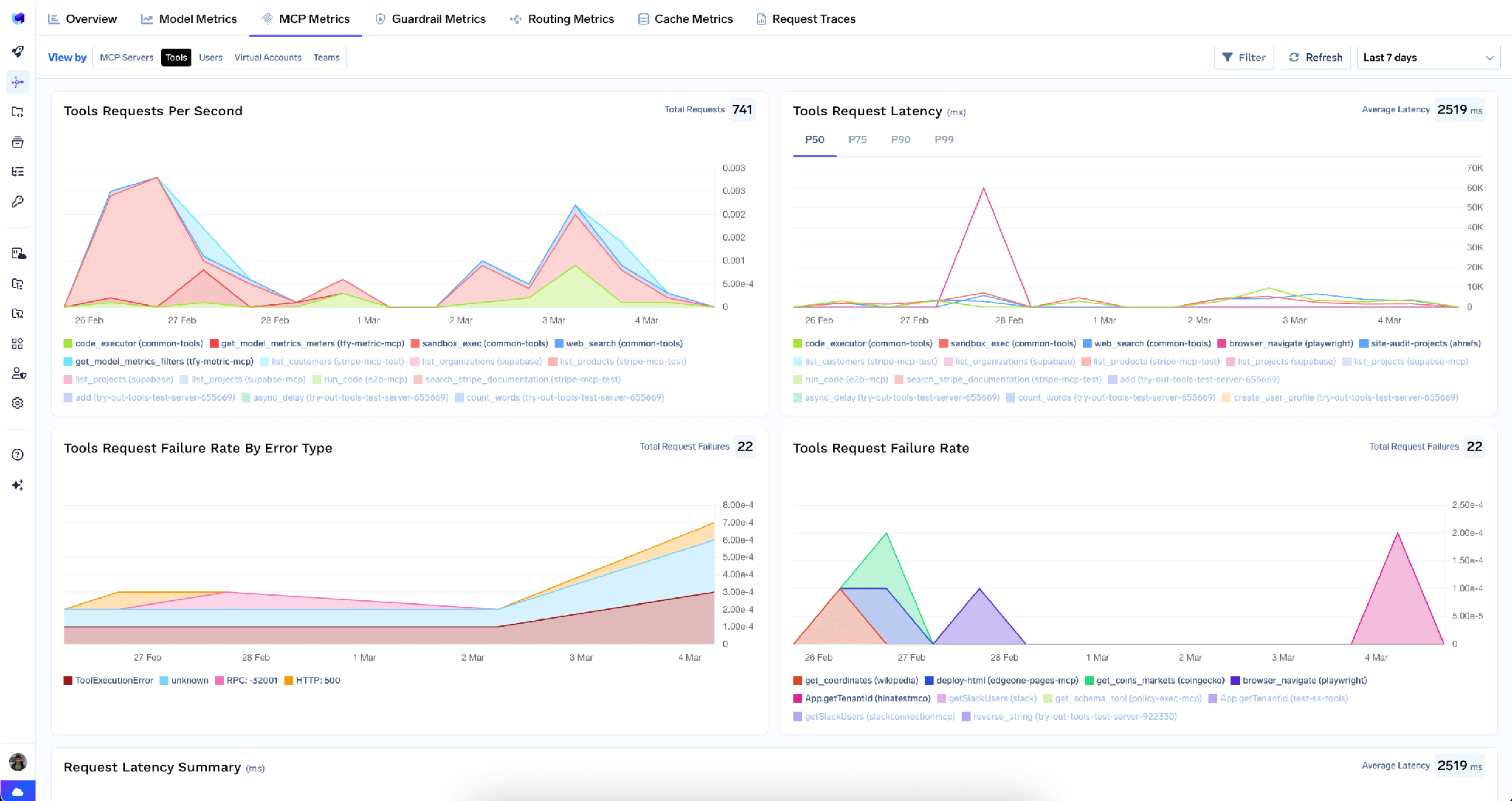
What you get: one version of the server, credentials in a secret store rather than eight laptops, per-tool visibility, and the ability to turn tools off centrally instead of asking people nicely.
A stuck install looks like a stuck server. For hosted stdio servers, a failed package install does not surface as an error — the server sits in mcp_server_starting indefinitely, because the package manager never hands off to the MCP process. Usual causes: a git URL with no pinned ref, credentials embedded in an npm package URL (npm normalizes them away), or a partial download poisoning the npx cache after a killed first run. Changing something in args re-keys the sandbox and starts clean.
Notifications outside a response stream are dropped. The gateway runs stdio servers in stateless mode, so standalone server-initiated notifications outside a request’s response stream are not delivered. Check the protocol support matrix before porting a server that pushes unsolicited messages.
The bind address will get you once. Binding localhost produces a container that starts, passes its own health check, and is invisible to the cluster. Every stdio wrap command in the docs carries --host 0.0.0.0 for exactly this reason.
Cold starts are real on npx/uvx. The package downloads at container start — fine for a development-facing server, annoying for anything latency-sensitive.
MCP server hosting is not an exotic problem. It is the familiar one of taking a process that works on a laptop and making it a service a team can depend on — a URL, an identity, resource limits, secrets, and a record of what happened.
What makes it worth doing carefully is that an MCP server is a tool endpoint. Reachability without access control is not a milestone; it is an exposure. Deploying on your own Kubernetes and registering behind a gateway in the same platform collapses the two halves into one job: the process runs where your network policy already applies, and the URL fronting it already knows who is calling.
TrueFoundry AI Gateway delivers ~3–4 ms latency, handles 350+ RPS on 1 vCPU, scales horizontally with ease, and is production-ready, while LiteLLM suffers from high latency, struggles beyond moderate RPS, lacks built-in scaling, and is best for light or prototype workloads.




Running an MCP server as a persistent, reachable process rather than a child process on a developer’s machine. In practice: deploying it as an HTTP service — directly if it already speaks HTTP/SSE, or wrapped with mcp-proxy if it speaks stdio — so many clients share one deployment behind one URL.
Local stdio for a single developer experimenting. A vendor’s managed cloud for public or read-only servers where speed matters more than network placement. Your own infrastructure for anything touching internal systems or regulated data, since network position and credential storage then become your decision rather than a vendor’s.
Yes. An MCP server that speaks HTTP is an ordinary stateless service — a container, a port, resource requests, a replica count. On TrueFoundry you deploy it into a workspace on your own cluster from a Git repo, from local code, or from a Docker image, and stdio servers get there by wrapping with mcp-proxy.
Yes. TrueFoundry runs in your VPC, on-prem, air-gapped, or hybrid, so prompts and responses never leave your domain even as you route across many providers.
Yes. It includes an MCP Gateway, an Agent Gateway, and an MCP & Agents Registry with tool-level access control. Agents on LangGraph, CrewAI, AutoGen, or a custom framework can all be governed centrally.
Yes. The gateway is OpenTelemetry-compliant and plugs into Grafana, Datadog, Prometheus, or your preferred stack. It traces every request from prompt to tool and model execution, so you get unified logging without ripping out what you already run.



The latest news, articles, and resources sent to your inbox



.png)
.png)
.png)
.png)
.png)
.png)
.png)
.png)
.png)
.png)


