


October 12, 2026
|
5 min read


Published: August 25, 2026
.webp)
Blazingly fast way to build, track and deploy your models!
AI agent guardrails are content-inspection controls that examine the actual payload of every agent interaction — the user prompt, the model's response, and the arguments and results of each tool call — and take action (allow, block, or rewrite) based on policy.
It helps to separate two questions every governed agent call has to answer:
Access control is the bouncer at the door; guardrails are the metal detector. You need both. An agent can be fully authorized to call your Postgres MCP server and still be tricked into sending a destructive query — access said yes, and only a guardrail on the tool arguments catches what the query actually is.
Guardrails aren't new to LLM apps, but agents change the problem in three concrete ways:
On TrueFoundry, guardrails are enforced at the gateway on the agentic call path — the chain of user → app → agent → sub-agent → MCP tool calls. Every governed hop passes an interception point with a before and after hook.
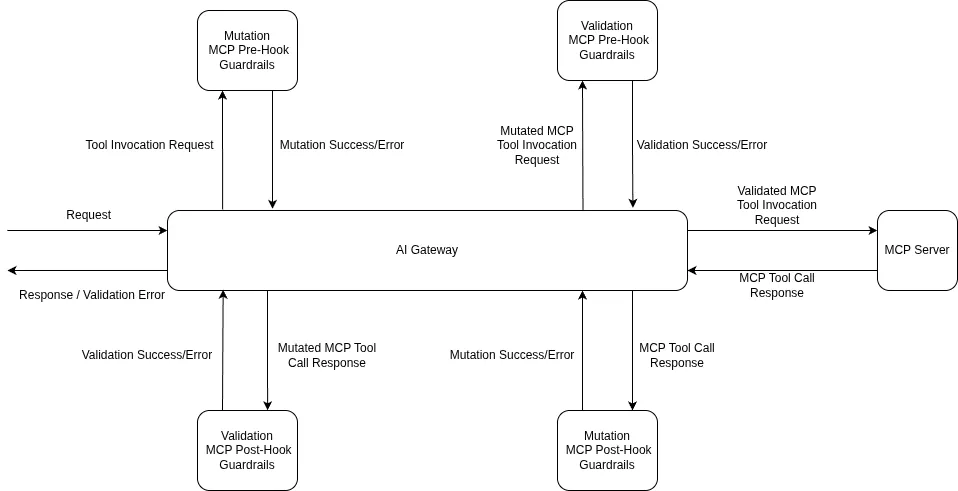
The ordering matters for cost and blast radius. A pre-tool failure means the tool never executes — the cheapest possible failure. An LLM input failure cancels the in-flight model request before you pay for it. Because every hop is checked independently, a compromised tool result on hop three is caught on hop three, not after it has already fanned out into three more calls.
The value of running guardrails at the MCP Gateway is that each real agent risk maps to a specific, built-in control. TrueFoundry's built-in guardrails run on TrueFoundry-managed infrastructure — no third-party API keys to provision.
Beyond the built-ins, the gateway plugs into external providers — Palo Alto Prisma AIRS, CrowdStrike AIDR, Cisco AI Defense, AWS Bedrock Guardrails, Google Model Armor, NVIDIA NeMo Guardrails, Guardrails AI, and more — and supports fully custom guardrails when you need logic specific to your domain.
The prompt-injection guardrail is the one built specifically for the agent problem: it analyzes the user prompt and any document or context content separately, so an injection hidden inside a returned web page or ticket is caught even when the user's own message is clean.
Applying guardrails to agent traffic is a three-step flow, and crucially none of it lives in your agent code.
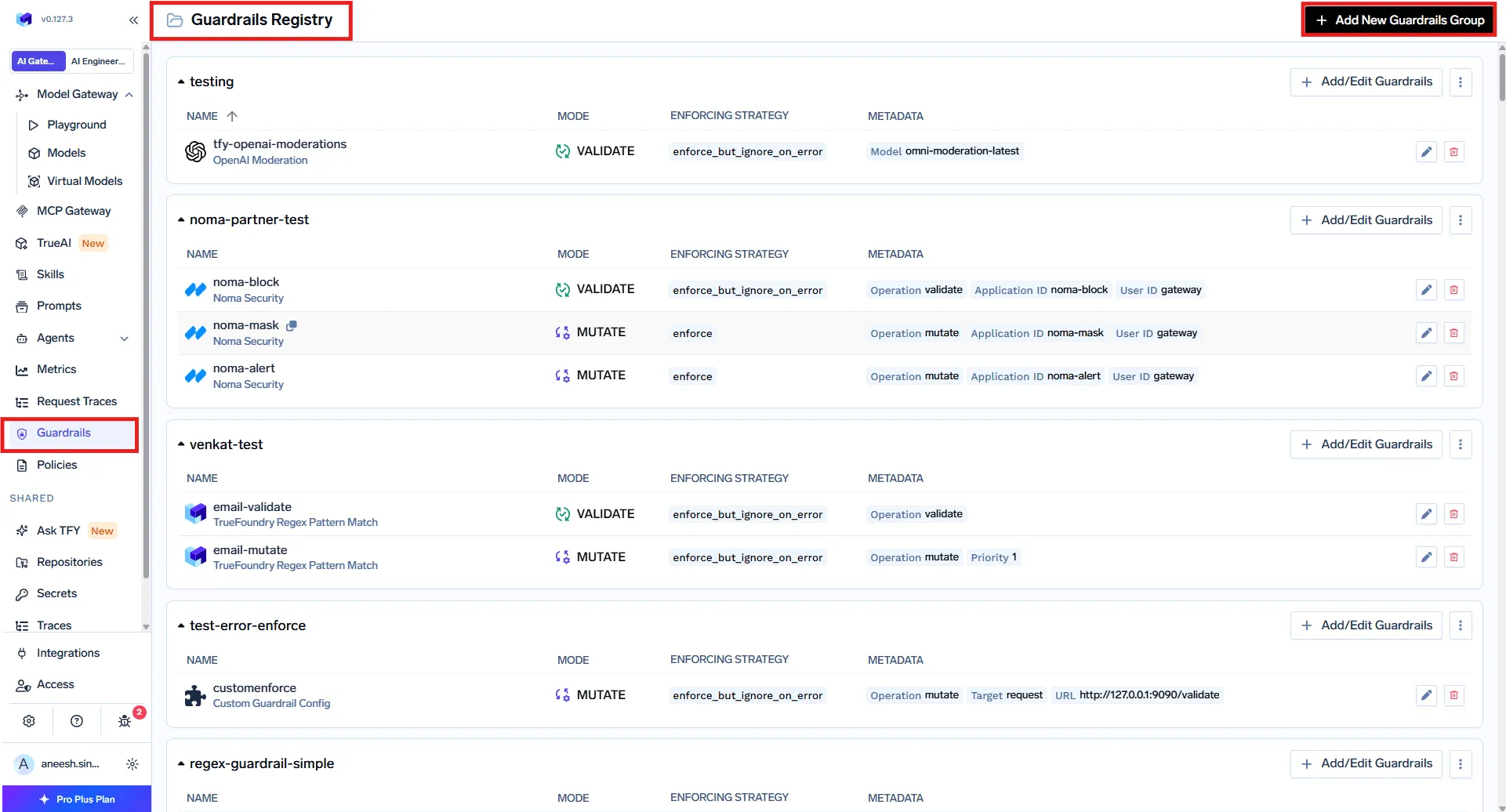
In AI Gateway → Guardrails, create a guardrails group and add the integrations you need — built-in, external provider, or custom. A group is also the unit of access control: a Manager can add, edit, and delete guardrails; a User can only apply them. A common pattern is one org-wide group owned by the platform team, plus per-team groups for product-specific checks.
In AI Gateway → Policies → Guardrails, create rules that decide when each guardrail runs. This is what makes the model scale to fleets of agents: rules are keyed on the target (the models, MCP servers, and even specific tools being called) and the subject (users, teams, or virtual accounts). Because a rule covers every caller of a given MCP server or model, it protects every agent that touches that target — with no per-agent setup.
Each rule combines:
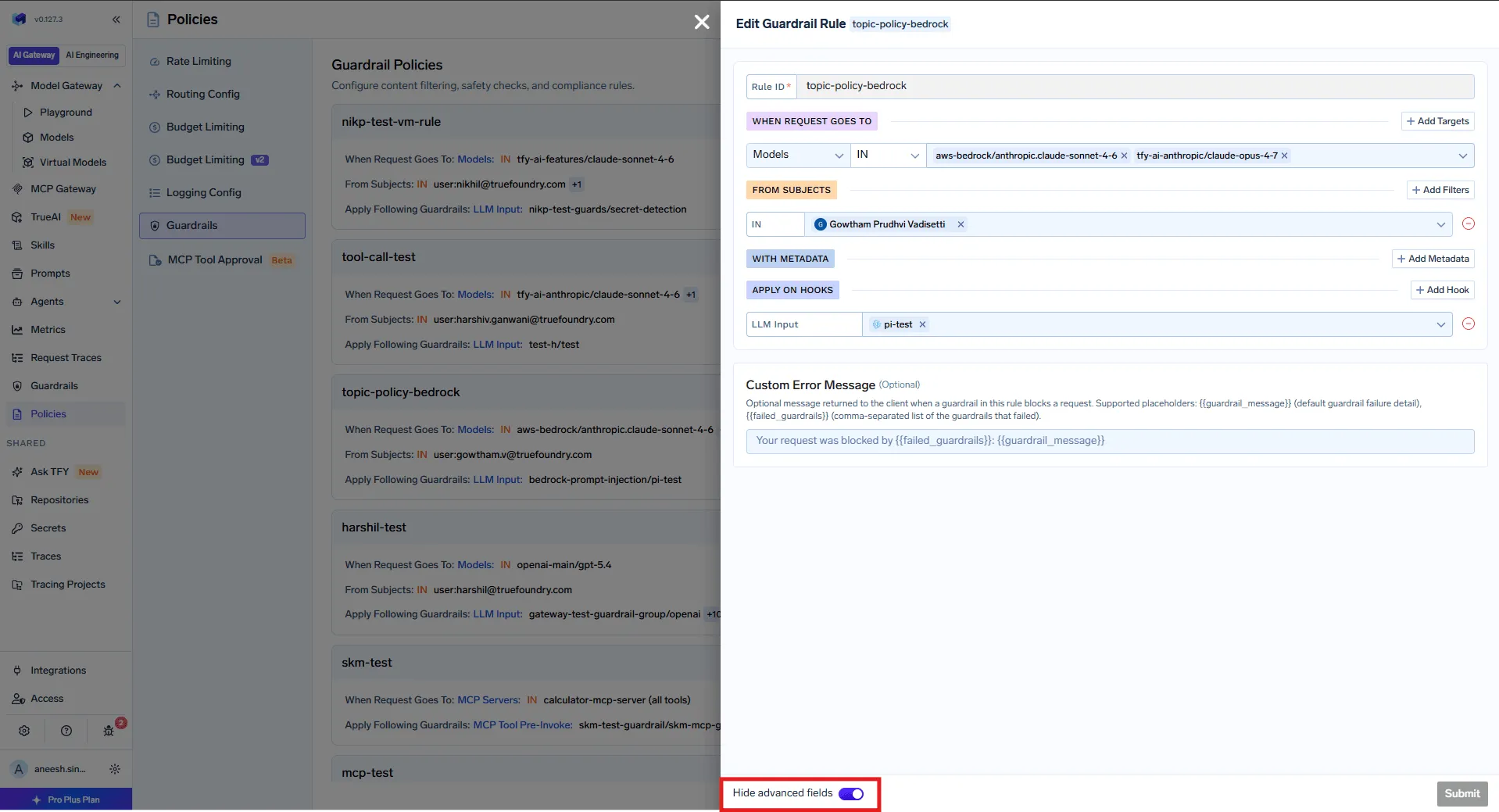
All matching rules are evaluated and their guardrails are merged per hook. If Rule A applies PII detection on LLM Input and Rule B applies prompt-injection detection on LLM Input, both run. A rule with no target or subject conditions becomes a baseline that applies to all traffic — useful for a company-wide prompt-injection check on top of everything else.
For quick tests or one-off calls, you can also pass guardrails per request with the X-TFY-GUARDRAILS header, which bypasses policies entirely:
curl https://<your-gateway>/api/llm/chat/completions \
  -H "Authorization: Bearer $TFY_API_KEY" \
  -H 'X-TFY-METADATA: {"environment":"production","agent":"research-agent"}' \
  -H 'X-TFY-GUARDRAILS: {"llm_input":["global/prompt-injection","global/pii-detection"]}' \
  -H "Content-Type: application/json" \
  -d '{
        "model": "openai-main/gpt-4o",
        "messages": [{"role":"user","content":"Summarize ticket #4521 and email the customer"}]
      }'
Every request is traced with the guardrails that ran and their verdicts, so you can confirm coverage before you trust it. This is also where you tune false positives, which matter more for agents than for chatbots: a blocked hop can fail an entire chain.
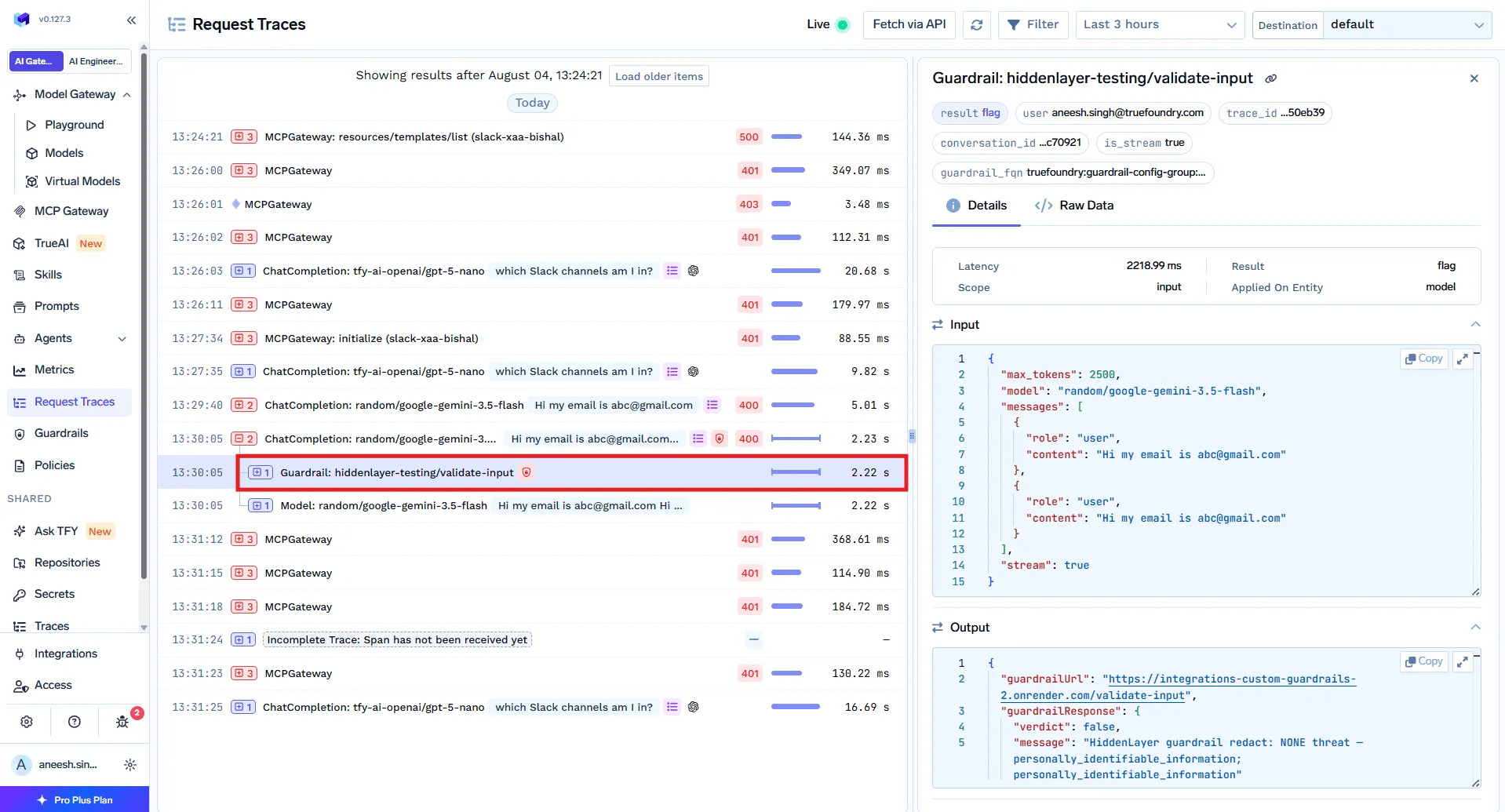
Before shipping, use the Playground to fire test prompts and tool calls against all four hooks and watch what gets caught.
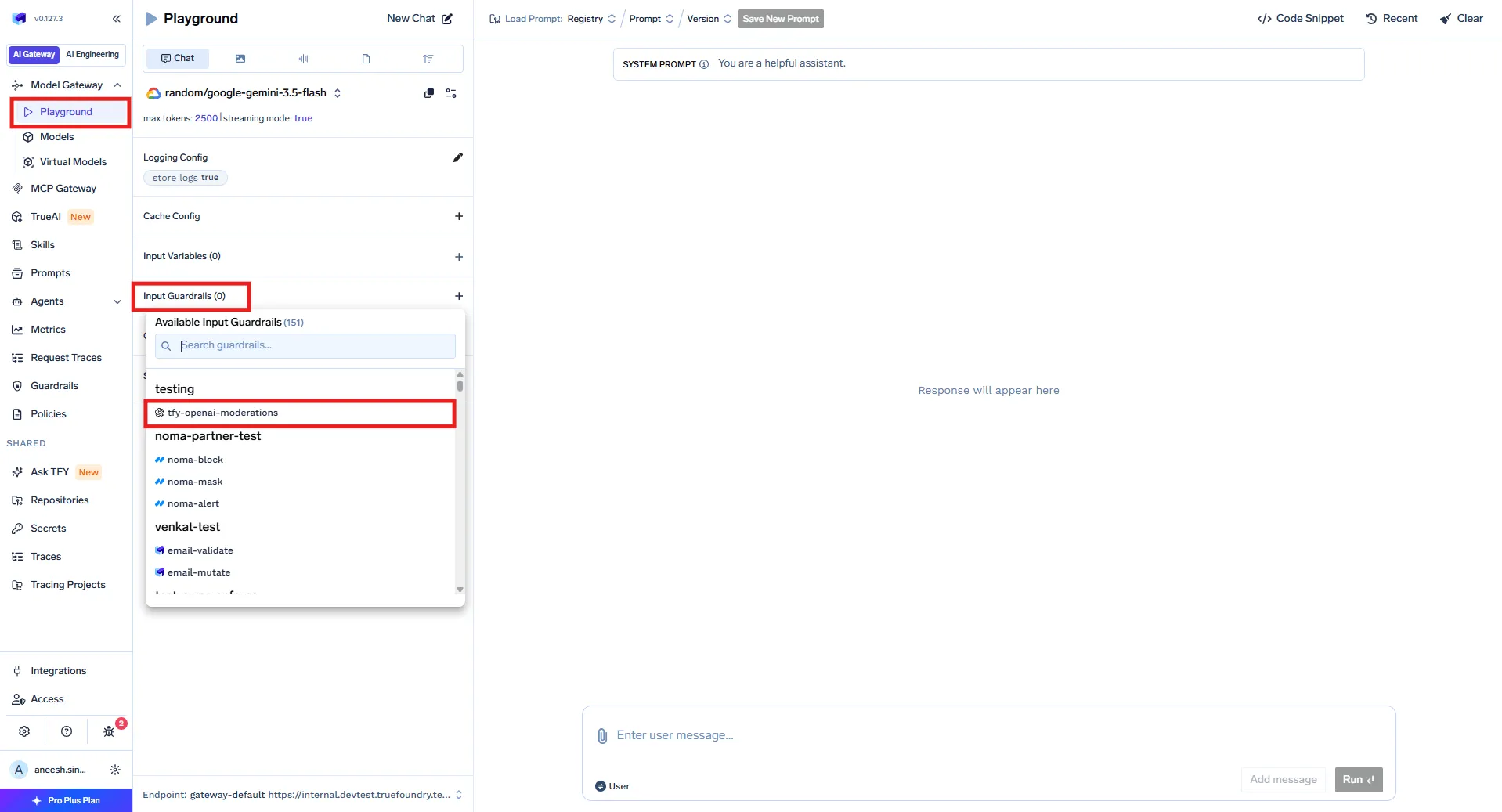
Two settings control how each guardrail behaves.
Operation mode:
Enforcement strategy:
For custom logic, you deploy a guardrail as an HTTP service and the gateway reads its response contract: an HTTP 2xx means the guardrail ran, and the JSON body carries the outcome — verdict: false to deny, or a mutated result body to rewrite:
// Validate — deny a destructive tool call
{ "verdict": false, "message": "Blocked: DELETE without a WHERE clause" }

// Mutate — redact PII from a tool result, then allow
{ "verdict": true, "transformed": true,
  "result": { "responseBody": { "content": "Customer <REDACTED_EMAIL> requested a refund" } } }
Recommended rollout for agents: start every new guardrail in Audit and watch traces to see what it would catch. Move to Enforce But Ignore On Error for protection that survives a provider outage. Reserve full Enforce for the checks you can't compromise on — PII, secrets, destructive SQL. Because a single blocked hop can break a whole agent chain, auditing first is not optional.
You could try to implement these checks inside each agent. The reason not to is the same reason an AI gateway beats an API gateway for this traffic: consistency and coverage.
The result is guardrails that behave like infrastructure: applied uniformly, observable in every trace, and owned by the platform team instead of scattered across a dozen agent repos.
AI agent guardrails are what keep an autonomous system from acting on the wrong instruction — inspecting every prompt, output, and tool call for injections, PII, secrets, and unsafe operations before they do damage. The hard part isn't any single check; it's applying them consistently across every agent, every model, and every tool without scattering logic through your codebase. Enforcing them at the gateway solves exactly that: one set of policies, keyed to targets, covering every caller, observable in every trace, running inside your own cloud.
See how TrueFoundry runs guardrails across your agents, models, and MCP tools from one control plane → Book a demo or start free.
TrueFoundry AI Gateway delivers ~3–4 ms latency, handles 350+ RPS on 1 vCPU, scales horizontally with ease, and is production-ready, while LiteLLM suffers from high latency, struggles beyond moderate RPS, lacks built-in scaling, and is best for light or prototype workloads.



AI agent guardrails are content-inspection controls that examine the prompts, model outputs, and tool-call arguments and results in an agent's workflow, then allow, block, or rewrite them based on policy. They stop unsafe content (injections, PII, secrets, destructive commands) from turning into unsafe actions — a distinct job from identity and access control, which only decides whether a call is permitted.
On TrueFoundry they run at the AI Gateway on four hooks — LLM input, LLM output, MCP pre-tool, and MCP post-tool. Each hop is inspected independently, so an injection in a tool result or a destructive argument is caught before it reaches the model or executes the tool.
Yes. The prompt-injection guardrail analyzes the user prompt and any document or context content separately, so an instruction hidden inside a returned web page, ticket, or database row is detected even when the user's own message is clean. It runs on the LLM input hook on every turn, because tool results re-enter the model's context continuously.
Register guardrails in AI Gateway → Guardrails, then create policies in AI Gateway → Policies → Guardrails that attach them by target (models, MCP servers, specific tools) and subject (users, teams, virtual accounts). Because rules key on the target, every agent that calls a governed model or tool is covered automatically — no per-agent changes.
Yes. It includes an MCP Gateway, an Agent Gateway, and an MCP and Agents Registry with tool-level access control, so agents from LangGraph, CrewAI, AutoGen, or a custom framework can be governed centrally.



The latest news, articles, and resources sent to your inbox
.webp)


.png)
.png)
.png)
.png)
.png)






.png)




